
 Script Planner Assistant▸
 AI Apps
 AI News

Clipop AI: A Smart Clip Maker That Turns Long Videos into Short Clips
Clipop AI: A Smart Clip Maker That Turns Long Videos into Short ClipsIntroduction
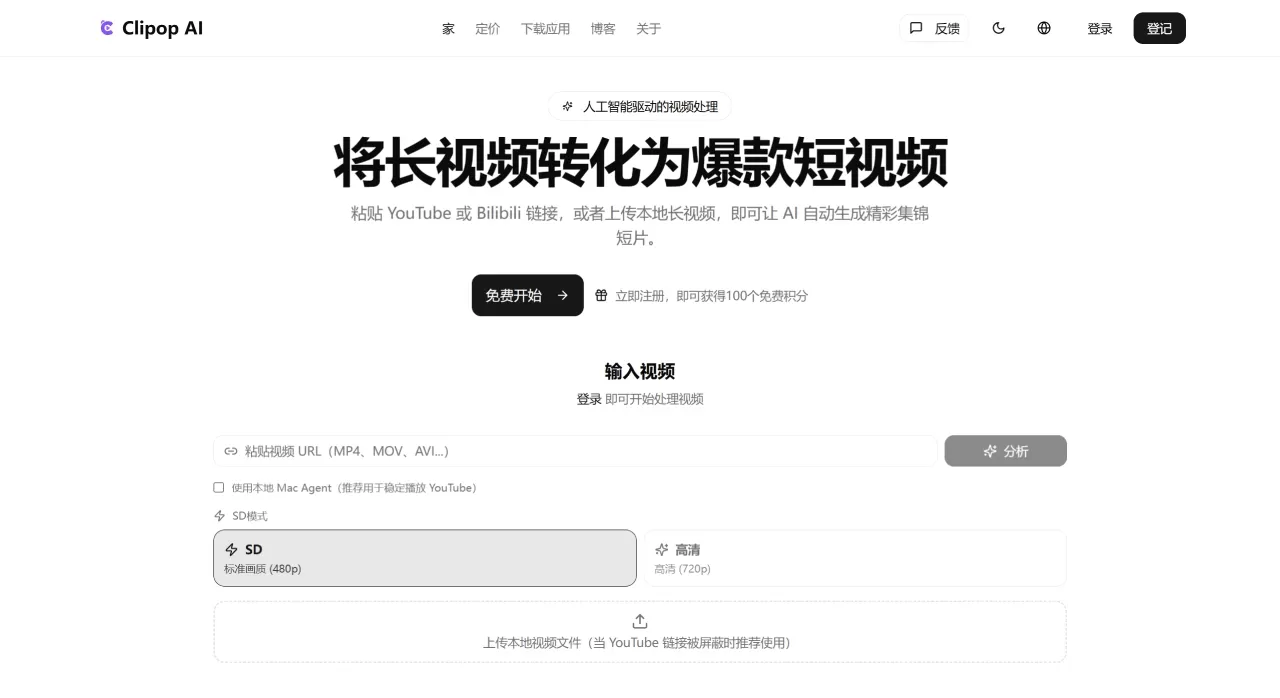
Clipop ai is a tool that automatically cuts long videos into short clips. Just drop in a YouTube or Bilibili link, or upload a local video, and it will automatically find the highlight moments and generate short videos ready for posting on Douyin, Kuaishou, Bilibili, or TikTok. It supports 32 languages. New users get 100 free credits on signup, and smart clipping can be done in about 2 minutes—perfect for creators who want to distribute content quickly. It currently has over 50,000 users and has processed more than 1 million videos.
What Clipop AI Can Do
Automatic Clipping: The AI scans the video and finds highlight moments, topic transitions, and key takeaways
Multi-platform Import: Supports YouTube and Bilibili links, as well as local MP4/MOV/AVI files
Auto Subtitles: Speech recognition automatically generates subtitles
Format Adaptation: Converts landscape video to vertical (9:16) with the subject automatically centered
Multi-format Export: Directly exports sizes optimized for Shorts, Reels, TikTok, and Bilibili
Privacy: The official site states that your original videos are not stored
Who Is Clipop AI For?
Self-media Creators: Break long videos into multiple short clips for distribution across all platforms
Podcasters/Interviews: Pick the best moments from long recordings to create teasers
Online Courses/Training: Cut course recordings into bite-sized knowledge clips for easier sharing
Corporate Marketing: Repurpose press conferences and live replay recordings
Live Streamers: Automatically clip highlight moments to extend the life of your content
Is Clipop AI Good?
Pros:
Easy to use—no editing skills required, just paste a link
New users get 100 free credits, enough to test several times
Native Bilibili support, making it friendly for Chinese users
Fast processing, usually produces clips in a few minutes
Does not store original videos, so privacy risk is low
Cons:
Features are relatively basic—no B-roll insertion, transition effects, sound effects, or other advanced capabilities
The brand is relatively new, so its template library and ecosystem aren't as rich as established products like Opus Clip
The official site doesn't disclose detailed pricing—only the "100 free credits" info is available
Limited fine-tuning after generation; complex edits need to be done in Jianying or CapCut after exporting
How to Use Clipop AI
Import: Go to clipopai.com, paste a YouTube/Bilibili link, or upload a local video
Wait for AI Analysis: The system automatically scans and identifies highlights—takes about 2–5 minutes
Pick Clips: Preview the AI-generated candidate clips and select the ones you like
Export: Download the format for your target platform, or post directly to social media
How Does Clipop AI Compare to Competitors?
| Dimension | Clipop AI | Opus Clip | Ssemble | Choppity |
|---|---|---|---|---|
| Price | Starts with 100 free credits, from $9.9/month | From $15/month, billed by the minute | From $7.5/month, billed per video | From $20/month, billed by the hour |
| Free Tier | 100 credits for new users | 60 minutes/month (with watermark) | No free version | Free preview, paid download |
| Clipping Quality | Average, basic highlight detection | Excellent, with Virality Score | Close to Opus | Excellent, customizable AI criteria |
| Subtitles | Supported | 40+ languages, 97% accuracy | 100+ languages | 97 languages, with dynamic effects |
| B-roll/Media | None | AI-generated + media library | Pexels media library | Supported |
| Transitions/Effects | None | Basic | Rich (sound effects, zooms, etc.) | 20+ dynamic subtitle styles |
| Direct Publishing | Manual upload after export | Direct posting supported | Direct posting supported | Direct posting + scheduling supported |
| API | Not disclosed | Custom for enterprise plans | Available on all plans | Not specified |
Why Choose Clipop AI
If you're new to AI clipping and want to try it out at zero cost, Clipop AI is a great starting point. The 100 free credits are enough to test the results, and its support for Bilibili links is especially practical for Chinese creators. It's better suited for "fast, simple, and usable" lightweight needs, and not ideal for those who want fine-tuned post-production.
FAQ
Are there any limitations on the Clipop AI free version?
New users get 100 credits, but the official site doesn't clearly state whether credits are deducted by the minute or per video. It's recommended to test the actual consumption with one long video first.
Which platforms does Clipop AI support?
Public links from YouTube and Bilibili, as well as local MP4, MOV, and AVI files.
Does the AI clip accurately?
It works well on content with clear structure like vlogs, interviews, and tutorials. For content that requires understanding of contextual jokes, sarcasm, or humor, you'll still need to review the clips yourself.
Can I manually edit the AI-generated clips?
You can preview and pick clips, but editing features are limited. For complex adjustments, it's recommended to export and use Jianying or CapCut.











