
 Script Planner Assistant▸
 AI Apps
 AI News

CreatView AI: AI Video Agent for Film, Ads, and Social Video
CreatView AI: AI Video Agent for Film, Ads, and Social VideoIntroduction
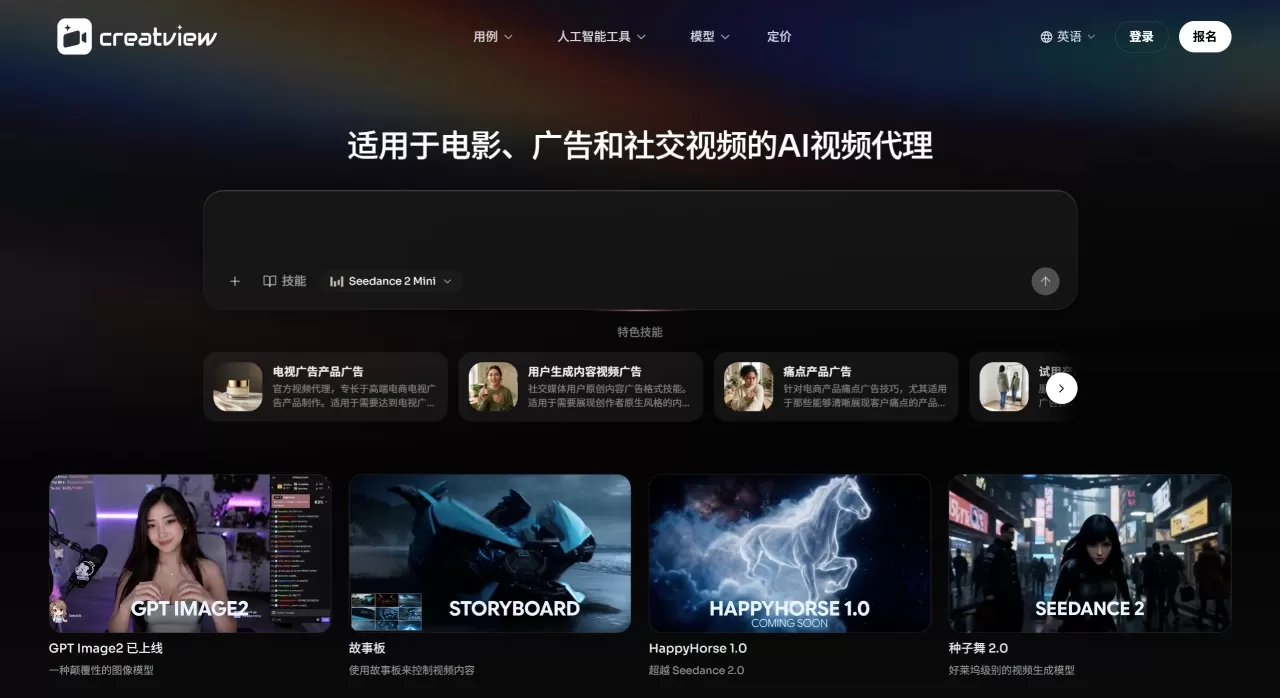
CreatView ai is essentially an AI video generation agent for films, ads, and social videos. It strings together every step needed to make a video—finding references, writing scripts, generating visuals, editing, and adapting for different platforms—into a single pipeline. Creators, marketing teams, or brands don't have to jump back and forth between Runway, Midjourney, and editing software; everything can be done in one platform.
The platform integrates all the major video, image, music, and voice models currently available, including Sora 2, Veo 3.1, Kling 2.6, Midjourney v7, ElevenLabs, etc. Users can access them with a monthly subscription instead of paying for each one separately.
CreatView AI Core Features
AI Video Agent: Give it a product link, an image, a reference video, or a few lines of text, and it will break down the rhythm and structure of the reference content on its own, then regenerate a new video around your素材. From creative input to final cut, no manual stitching is needed in between.
Unified Multi-Model Access: CreatView integrates more than ten models—video models include Veo 3.1, Sora 2, Kling 2.6, Seedance 2.0, etc.; image models include Midjourney v7, Flux Max, GPT Image 2, etc.; music includes Suno v5; voice includes ElevenLabs. The platform automatically assigns models based on the task, so you don't have to figure out which one to use.
Viral Video Cloning: See a video performing well on TikTok or YouTube? Drop the link into CreatView, and it can break down that video's hook, pacing, and shot logic, then help you make a new video with the same structure using your product or story.
Image and Video in One Flow: Complete image generation, storyboards, video clips, and post-editing all in one workflow. From static images to dynamic video to final cut, no need to export to other software.
Narrative-Level Long Videos: The Agent plans scenes, characters, and shots, outputting a coherent complete video from start to finish—not giving you a bunch of scattered clips to assemble yourself.
Automatic Platform Adaptation: After generation, it automatically crops to the sizes and durations required for TikTok, Reels, Shorts, and Stories.
Multilingual Localization: Supports dubbing, subtitles, and localized versions in 30+ languages, ideal for teams that need to distribute to different regions.
Video and Audio Tools Suite: Includes AI face swap, lip sync, video translation, upscaling, watermark removal, background removal, text-to-speech, voice cloning, etc.
Project Asset Library: Save reference materials and brand visual directions to call on directly for subsequent projects.
CreatView AI Use Cases
E-commerce Ads: Upload product images or links to automatically generate runnable short videos, making it easy to do multi-SKU and multi-hook testing.
Social Media Operations: Quickly produce TikTok, Reels, and Shorts to maintain update frequency.
Brand Marketing: From campaign concept to channel variants, shorten the time from brief to review-ready cuts.
Product Demos: Create feature demonstrations and tutorial-style videos.
Localized Distribution: Generate multilingual versions from one master cut, no need to reshoot.
Viral Content Replication: Break down high-engagement reference videos and quickly produce new content with the same structure.
Training Videos: Combine with AI dubbing to create internal training or customer education content.
CreatView AI Pros and Cons
What Works Well:
Multi-model integration saves the money and management hassle of subscribing to multiple tools separately.
The Agent workflow connects scattered steps, reducing manual stitching and format conversions.
Reference video cloning is very practical for e-commerce and social media, lowering creative trial-and-error costs.
Supports natural-language interaction for modifications, no need to memorize complex prompts.
Project assets and revision history are preserved, so you don't have to start from scratch when iterating.
Not-So-Ideal Aspects:
Free tier limits are strict: Video Agent can only be used 3 times per day, videos are publicly visible, and generated content is retained only short-term.
Credits reset monthly without rollover, which can lead to waste or shortage when usage fluctuates significantly.
Generation quality depends on the specific model called, and style consistency can sometimes be unstable.
Advanced features require the Pro plan or higher.
Currently no enterprise-grade SSO, API, or private deployment options are visible; large teams need to confirm.
How to Use CreatView AI
After registering, choose your entry point based on your needs: pick AI Ad Generator for product ads; Clone Viral Video to replicate trending videos; Text to Video or Image to Video to create from scratch.
Input materials: paste a product link, upload an image or reference video, or directly type a description.
If you're cloning a reference video, CreatView will first analyze the original video's structure, then generate scripts and shot plans; for creation from scratch, it goes directly to storyboard generation.
Before generation, you can review the storyboard, edit the script, and adjust the visual direction. You can also request changes using natural language, such as "make the opening more impactful."
After confirmation, the Agent calls models to generate the video. Once done, you can export platform-specific sizes with one click, or continue with lip sync, translation, or upscaling.
CreatView AI vs. Competitors
| Dimension | CreatView | Runway | InVideo | HeyGen | Topview.ai |
|---|---|---|---|---|---|
| Positioning | AI Video Agent (end-to-end workflow) | Generative AI creation suite | Template-driven social video | AI digital human/talking-head video | E-commerce AI video |
| Core Capabilities | Text/image-to-video, video cloning, multi-model integration | Gen-4 video generation, Motion Brush | Template + stock library auto-assembly | Digital human + voice cloning | Product image to ad video |
| Video Quality | Depends on the model called | Industry-leading | Template-level, suitable for social media | High digital human realism | Optimized for e-commerce scenarios |
Why choose CreatView AI
If you need text-to-video, image-to-video, product ads, viral video replication, multilingual dubbing, and image generation at the same time, CreatView saves you the hassle of switching between multiple tools. Multi-model integration lets you pick the best engine for each project without being locked into a single model. For e-commerce and social media teams, reference video cloning and automatic platform adaptation are real time-savers. The annual Basic plan at about $13.6/month is a reasonable starting cost for getting in.
FAQ
Q: What can the CreatView AI free version do?
A: 3 Video Agent uses per day, with basic generation quality. Videos are publicly visible, retained only briefly, and support is email-only.
Q: How are Credits calculated?
A: Different models consume different amounts. Calculated with the lowest-cost model, Basic's 70 credits can generate about 77 videos or 350 images. Advanced models consume more.
Q: Do Credits roll over?
A: No, they reset every month.
Q: Which languages are supported?
A: Video translation and dubbing support 30+ languages.
Q: Is it more worthwhile than buying tools separately?
A: If you use Runway, Midjourney, and ElevenLabs, a CreatView subscription starts at $13.6/month, cheaper than buying them separately (at least $27/month). But if you only need the deep functionality of one, subscribing to that single tool is more cost-effective.












