Script Planner Assistant▸
 AI Apps
 AI News
LANDrop: Free Cross-Platform LAN File Transfer Tool
LANDrop: Free Cross-Platform LAN File Transfer ToolIntroduction
LANDrop is a free, open-source (although currently under temporary closed-source maintenance, the software remains free to download and use) cross-platform LAN file transfer tool. It is designed to meet the need for file transfer between different computers and mobile devices within a local area network.
LANDrop supports multiple operating systems, including iOS, Android, macOS, Windows, Linux, and even TV devices, enabling a similar experience to Apple's "AirDrop" on non-Apple devices.
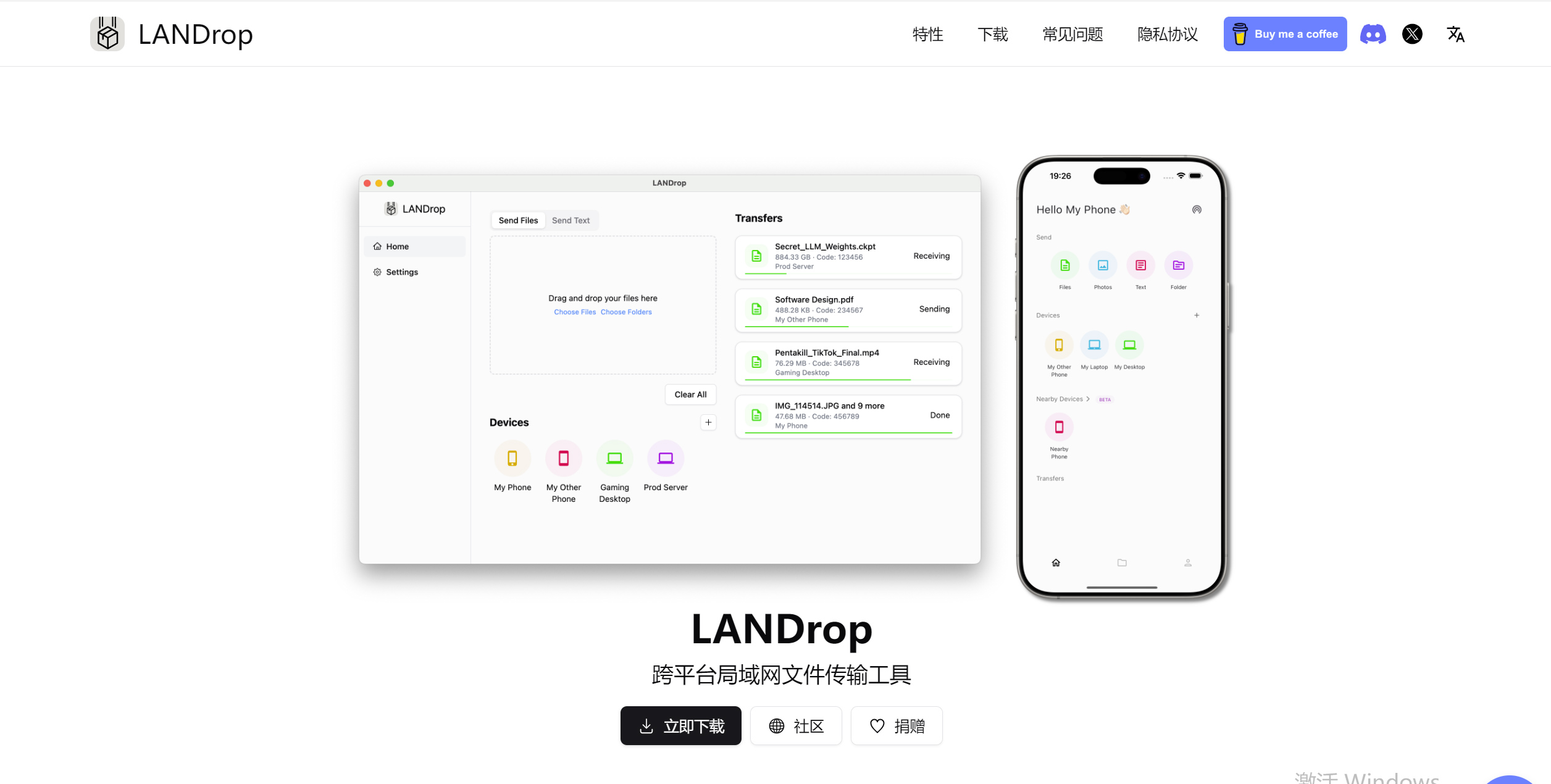
LANDrop Core Features:
No server setup required: Users do not need to perform complex network configurations like entering IP addresses or setting up a server; the software automatically discovers other LANDrop devices on the LAN.
Cross-platform compatibility: Covers mainstream operating systems on the market, ensuring broad compatibility between devices.
Direct file drag-and-drop: On the computer, files can be sent by simply dragging them onto the interface, with intuitive operation.
Folder transfer support: The latest version of LANDrop supports sending folders from the computer, improving file management convenience.
Android receive path: On Android devices, received files are typically located in the /Android/data/app.landrop.landrop_flutter/files/Downloads directory, and can also be viewed through the recent files section of the file manager.
Fast and no file compression: Files are not compressed during transfer, maintaining original quality; speed depends on LAN performance.
Security: Supports ECC public key verification, enhancing transfer security.
Auto-start on boot (Windows): Allows users to set it to auto-start on boot for convenient daily use.
LANDrop Usage Flow:
Install and launch: Download the installation package for your device from the official website or recommended channels; the Windows version can be extracted and run directly, while mobile versions are installed from app stores.
File transfer: On the computer, select files and drag them to the LANDrop window, and choose the target device to send; on Android or iOS, select files within the app or use the share menu to send via LANDrop.
Receive confirmation: The receiving end must confirm to receive the file, ensuring data security.
Note: After launching LANDrop, the software automatically scans for other devices running LANDrop on the same LAN. There is no need to manually enter IP addresses or set up a server as with other applications — LANDrop handles everything automatically.
LANDrop Features:
LANDrop automatically detects other LANDrop devices on the same Wi-Fi network, so you don't need to manually enter IP addresses. LANDrop handles everything in the background — just like a cross-platform airDrop.
Cross-platform: We support iOS, Android, macOS, Windows, Linux, Android TV, and other operating systems. LANDrop runs seamlessly on all major platforms.
Ultra-fast and secure: LANDrop uses advanced protocols to provide full-speed transfers, with military-grade encryption and authentication, ensuring top-tier security.
No mobile data usage: Out and about? No worries — LANDrop works over a personal hotspot without using mobile data.
Lossless transfer: LANDrop transfers your photos and videos without any compression, ensuring their high quality.
Nearby sharing: Even when not on the same Wi-Fi network, LANDrop can detect nearby devices and transfer to them via WebRTC.
Trusted devices: You can add trusted devices in LANDrop to automatically accept file transfers from those devices without confirming each time.
LANDrop Frequently Asked Questions:
Do both ends need to install it?
Yes, LANDrop must be installed on both ends for file transfer.
Speed stability: Transfer speed is affected by the LAN environment and may fluctuate, but is typically fast, especially with small files and good LAN conditions.
Update news: As of November 2024, LANDrop has been updated to v2.7.1, continuously optimizing the user experience. Although the source code is temporarily not public, software maintenance and updates are still actively ongoing, ensuring users can continue to enjoy improved features and services.