
 Script Planner Assistant▸
 AI Apps
 AI News

Kanting AI: An All-in-One Platform for AI Comic Drama and Short Drama Creation
Kanting AI: An All-in-One Platform for AI Comic Drama and Short Drama CreationIntroduction
Kanting AI is a one-stop platform dedicated to AI comics and short dramas. What makes Kanting AI stand out is that it doesn't scatter features all over the place. Instead, it connects the entire pipeline—from script analysis, character extraction, storyboard breakdown, and image generation to video composition. You just upload your novel or script directly, and it automatically handles chapter import, character recognition, and project initialization. From there, it keeps producing content around fixed characters and scenes while maintaining a consistent art style. It's especially well-suited for short drama teams, animation creators, or anyone running IP operations, helping them quickly turn written stories into finished films. The platform currently has nearly 13,000 active creators and has produced over 86,000 works in total, with an average response time of just 1.6 seconds and 24 supported feature modules.
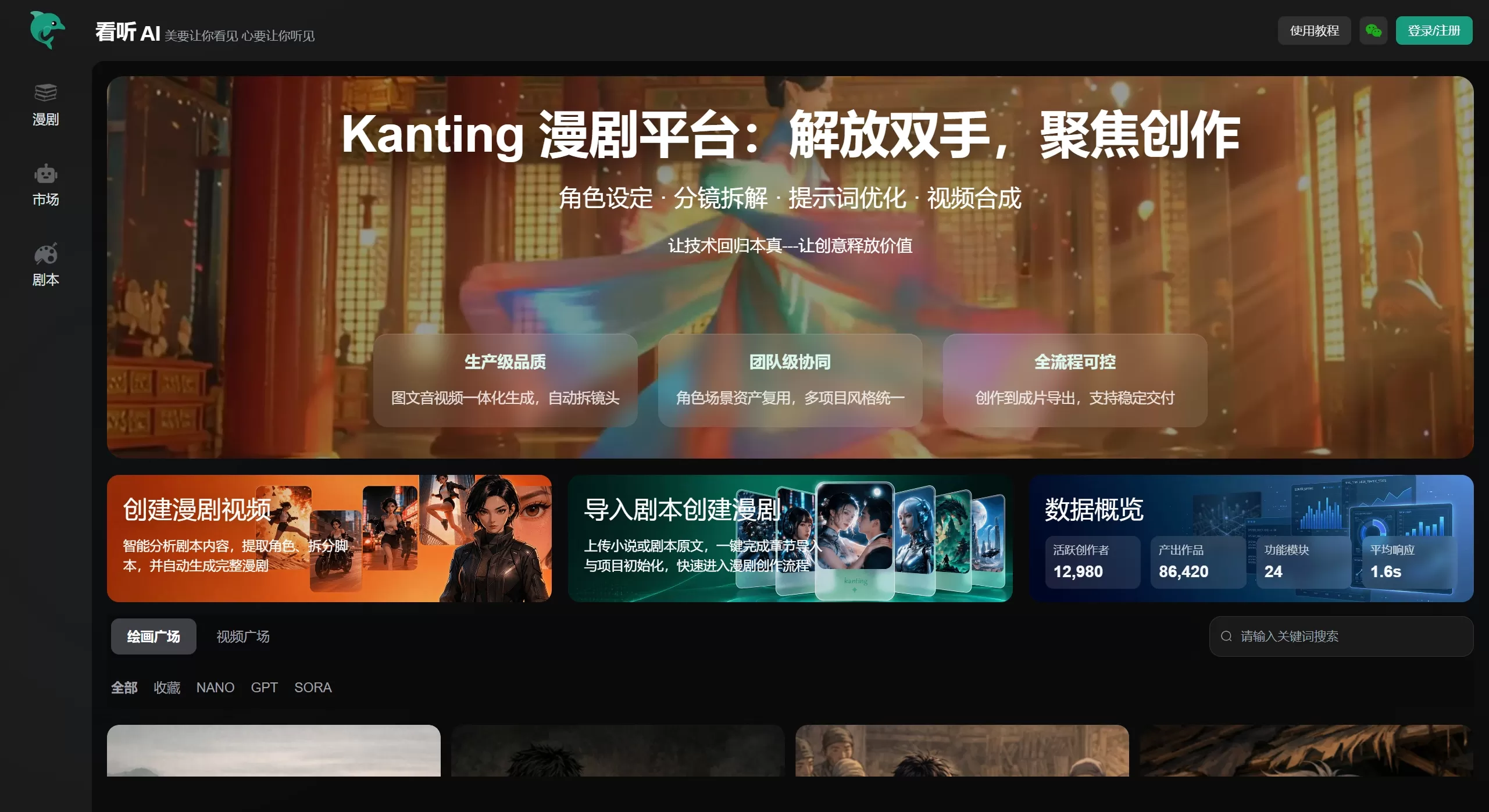
Main Features of Kanting AI
Script Import and Intelligent Analysis: Supports direct upload of novel or script text, completes chapter import and project initialization with one click, and automatically extracts characters and splits scripts.
Character Setting and Asset Reuse: Character images can be locked in and repeated across projects, making it ideal for serialized IP operations and ensuring consistent style across multiple projects.
Storyboard Breakdown: Automatically splits scripts into individual shots, saving you a great deal of manual storyboarding work.
Prompt Optimization: Built-in prompt optimization feature means you don't have to keep fumbling with AI drawing prompts.
Integrated Image, Audio, and Video Generation: Covers everything from image generation, voiceover, and background music to video composition, with automatic shot splitting.
Team Collaboration: Supports multi-member collaboration, with character and scene assets shared and reused across the team.
Finished Film Export: From creation to final export, the entire workflow stays under your control with stable delivery.
Kanting AI Application Scenarios
Short Drama Teams: Need to batch-produce comics content, quickly validate themes, and keep characters and style consistent.
Novel/Web Fiction IP Operations: Directly import existing novel text and quickly transform it into visual comics to further unlock IP value.
Animation Content Creators: Reduces the gaps between text scripts, storyboards, and final videos.
Marketing and Brand Content Teams: Package brand stories and product plots into visually engaging comics content.
MCNs and Content Studios: Enable team collaboration, unify character assets and visual style, and boost production efficiency.
Kanting AI Pros and Cons
Pros
Built for production, with a complete pipeline: covers everything from script import to finished film export—not just a single-point tool that only handles one task.
Strong team collaboration: reusable character and scene assets make it ideal for serialized, large-scale content production.
Automatic storyboard breakdown: significantly reduces manual storyboarding work, with solid capability for handling long-form scripts.
Fast response: averages 1.6 seconds, delivering a smooth experience.
Cons
As a professional-grade platform, it has a steeper learning curve than "one-prompt generation" beginner tools—you need some understanding of the comics production process.
Compared to Bairimeng AI, Manxiaoya, and others, it's still building brand awareness.
Production-grade features may be limited for free users, and deep usage typically requires a paid plan.
How to Use Kanting AI
Visit Kanting AI's official website at kanting.com and register/log in.
Select "Import Script to Create Comics," upload your novel or script text, and the platform will automatically complete chapter import, character extraction, and project initialization.
In the character settings module, confirm or fine-tune the AI-extracted character appearances to ensure the style matches your expectations.
Enter the storyboard breakdown stage, review the automatically split shot sequence, and make minor adjustments as needed.
Use the prompt optimization feature to generate or adjust images while maintaining consistent character and scene styles.
In the video composition module, add voiceover and background music, then complete and export the final film.
Kanting AI vs. Alternative Competitors
| Comparison Dimension | Kanting AI | Bairimeng AI | Manxiaoya | Chengxing Dream Factory |
|---|---|---|---|---|
| Product Positioning | Production-grade AI comics platform | Text-to-Video AIGC creation platform | Free AI comics creation platform | Lightweight AI comics creation platform |
| Core Features | Script import, character setting, storyboard breakdown, prompt optimization, video composition | Copy-to-video, intelligent voiceover, storyboard control, partial repaint | One-sentence comics generation, multi-model integration, automatic voiceover | Quick storyboard splitting, low-cost image generation, AI voiceover and subtitles |
| Character Consistency | Reusable character assets, consistent style across projects | Supports character locking and style consistency | Character locking, meets short video needs | Basic consistency guarantee |
| Learning Curve | Medium, requires understanding of comics production workflow | Low, three-step video generation | Very low, zero barrier to entry | Low, beginner-friendly |
| Team Collaboration | Supports team-level character/scene asset reuse | Weak, leans toward individual creation | None | None |
| Pricing Model | Free + paid | Free quota + paid subscription | Completely free | Pay-per-use/subscription |
| Target Users | Short drama teams, IP operators, content studios | Short video creators, short drama commentators, beginners | Total beginners, individual creators | Beginners, lightweight content production |
| Key Strength | Controllable production-grade full workflow, team collaboration and asset reuse | Extremely simple operation, lip sync, rich templates | Completely free, finished films in minutes | Fast storyboard splitting, low image generation cost (0.1 yuan/image) |
| Main Weakness | Higher learning curve than pure beginner tools, brand awareness still needs improvement | Weak deep customization, insufficient industrial collaboration features | Limited long-text handling, homogeneous art style | Basic features, weak professional-level adjustment capability |











