
 Script Planner Assistant▸
 AI Apps
 AI News

Bairimeng AI: Generate Original IP Story Videos in One Click
Bairimeng AI: Generate Original IP Story Videos in One ClickIntroduction
BairimengAI is a text-to-video AIGC platform launched by Shenzhen Guangmo Tech, with the core selling point of "enter a story, get a finished video in one click." In the past, making videos required juggling a bunch of tools—writing scripts, drawing storyboards, generating visuals, then dubbing and editing. Now it packages all these tasks into a single workflow. People doing things like novel promotions, short drama creation, or educational content can save a lot of effort with it.
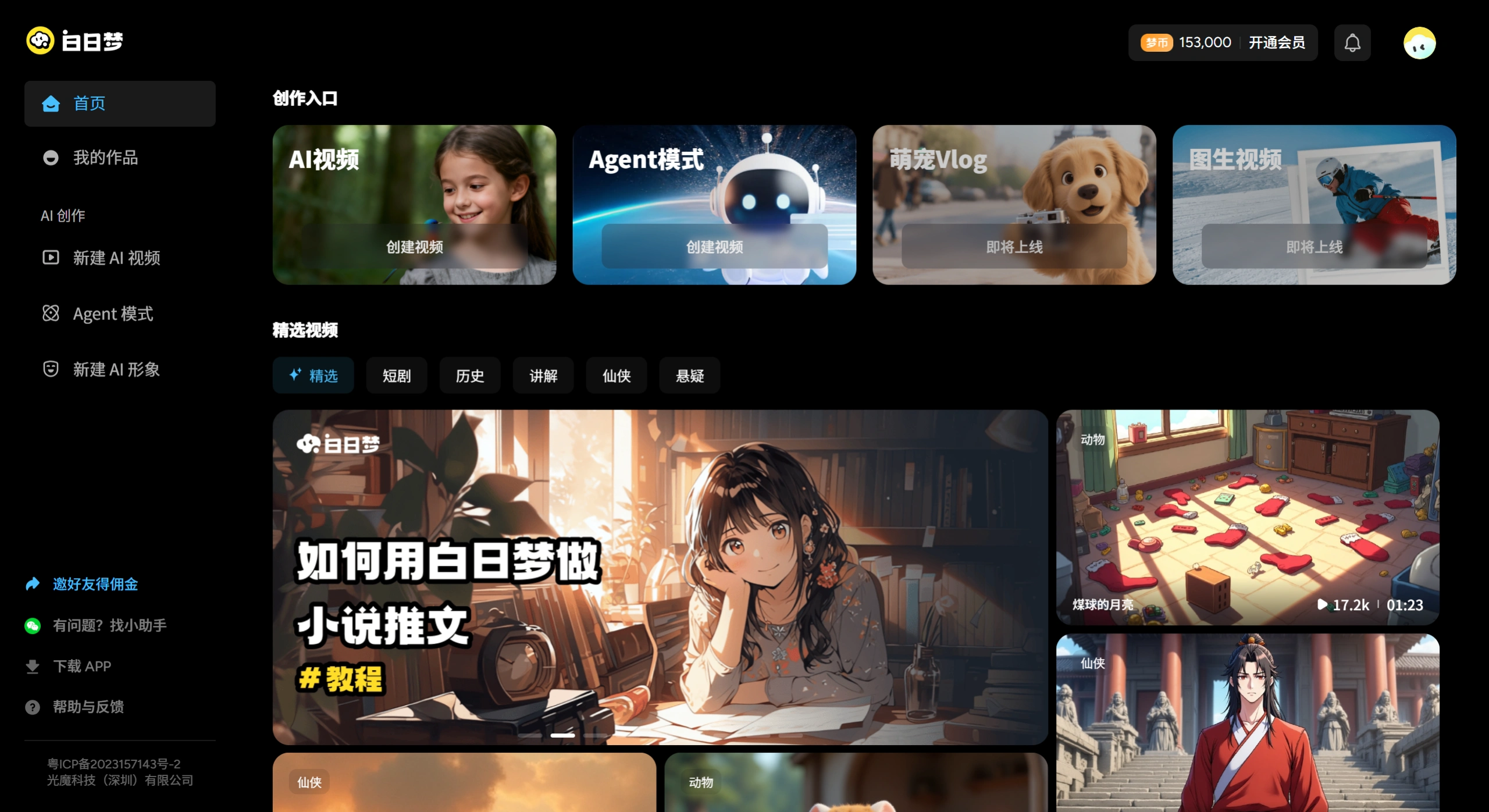
Features of BairimengAI
Text-to-Video: Just drop in a text story, and the AI will automatically break it into storyboard sketches, then convert them into dynamic videos, with continuous output of up to 6 minutes. Both static and dynamic modes are available.
AI Storyboard System: Automatically generates shot descriptions and scene transitions based on the copy. You can manually fine-tune composition, camera movement, and even character positions frame by frame—essentially a built-in simplified director's workstation.
Character Consistency: Upload 5 to 8 photos to build a custom character library. No matter how the scene changes, the character appearances remain consistent. This essentially solves the long-standing headache in most AI videos where "the face changes every time the shot changes."
AI Voiceover and Voice Styles: Narration is auto-matched, with plenty of voice options—dialects, mature sister, domineering boss style, etc. If you're not satisfied, you can manually swap them.
Style Templates: Over 30 visual styles to choose from, including Chinese animation/guofeng, cyberpunk, suspense and mystery, Japanese kawaii, Disney cartoon, you name it. Aspect ratios can also be adjusted freely.
Static to Dynamic: Turn ordinary storyboard images into dynamic scenes with one click—for example, rain hitting a bamboo forest or spaceships flying through—these kinds of environmental effects are all handled.
Use Cases for BairimengAI
Novel/Comic Promotions: Novel copy under 2000 characters can be directly converted into audio comic videos, helping the original work drive subscriptions and traffic.
Knowledge & Science Communication: Teachers or self-media creators can turn abstract concepts into animated short videos to make them easier to understand.
Short Drama Creation: Individual creators can handle the entire process from script to finished video on their own, saving on filming and actor costs.
Marketing Materials: Want to create a product story video or brand animation for social media? It can generate one quickly.
Character IP Development: Use fixed character images across videos to build up recognition over time.
Pricing Model of BairimengAI
BairimengAI uses a hybrid "free trial + credits/membership paid" model. New users typically receive a batch of free generation credits and platform coins upon registration—enough for you to directly generate watermark-free videos and try it out. Once the free quota runs out, you can purchase credits to unlock higher resolution, faster generation speed, or premium styles.
Advantages of BairimengAI
The entire workflow loop is quite complete—from text to finished video—without needing to switch back and forth between multiple software tools.
Character consistency stands out as a notable selling point among similar products, making it especially suited for serial content creation.
Deployed on domestic servers with stable access, no need to fiddle with special network environments.
Tutorial: How to Use BairimengAI
With BairimengAI, you can generate a work in just a few steps: write a story, set up characters, select storyboards, edit images, and preview the video:
Step 1: Write the Story
First, use GPT or a domestic AI large model, such as Kimi, to write a story script. The prompt format is as follows: replace the topic with the information you want. For example: Write a story, briefly tell the story of Little Red Riding Hood.
Step 2: Open the BairimengAI Official Website
Go to the "BairimengAI" website, register and log into your account, enter the homepage creation entry, and click [Create] in the left navigation bar.
Step 3: Paste the Story Content
Enter the new work page, add the work title and the story body. Here, we copy the story script generated by Kimi in Step 1 above into the work, then click "Next."
Step 4: Select the Work Style
Choose your preferred creation style—here I select [Anime Chinese Style]—then click [Next] in the upper right corner.
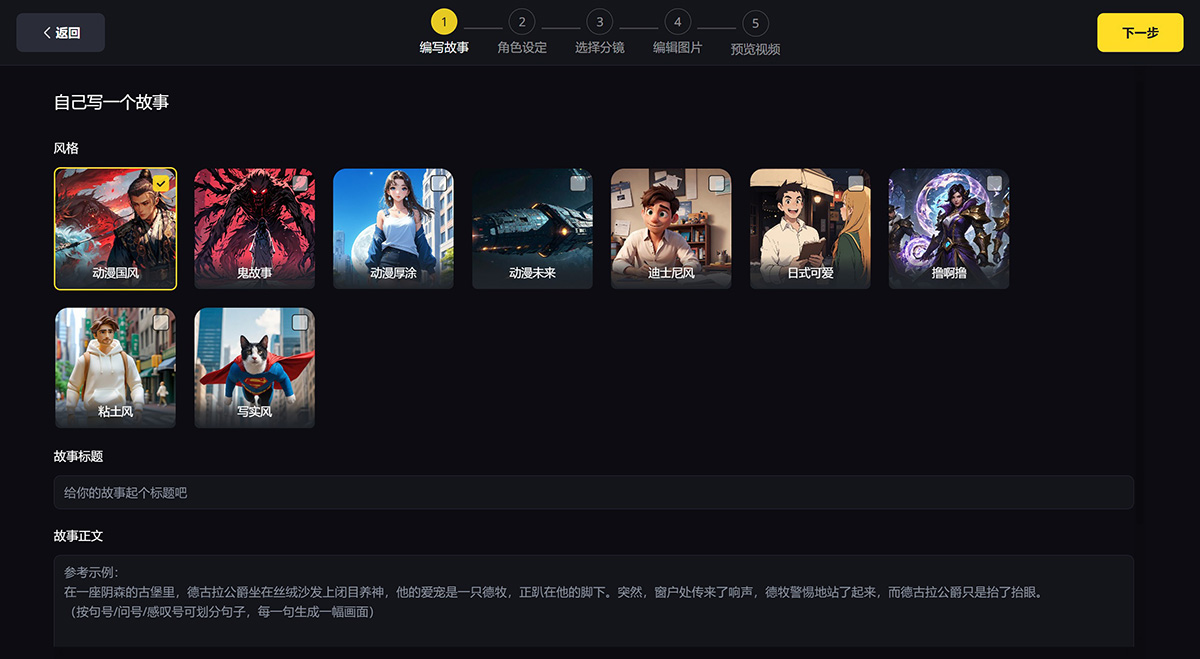
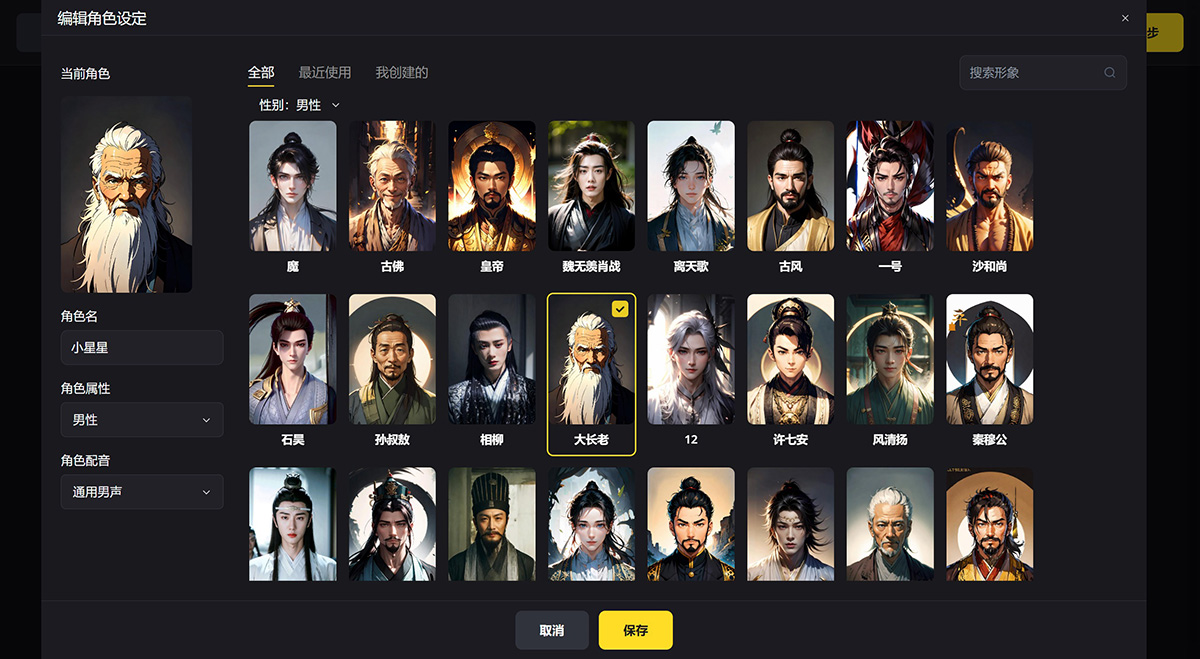
Step 5: Character Setup
Based on the input text, you can manually assign a suitable image to each character. In the left sidebar, add a new character, name the character, add character attributes, select a character image, and save to proceed to the next step. If you're not satisfied with the character, you can also click the plus sign on the right side of "Set Image" and upload a few photos to create a custom character image.
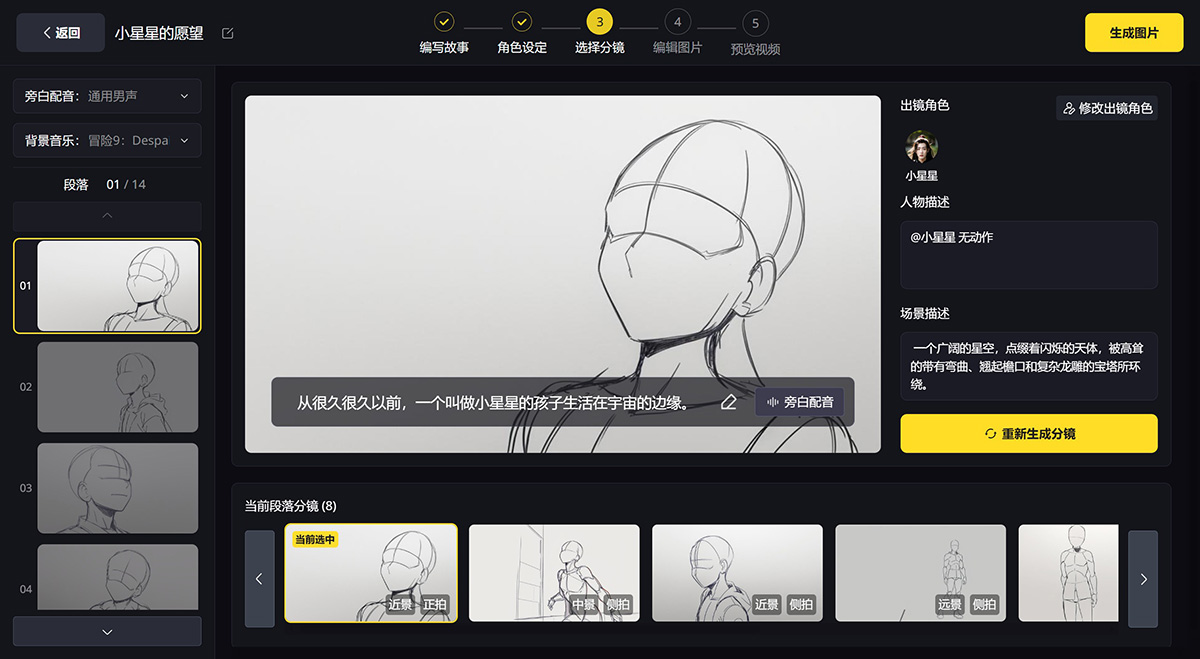
Step 6: Generate Storyboard Sketches
The AI will automatically generate all storyboard sketches based on the copy. Multiple sketches will be generated for each image, with up to three selectable for each. By default, the first three are selected, and these can be manually adjusted. You can individually select each sketch to tweak the copy, video characters, framing and composition, and other elements. After choosing a new sketch, regenerate the image—this step may take a moment.
Step 7: Generate Storyboard Images
After confirming the storyboard sketches are correct, click to generate the specific storyboard images. By default, all shots are static images. If you want to convert them into dynamic video effects, you can click "Convert to Dynamic"; if you're not satisfied with the details, click "Edit Image" to modify; if you're not satisfied with the entire storyboard, click "Regenerate" on the right side.
Step 8: Generate the Final Video
After confirming everything is correct, finally click the "Generate Video" button in the upper right corner to complete the creation.
Frequently Asked Questions about BairimengAI
1. What is the maximum number of characters I can input in BairimengAI?
It currently supports up to 2000 characters.
2. What is a storyboard?
A storyboard shows a scene from different angles. A storyboard can have multiple dimensions, such as long shot and close-up, front view and side view, etc.
3. Can I define my own character images instead of only choosing from the character library?
BairimengAI currently only supports selecting from the character library. In the future, we will support users defining their own character images—you can even upload your own photos and make yourself the protagonist of the story~
4. What if the generated images are not the effect I want?
On the content details page, you can select the image you want to replace, click the edit button, and modify the image by re-selecting the character, re-selecting the storyboard, or simply redrawing the image, until you are satisfied with the result.
5. What if the character I want is not correctly identified?
You can add a note at the very beginning of the copy such as "this story has a total of x characters," or increase the frequency of secondary character names in the copy to improve character recognition accuracy. If a single image doesn't show the correct character or the right number of characters, you can click edit on that single image's details page to make adjustments.
6. How do I edit character tags?
Character tags in the current version of BairimengAI are auto-identified by the system and cannot be edited at this time.
7. How do I edit the title?
You can edit the work title at any time in the upper left corner during the creation process.
BairimengAI vs. Competitors
| Dimension | BairimengAI | JimengAI | Keling/Hailuo | PixVerse |
|---|---|---|---|---|
| Core Positioning | One-stop long story/short drama generation | Short video/image generation + editing | High-quality video generation model | Community-based AI video creation |
| Video Length | Up to 6 minutes | Mainly short clips | Medium length | Medium length |
| Character Consistency | Strong (custom character library) | Medium | Medium | Relatively weak |
| Storyboard Control | Yes, frame-by-frame adjustment | Relatively weak | Relatively weak | Relatively weak |
| Entry Barrier | Low (guided workflow) | Low | Medium | Low |
| Target Users | Novel promotion & short drama creators | Short video bloggers, designers | Professional creators | Overseas users, community players |
LightMagic Technology (Shenzhen) Co., Ltd. was established in 2023, with the vision of "enabling everyone to tell the stories in their hearts"! By building an AIGC content creation story engine, we provide creators with a platform for free expression and dream realization, helping artists and creators unleash their limitless potential.
Related News:
Complete Guide to AI Comics Production Workflow and Tools
2026 Recommendations: Review of 5 AI Comics Production Tools












