
 Script Planner Assistant▸
 AI Apps
 AI News

GemDesign: AI-Powered High-Fidelity Prototyping Tool
GemDesign: AI-Powered High-Fidelity Prototyping ToolIntroduction
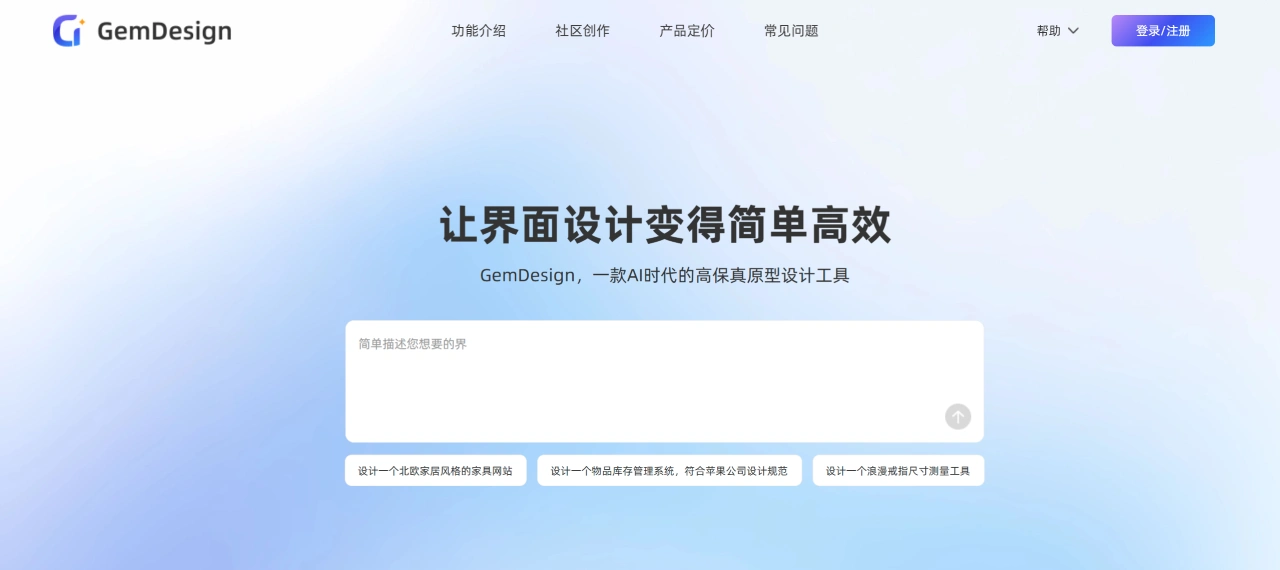
GemDesign is a high-fidelity prototyping tool built for the AI era. It helps users quickly generate designs from text or images, supports flexible adjustments and consistent styling, and exports designs in multiple formats that work across computers, phones, and tablets. It's suitable for product managers, entrepreneurs, designers, marketers, and many other users. Compared with tools like Figma and MockingBot (墨刀), what makes it stand out is that there's no need for complex operations—just describe what you want, and a design is generated, letting you complete the initial design and validate your ideas much faster.
Main Features of GemDesign
Text-to-Interface: Enter a description of your needs (either simple or detailed), and GemDesign automatically generates a complete prototype or design draft.
Image-to-Interface: Upload a sketch or screenshot, and GemDesign can turn it into an editable, professional prototype with one click.
Avoids Common Oversights: The system automatically fills in gaps such as broken interactions and missing requirements that product managers often overlook.
Direct Code Output: GemDesign can export front-end code with one click, reducing communication costs with the technical team.
Creates Operable Prototypes: AI automatically generates interactive effects, turning static designs into prototypes you can click and use, just like the real thing.
Flexible Adjustments: If you're not satisfied with the generated result, you can freely drag, edit the copy, or switch fonts to refine the details.
Maintain Consistent Style: Use the "Reference Page" or "Reuse Content Block" features to keep multiple pages stylistically consistent.
What Can GemDesign Be Used For
Quickly Produce Design Drafts: Describe your idea in words, and GemDesign will deliver high-fidelity designs quickly.
Turn Sketches into Interfaces: If you have sketches or reference images on hand, they can be quickly turned into polished interfaces.
Build Operable Prototypes: Transform static designs into interactive versions for internal discussions, investor demos, or user testing.
Ensure Consistent Design Style: Across multiple pages, the overall style stays coherent.
Advantages of GemDesign
Fast: Generates high-fidelity prototypes in seconds to minutes, far faster than traditional methods.
Low Barrier to Entry: No need to learn complex design skills—beginners can get started quickly.
AI-Assisted Optimization: GemDesign automatically adjusts design elements, reducing the manual tweaking needed.
Adaptable to Multiple Devices: Works with computer, phone, and tablet screen sizes for any scenario.
Who Is GemDesign For
Product Managers: Quickly turn product ideas into high-fidelity prototypes.
Entrepreneurs: Validate product concepts with less money and higher efficiency.
Project Managers: Clearly define project requirements and visual effects.
Marketers: Quickly create high-fidelity previews of marketing pages and ad assets.
UI/UX Designers: Rapidly explore design directions or supplement early-stage design drafts.
Business Professionals: Create professional product demos or proposal materials.
Teachers/Students: Learn the product design process through hands-on practice.
How to Use GemDesign
Register and Log In: Visit the official website, click Register/Log In, and enter the design page.
Create a Project: Create a new project in the workspace and give it a name.
Generate an Interface: Choose "Generate from Text" or "Generate from Image," enter your requirements or upload a sketch, then click Generate.
Adjust and Refine: Modify and polish the generated result.
Frequently Asked Questions About GemDesign
Question 1: Compared with traditional tools like Figma and MockingBot, what is GemDesign's biggest advantage?
Answer: The biggest advantage is its "design by speaking" mode. Traditional tools like Figma require you to manually drag components and draw, which is hard to learn and slow—better suited for fine-tuning. Tools like MockingBot require you to manually assemble prototypes, mainly for low- to mid-fidelity flow demos. GemDesign only needs you to enter text or upload a sketch, producing an interactive high-fidelity prototype in seconds to minutes, with no professional design skills required. The barrier to entry is low, efficiency is high, ideas can be quickly turned into designs, and the time from concept to prototype is saved.
Question 2: What formats can GemDesign export? Is it compatible with other platforms? Is it helpful for work?
Answer: Supported export formats include: images (static images of a single page or an entire flow), HTML files (with basic interactive functions), and Figma files. Files can also be imported into other design platforms such as MockingBot (墨刀), Pixso, and Sketch. The benefits for work are: images can be used for sharing or reporting, HTML can be demonstrated to people without an account, Figma files let designers make fine adjustments; and it offers "seamless integration," so there's no need to redo designs because of using different tools—you can directly use GemDesign's prototypes in your existing workflow, saving effort and boosting efficiency.
Question 3: What specific problems can different users solve by using GemDesign?
Answer: Different users solve different problems:
Entrepreneurs: Without dedicated design resources and on a tight budget, yet wanting to validate a product quickly, GemDesign enables you to create interactive demos at low cost—no need to wait for a designer—helping attract investors or users.
UI/UX Designers: When exploring early design directions is slow, GemDesign can quickly produce multiple options for inspiration, serve as a supplement to design drafts, and reduce repetitive foundational work.
Product Managers: When communicating requirements there is no intuitive prototype, and you must wait for the designer, GemDesign can quickly turn ideas into high-fidelity prototypes for internal discussions, reviews, or user testing—no waiting for a designer, accelerating progress.












