
 Script Planner Assistant▸
 AI Apps
 AI News

AnySlide: Auto-Generate Full PPT Decks from Articles, Links, or PDFs
AnySlide: Auto-Generate Full PPT Decks from Articles, Links, or PDFsIntroduction
What is AnySlide
AnySlide is a generator that can automatically turn articles, links, and PDFs into complete ppts. With 150+ curated templates and native Chinese rendering powered by gpt-image-2, the slides AnySlide produces are genuinely ready to be presented as-is.
Under the hood, AnySlide uses two engines: HTML and gpt-image-2. It's not one of those tools that make you drag and drop from scratch — it's more like an engine that "reorganizes content by track": you throw in a topic, an article, or a link, and the ai figures out the structure, matches a visual style, and finally gives you a set of slides and image-text cards ready to present or share on social media.
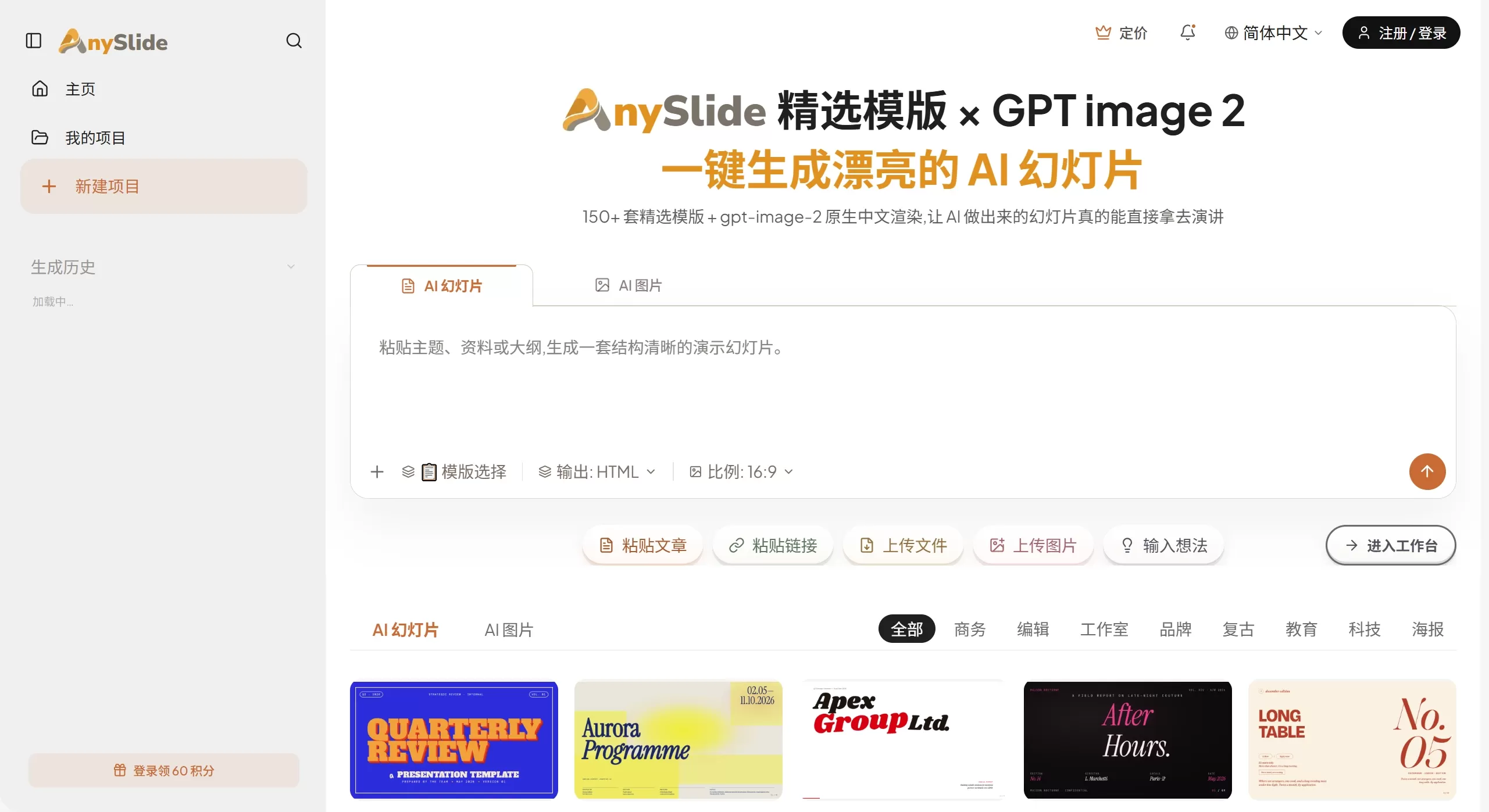
AnySlide official site screenshot
Features
Organized by track: 8 built-in vertical tracks including Workplace, Finance, Reading, Beauty, Health, Chinese Style, Travel, and Brand Marketing. The AI automatically matches the corresponding visual style, content structure, and layout conventions based on the track you choose.
Two generation modes:
AI Image Mode: Powered by gpt-image-2, 5 credits per image, outputting a sequence of high-quality images.
HTML Template Mode: 1 credit per page, generated purely by LLM at very low cost.
No Chinese character errors: Chinese characters are embedded directly into the prompt for generation, so the characters on every card are clear and accurate — no more worrying about garbled text.
One-click full export: Each generation outputs an image sequence + 3 viral titles + matching copy + recommended tags, bundled as a ZIP download and ready to publish.
Automatic style matching: 6 built-in visual styles. The AI recommends one based on the track and content, and you can switch with one click — all cards update in sync.
Streaming generation: Each card is displayed the moment it's generated, with a live preview as it goes. On average, a full set takes about 30 seconds.
150+ templates: 38 slide templates and 12 image styles, ready to use out of the box.
Use Cases
Long-form breakdown: Turn long articles into clearly structured slides, with one key point per page.
Book notes: Quotes, chapter summaries, and mind maps, output as a set of savable image-text cards.
Course / product posters: Course outlines, core selling points, and target audience — all communicated clearly in one set of posters.
Listicles / collections: Sequence cards like Top 10, must-read lists, and weekly roundups — great for gaining followers and retention.
Professional personal brand: Recaps, job-seeking prep, and personal growth insights turned into polished image-text shares.
Beauty education: Ingredient comparisons, skincare routines, and product reviews — turning chemistry jargon into intuitive infographics.
Health content: Workout menus, dietary suggestions, and health education delivered as professional image-text cards.
Recipe cards: Step-by-step breakdowns, finished-dish photos, and ingredient tables — easy to follow straight from the cards.
Seasonal marketing: Poster themes for the 24 solar terms like Start of Spring, Start of Summer, Qixi Festival, and Mid-Autumn Festival — generate a marketing calendar with one click.
Data visualization: Turn statistics into easy-to-read infographics — no more pasting Excel screenshots.
Internal communications: Business image-text cards for event notices, product launches, and quarterly summaries.
Social media covers: Business covers, quote graphics, travel covers, book recommendation images, and more.
Pros & Cons of AnySlide
Pros
The track-based approach to content is quite precise — the output is more aligned with Chinese users' aesthetic preferences and content consumption habits than what general-purpose tools produce. gpt-image-2's native Chinese rendering capability is a clear differentiator among similar products, completely solving the long-standing issue of Chinese character garbling. The content pipeline is very short: from "seeing a great piece of content" to "publishing a complete set of image-text cards" — compressed into one input and one click. The output is a complete package of images + titles + copy + tags, which fits perfectly with publishing workflows on Chinese social media platforms like Xiaohongshu, WeChat Official Accounts, and Zhihu. HTML Template Mode has very low cost, making it ideal for high-frequency, batch generation.
Cons
Currently, it mainly outputs image sequences and HTML, and does not support exporting editable PPTX files — so if you need to do further editing for a traditional presentation, it's not very convenient. Images generated on the free tier expire after 7 days, and long-term storage requires a paid plan. The Pro subscription hasn't officially launched yet — right now you can only buy top-up cards (¥35/¥140/¥350), and due to Stripe's restrictions, users in mainland China cannot use auto-renewal. Compared with international tools like Gamma and Canva, collaboration and team features are still not clearly defined. Additionally, since it depends on gpt-image-2, any underlying model updates or policy adjustments may affect service stability.
FAQ
Q: What exactly is AnySlide? How do I use it?
A: An AI platform for making slides and images. Paste a topic, article, or link, and the AI organizes the structure, matches a style, and generates slides or high-quality AI images with one click.
Q: What are the limitations of the free tier?
A: New users get 60 credits upon registration, and it automatically resets to 10 credits per day. Generated images expire after 7 days.
Q: How many credits does each generation cost?
A: AI Image Mode costs 5 credits per image; HTML Template Mode costs 1 credit per page. The system will alert you in advance when credits are running low.
Q: How do I cancel the Pro subscription?
A: Go to "Account/Balance → Manage Subscription" to reach the Stripe page, where you can cancel anytime. Benefits for the current billing period remain unaffected.
Q: What payment methods are supported?
A: Top-up cards can be paid with Alipay, WeChat Pay, Visa/Mastercard/AmEx. The Pro subscription only supports international credit cards due to Stripe's restrictions, so users in mainland China are recommended to buy top-up cards and renew manually.
How to Use AnySlide
Open https://anyslide.app/zh to register an account — new users receive 60 credits. On the homepage, first select a track (Workplace, Reading, Beauty, etc.), or you can use the general entry directly. Then enter a topic, paste the body of an article, or submit a link, and the AI will automatically parse the content structure. Next, choose a generation mode: AI Image Mode (high-quality images, 5 credits per image) or HTML Template Mode (fast and low-cost, 1 credit per page). The AI automatically matches a visual style and provides a live preview as it generates — each card becomes visible the moment it's ready. If you don't like the current style, you can switch with one click and all cards will update in sync. Once confirmed, export: the ZIP package contains the image sequence, 3 viral titles, matching copy, and recommended tags. The content you get can be published directly to WeChat Official Accounts, Xiaohongshu, Zhihu, or used for internal reports and similar purposes.
Competitor Comparison
| Comparison Dimension | AnySlide | AiPPT | iSlide AI | 笔格AI PPT |
|---|---|---|---|---|
| Product Positioning | Track-based content restructuring engine (AI Slides + AI Images) | Established AI PPT generation tool | Office-scenario full-workflow AI PPT plugin | AI PPT generation platform from the 135 editor team |
| Core Engine | gpt-image-2 + HTML dual engine | ana Mode) | Self-developed AI algorithm, supports multiple model calls | AI language model + intelligent layout engine |
| Chinese Rendering | Precise (native embedding of Chinese characters via gpt-image-2, no more garbled text) | Good | Excellent (optimized Chinese typography, plug-in level font adaptation) | Fairly good (stable Chinese typography) |
| Output Format | Image sequence (JPG/PNG) + Copywriting bundle (ZIP package) | PPTX, PDF (export after online editing) | PPTX (directly embedded in PowerPoint/WPS) | PPTX, PDF, PNG, JPG, Video (Digital Human) |
| Template Resources | 150+ curated templates, 8 major vertical tracks | 100,000+ templates, covering 22 major scenarios | 5,000,000+ assets (templates, diagrams, icons, images) | 200,000+ premium templates, covering 100+ industry scenarios |
| Generation Method | Enter a topic / paste an article / submit a link | Enter a topic / upload a document / generate from URL | Enter a topic / upload a document / one-click AI generation | Enter a topic / import a document / paste text / URL / voice conversation |
| Online Editing | One-click style switching, real-time preview, no support for deep single-page editing | Online editing, with an operating logic similar to traditional Office PPT | Plug-in embedded in Office/WPS, 40+ efficiency-boosting features, one-click layout optimization | Outline secondary editing, single-page style freely changeable, one-click color and font switching |
| Bundle / Value-Added Output | Images + 3 viral titles + matching copy + recommended tags (one-click ZIP export, ready to publish) | PPT file only | PPT file only | PPT file + AI Digital Human Presentation Video (generated in about 3 minutes) |
| Pricing Strategy | Free plan: 10 credits/day (60 credits for new users); AI image mode 5 credits/image, HTML mode 1 credit/page; top-up cards ¥35 / ¥140 / ¥350 | Free plan with limited uses; annual subscription starts at ¥99 | Basic free version; advanced subscription unlocks all templates | Free plan: 3-5 generations; personal from ¥5.6/month, 6 months ¥69, 1 year ¥99, lifetime ¥299; enterprise from ¥15.3/seat/month |
| Core Differentiators | ① Track-based AI configuration (automatic style matching for 8 major vertical fields) ② Precise Chinese rendering (a rare capability in the industry) ③ Complete social media publishing bundle (images + copy + tags) ④ Real-time streaming generation (30 seconds per bundle) | ① Industry-leading template volume (100,000+) ② Dual-mode generation (standard + free canvas) ③ Simultaneous upload of multiple files (up to 5) ④ Multilingual text rendering | ① Plug-in form embedded in PowerPoint/WPS (zero switching cost) ② 5,000,000+ asset library with comprehensive copyright protection ③ One-click layout optimization (font/line spacing/paragraphs) ④ Cloud sync + multi-user collaboration | ① Backed by the 135 Editor team ecosystem ② AI Digital Human Presentation Video (rarely offered by peers) ③ Private Deployment (data stays on the intranet for government and enterprise clients) ④ AI text-to-image + AI copy expansion and polishing |
| Best-Suited Audience | Chinese social media content creators, knowledge bloggers, Xiaohongshu/WeChat Official Account operators (pursuing "generate and publish right away") | Users with batch content production needs, template-driven users, workplace office scenarios (pursuing template richness) | Enterprise users, high-end business presentations, teachers creating premium courseware, heavy Office users (pursuing seamless integration with local software) | Workplace reporting, teaching courseware, thesis defense, government reports, government and enterprise clients (pursuing editable PPTX + digital human value-added features) |















