Script Planner Assistant▸
 AI Apps
 AI News

Bloomtype - Markdown WeChat Article Formatting Tool
Bloomtype - Markdown WeChat Article Formatting ToolIntroduction
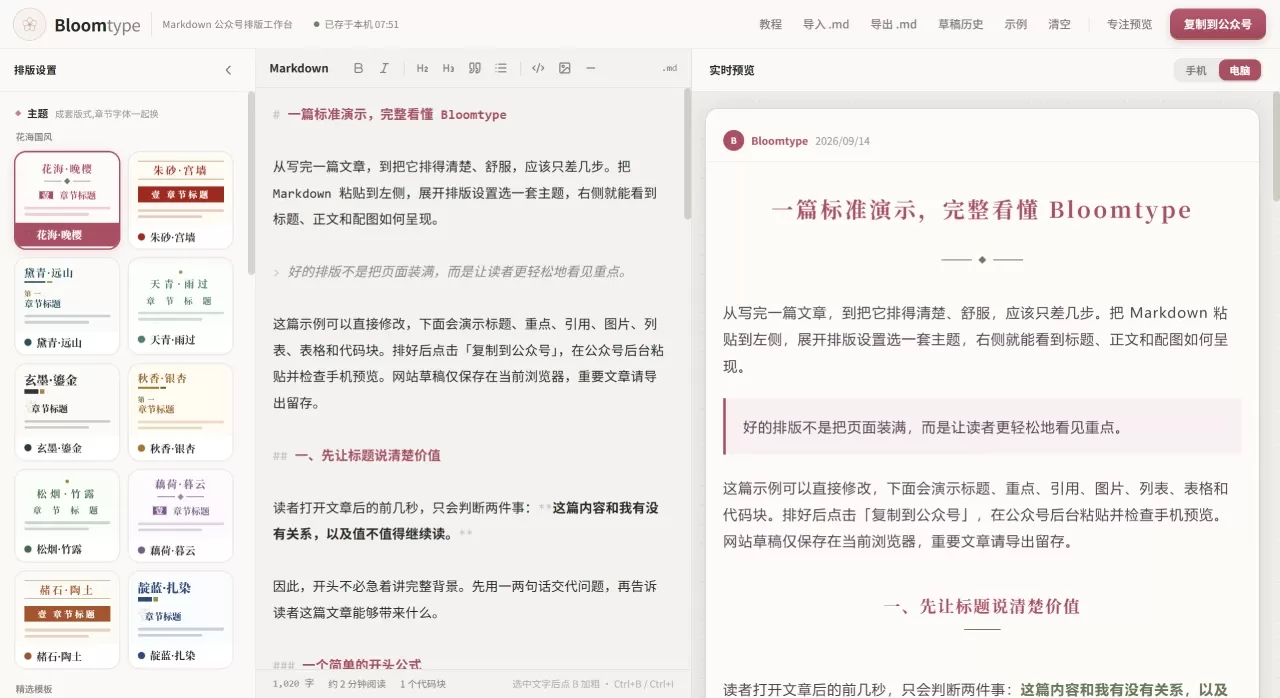
Bloomtype is a Markdown formatting tool built specifically for WeChat Official Accounts. It turns Markdown drafts into comfortably formatted WeChat articles. The workflow is simple: "Paste Markdown, pick a theme, copy to WeChat." Its standout feature is a traditional Chinese aesthetic — it ships with theme galleries such as "Floral Sea National Style" and "Whitespace Zen," plus suites named after traditional Chinese colors like "Cinnabar · Palace Wall" and "Sky Blue · After Rain." It also supports Obsidian preview, local draft saving, and .md file import/export, making it a great fit for creators who are used to writing in Markdown.
Core Features
Real-time Markdown editing: Edit on the left, preview in real time on the right. Full support for syntax including headings, bold, blockquotes, lists, tables, and code blocks.
National-style theme library: Includes 10+ traditional Chinese color-themed sets that apply coordinated colors to headings, body text, quotes, and more with one click.
Section heading styles: Offers 20+ heading decorations, such as handwritten numbering, vermilion seals, and receipt-style numbering, adding structure to long articles.
Custom formatting: Supports two font families — Heiti and Song/Kai — with adjustable font size, line height, and body color.
Code block beautification: Built-in syntax highlighting and background colors, ideal for technical articles.
One-click copy: Formatted output copies directly into the WeChat Official Account editor with strong format compatibility.
Drafts & export: Drafts are auto-saved in the browser locally, with .md file export supported for backup.
Obsidian integration: Direct preview from Obsidian, bridging the gap between local writing and publishing.
Why Choose Bloomtype
National-style design: Most formatting tools lean business or minimalist. Bloomtype centers on traditional colors and Chinese cultural elements — a natural fit for culture and literature accounts.
Great Markdown experience: Write and format in one place, so tech bloggers don't have to switch tools.
Rich heading styles: 20+ section decorations are rare among similar tools.
Lightweight and friction-free: No signup, no ads, ready to use on open.
Native code block support: Solves the long-standing pain point of displaying code on WeChat tech accounts.
Obsidian compatibility: Friendly to local knowledge-management users.
Use Cases
Tech blogs / how-to Official Accounts: Markdown editing + code block beautification for efficient formatting.
Culture / literature Official Accounts: National-style themes + Song/Kai fonts deliver a built-in scholarly feel.
Daily posts: Paste drafts, pick a theme, copy and publish — perfect for high-frequency updates.
Academic / knowledge sharing: Multi-level headings and quote blocks make content structure clearer.
Obsidian users: Convert local Markdown to WeChat format in one step.
How to Use Bloomtype
Open the tool: Visit the official site to go straight to the formatting workspace.
Enter content: Paste or write your Markdown in the left editor.
Choose a theme: Pick a theme or template from the right panel — the preview updates instantly.
Customize details: Adjust colors, heading styles, fonts, line height, or set a fixed ending as needed.
Preview and publish: Switch between mobile and desktop preview. Once confirmed, click "Copy to WeChat" and paste into the backend.
Save a backup: For important articles, export the .md file to guard against browser cache loss.
FAQ
Is Bloomtype free? Core features are free. For specific pricing, refer to the latest announcement on the official site.
Will drafts be lost? Drafts are stored locally in the browser only. Clearing the cache will erase them, so exporting .md backups in time is recommended.
Which syntax is supported? Standard Markdown is supported, including headings, bold, blockquotes, lists, tables, code blocks, and image links.
Will the formatting break? In most cases it stays intact, but it's a good idea to check images and tables in the WeChat editor after pasting and fine-tune if needed.
Can I use custom fonts? Preset font families (Heiti / Song-Kai) are supported, along with font size, line height, and color adjustments. For special fonts, embedding them as images is recommended.
How do I add images? Publicly accessible links are recommended. Local images need to be uploaded to an image host or the WeChat Official Account media library first to obtain a link.
Bloomtype vs. Competitors
| Comparison Dimension | Bloomtype | 135 Editor | Xiumi | Youyiyun AI | Yiban Assistant |
|---|---|---|---|---|---|
| Core positioning | Markdown + national-style formatting | All-in-one AI formatting + asset library | H5 visual design + template formatting | AI end-to-end formatting | WeChat Official Account backend plugin |
| Markdown support | Native editing + real-time preview | Import supported | Weak | Import supported | Supported |
| National-style themes | 10+ national-style themes + traditional colors | Some templates available | Some templates available | None | None |
| Section heading styles | 20+ decorative styles | Basic styles | Rich | Basic | None |
| Code block beautification | Built-in highlighting | Supported | None | None | None |
| AI capabilities | None | AI writing + formatting | None | AI formatting + writing | AI writing + formatting |
| Multi-platform sync | WeChat only | Limited | None | 20+ platforms | Mainly WeChat |
| Obsidian integration | Supported | None | None | None | None |
| Learning curve | Low | Medium | Medium-low | Low | Low |
| Price | Lightweight free / low cost | From 15 RMB/month to 3,390 RMB/year | Around 20 RMB/month and up | From 239 RMB/year | From 269 RMB/year |
| Best for | Tech bloggers, national-style enthusiasts, Markdown users | Enterprise operations teams, high-volume content producers | Users with high design demands | Those pursuing end-to-end efficiency | Deep WeChat Official Account operators |
Related News:
get="_blank" rel="noreferrer noopener">2026 WeChat Official Account Layout Design Tools Recommendation: From AI Layout to Established Editors