Script Planner Assistant▸
 AI Apps
 AI News

SunoMetaTagCreator: Suno AI Prompt Generator
SunoMetaTagCreator: Suno AI Prompt GeneratorIntroduction
SunoMetaTagCreator is a prompt preprocessing tool designed around Suno AI. It doesn't generate audio — instead, it translates "what kind of song you want to make" into instructions that Suno can execute precisely. At its core is a drag-and-drop database of over 1,000 meta tags, plus AI lyric generation, prompt optimization, Last.fm style scraping, and a Chrome extension that integrates directly with Suno.com.
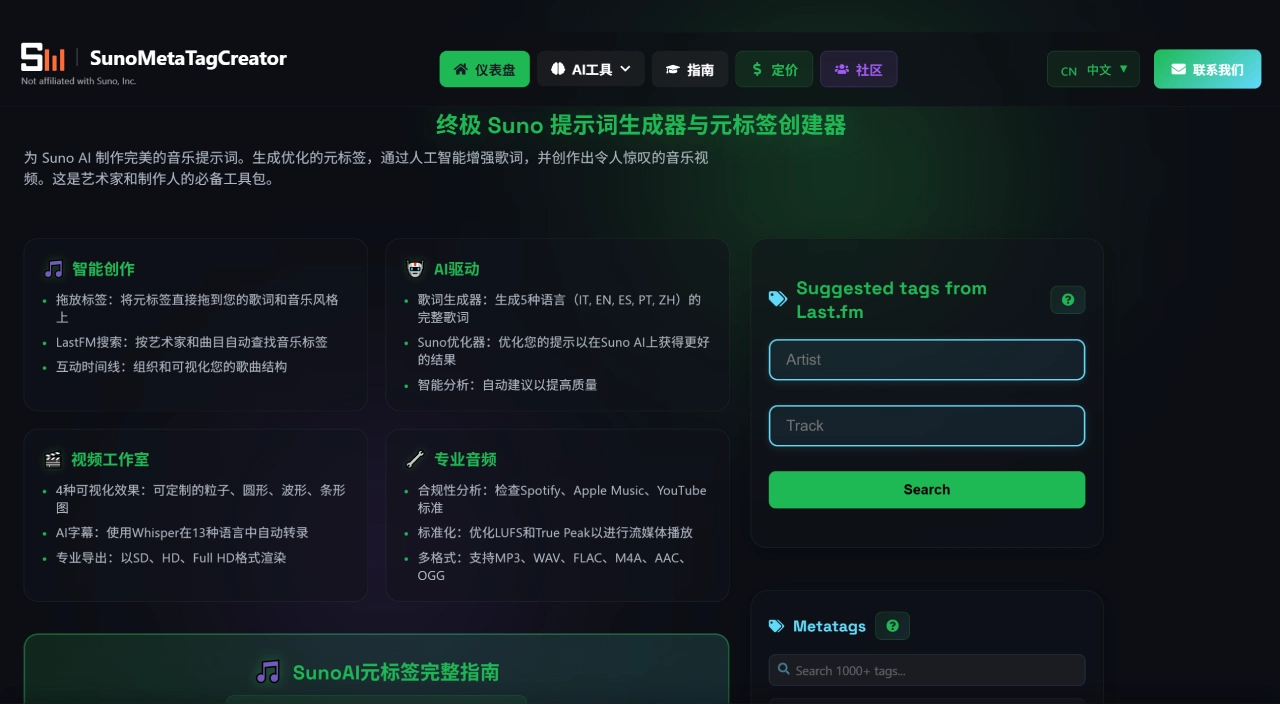
SunoMetaTagCreator Core Features
Meta Tag Drag-and-Drop System: Over 1,000 verified Suno meta tags covering structure (Intro/Verse/Chorus/Bridge/Outro), vocals (Whispered, Stacked Harmonies), instruments (808 Sub Bass, Orchestral Strings), production effects (Hall Reverb, Tape Saturation), and mood/energy (Building, Melancholic). Drag them into the lyric editor and they're automatically inserted in bracket format, ready to be copied directly into Suno's Lyrics and Style fields
AI Lyric Generation: Enter a song title and style, and complete lyrics with verse-chorus structure are automatically generated, supporting languages such as Chinese, English, Italian, Spanish, and Portuguese. Each generation costs 5 credits
Prompt Optimizer: Analyzes the title, style, and lyrics you've entered, automatically adds professional production tags, and optimizes them into a format Suno can parse more easily. Costs 1 credit
Last.fm Tag Search: Enter an artist's name, and the tool scrapes that artist's commonly used style tags from Last.fm as a reference for writing prompts
Chrome Extension SunoSaver: Once installed, you can save generated songs on Suno.com with one click, automatically extracting prompts, meta tags, and audio backups to your workspace, with support for WAV format downloads of private songs
Audio Post-Production Toolkit:
AI Mastering Studio: 8 genre presets for one-click release-grade mastering (5 credits)
Audio Normalization: Loudness-standard processing tailored for Spotify, Apple Music, and YouTube (3 credits)
Audio Noise Reduction: 2 credits
Lyric-to-Vibe: Reverse-engineers existing lyrics into Suno-style prompts with annotated meta tags (2 credits)
AI Music Analysis: Upload a track to receive Suno-compatible descriptive text (3 credits)
Video & Visuals: The music video generator supports three modes — Cinematic, Avatar Lip Sync, and Platinum (requires video credits); the cover art generator costs 8–14 credits
SunoMetaTagCreator Use Cases
Productivity Boost for Advanced Suno Users: If you've been making music with Suno for a while and are tired of "write a paragraph and hope for the best" random outputs, this tool's tag system can take your generations from "roughly the right vibe" to "precisely controlled section structure"
Multilingual Content Creation: Creators who need background music in different languages for short videos, podcasts, or ads can use AI lyric generation to quickly produce multilingual lyric frameworks, then fine-tune and import them into Suno
Style Research & Imitation: Use Last.fm search to analyze specific artists' tag combinations, learn how professional musicians are described and classified, then transfer those tags to your own creations
Batch Pre-Production: The workspace supports unlimited project saving and custom folders (10 colors), making it suitable for organizing large numbers of song drafts by genre, mood, or client
SunoMetaTagCreator Pros & Cons
Pros:
Large, curated tag library — far more efficient than digging through your own documents
Intuitive drag-and-drop interaction that lowers the learning curve for meta tags
Credits never expire, unlike Suno's official subscription which resets monthly
Low price barrier — Premium is $3.99/month, and the first month is just $1.99 with code TRY199
Chrome extension bridges with Suno.com, allowing you to back up and learn from other users' public song prompts
Mastering, normalization, and other post-production tools are integrated on one platform — no need to switch between tools
Cons:
Doesn't generate audio itself — it's only a preprocessing tool, so you ultimately still need to go to Suno to generate
After 7 days, the free version locks drag-and-drop and Last.fm search; you can only browse tags and copy manually
Features are spread fairly broadly (lyrics, video, mastering, covers), but the depth of any single feature isn't as strong as dedicated tools
Requires some music production know-how to get full value from the tag system — total beginners may still not know which tags to drag
Lyric generation quality depends on your title and style input — too vague and the output will be generic too
SunoMetaTagCreator Tutorial
Sign Up & Trial: Visit sunometatagcreator.com/zh to register. Get a 7-day free trial of Premium features + 20 welcome credits. During these 7 days, drag-and-drop, Last.fm search, and project saving are all unlimited
Create Song Prompts: In the Song Builder, browse the tag library and filter by genre, mood, instrument, or structure. Drag the tags you need into the Lyrics area, and they'll automatically arrange into structures like [Verse], [Chorus]. Drag style description tags (e.g., Dark, Aggressive, Reverb Heavy) into the Style area. Click "Copy to Suno" to copy lyrics and style text to your clipboard in one click
Generate Lyrics (Optional): If you don't have lyrics yet, click AI Lyrics Generator, enter a title and style, choose a language, and once generated the lyrics can be inserted directly into the tag structure. Costs 5 credits
Optimize Prompts: Drop your current lyrics and style into the Prompt Optimizer to have it fill in production tags you might have missed. Costs 1 credit
Import into Suno to Generate: Open Suno.com, switch to Custom Mode, paste Lyrics into the lyrics box, paste Style into the style box, and generate your song
Backup & Management (Premium): Install the Chrome extension SunoSaver. After generating a piece you're happy with on Suno.com, click the extension icon to one-click save the prompt, meta tags, and WAV to your workspace, organized by folder
SunoMetaTagCreator vs Competitors
| Dimension | SunoMetaTagCreator | HookGenius | SunoPrompt | Suno Prompt Builder |
| Core Positioning | Meta tag drag-and-drop + pre-production suite | Lyrics + style prompt refinement | All-in-one AI music platform | Quick free prompt generation |
| Meta Tag Control | 1000+ tags, drag-and-drop | Automatically embedded into optimized prompts | Basic tag support | Sliders + basic tags |
| Lyric Generation | Supported (5 credits/time) | > | Supported | Basic Builder |
| Audio Generation | ❌ (Pre-processing only) | ❌ (Pre-processing only) | ✅ Directly generate songs | ❌ |
| Vocal Separation/Stems | ❌ | ❌ | ✅ Up to 8 tracks + MIDI export | ❌ |
| Mastering/Post-production | ✅ Integrated mastering, normalization, noise reduction | ❌ | ❌ | ❌ |
| Chrome Extension | ✅ SunoSaver | ❌ | ❌ | ❌ |
| Last.fm-style Scraping | ✅ | ❌ | ❌ | ❌ |
| Free Quota | 7-day trial + 20 credits | 5 credits | Free prompt generation | 100% free, no registration |
| Pricing Model | $3.99/month or credit pack $3/20 credits | Subscription | Free + pay-as-you-go | None |
| Target Users | Advanced users who like manual tag control | Creators who want a "describe it and get the finished product" experience | People who want to complete the entire workflow on one platform | People who only use it occasionally and don't want to register |
Reasons to Choose SunoMetaTagCreator
If you already use Suno's Custom Mode but want to escape the randomness of "writing prompts by gut feeling," this tool's tag library and drag-and-drop interaction offer excellent value as an upgrade
$3.99/month gets you unlimited tag drag-and-drop, Last.fm-style reference, and Chrome extension backup — far more efficient than flipping through tags in a document yourself
The credits never expire feature is also more flexible than Suno's official subscription, making it suitable for those who don't create at high frequency every month
Frequently Asked Questions
What can I still use after the 7-day free trial ends?You can browse the 1000+ meta tags and manually copy them, and use the 20 welcome credits to test the AI tools. However, the drag-and-drop functionality and Last.fm search will be locked and require upgrading to a Premium Workspace to restore
What's the difference between credits and Premium Workspace?Credits ($3 for 20) are only used for AI tools (lyrics, mastering, video, etc.) and don't include Workspace features. Premium Workspace ($3.99/month) unlocks unlimited drag-and-drop, Last.fm, project saving, Chrome extension, and includes 40 free credits per month
Is there a copyright risk with the generated lyrics?The tool claims to use RAG technology to generate original lyrics and does not directly reference existing works. However, as with any AI-generated content, it's recommended to manually check for sections too similar to known songs before commercial use
Are more tags always better?No. The official guide recommends 3-5 tags per section, with a maximum of 8. Too many tags can confuse Suno's parsing and actually reduce accuracy. Prioritize clarity across the dimensions of style, mood, core instruments, and structure
Which languages are supported for lyric generation?The homepage lists 5 (IT, EN, ES, PT, ZH), while the guide page mentions 8 languages. The actual options available in the UI take precedence
Can I get a refund?Premium Workspace comes with a 30-day money-back guarantee. Credit purchases are non-refundable, but credits never expire, so you can save them for later