Script Planner Assistant▸
 AI Apps
 AI News

SunoPrompt: AI Music Prompt Generator & Music Creation Platform
SunoPrompt: AI Music Prompt Generator & Music Creation PlatformIntroduction
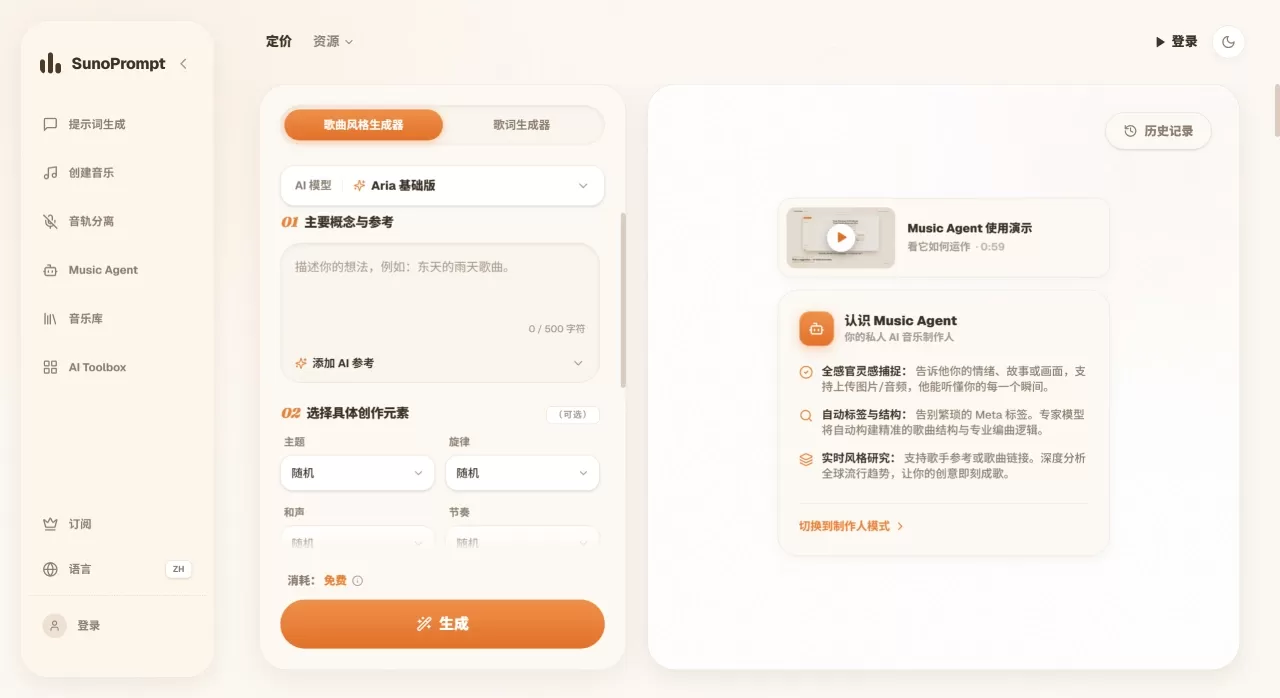
SunoPrompt is an AI music creation platform that brings together prompt generation, songwriting, vocal separation, and multimodal composition. No more switching back and forth between Suno, Udio, and LALAL.AI—one account takes you from inspiration to finished product.
SunoPrompt currently offers 4 core tools: AI Prompt Generator, AI Music Generator, Vocal Remover, and AI Music Agent. The Prompt Generator is free, while Music Generation and Music Agent come with free credits for new users—so you can try before you buy.
Core Features of SunoPrompt
AI Prompt Generator: Writes professional prompts for Suno and Udio. It has 12 adjustable dimensions covering melody, harmony, rhythm, and mood. You can choose between Gemini 2.5 Flash, Gemini 2.0, or GPT-4o Mini, and it'll also generate lyrics along the way.
AI Music Generator: Type in text or lyrics and get a complete song. 4 quality tiers are available, with options for male/female vocals, instrumental-only mode, and style tags. Text mode is capped at 500 characters; lyrics mode supports up to 5,000 characters.
Vocal Separation & Stem Splitting: Upload MP3/WAV/FLAC and split it into stems. The free tier splits into 2 stems (vocals + accompaniment), the advanced tier splits 5 stems, and the premium tier goes up to 8 stems with MIDI export.
AI Music Agent: Conversational multimodal creation. Pass in text, images, video, or audio, and the AI analyzes everything to generate matching background music. 4 quality tiers are available here too.
Coming Soon: Religious Music Generator, Karaoke Accompaniment Maker, Personalized Song Generator, and AI MIDI Generator.
What Can You Use SunoPrompt For
Short Video Soundtracks: Type a scene description or upload a video to quickly generate background music
Music Demos: Turn inspiration into a listenable demo in minutes
Covers & Remixes: Extract stems and MIDI, then re-arrange in your DAW
Brand Audio: Generate jingles based on a key/style description
Film/TV Scoring: Upload a video clip and the AI automatically matches music to the on-screen mood
Religious/Spiritual Music: Generate worship, praise, or chant accompaniment (coming soon)
Karaoke Practice: One-click vocal removal to make accompaniment tracks (coming soon)
Pros and Cons of SunoPrompt
Pros:
Prompt → Audio → Stem Split → MIDI all in one flow—no switching sites
Text, images, video, and audio can all serve as input
Prompt Generator is free, new users get credits—zero-cost trial
Up to 8 stems + MIDI export for solid precision
7 AI models to switch between freely, no lock-in to a single engine
New tools added continuously, all within the same workflow
Cons:
The Prompt Generator is a parametric tool; lyric depth doesn't match dedicated lyric-writing tools like HookGenius
Music generation quality still depends on the underlying model—no fundamental advantage over native Suno/Udio
Premium features (8 stems, MIDI export) require a paid plan
How to Use SunoPrompt
Write Prompts: Open the Prompt Generator, pick a model (Gemini 2.5 Flash works fine), and adjust parameters across the 12 dimensions—for example, mood "melancholic," tempo "medium," instruments "piano + strings." Enter a topic, generate, then copy the prompt and lyrics.
Generate Music: Go to the Music Generator, choose Text Mode or Lyrics Mode. Paste your content, select a quality tier, voice type, instrumental toggle, and hit Generate. Tweak parameters and retry if you're not satisfied.
Stem Splitting & Export: After downloading a song, head to the Vocal Remover, upload the file, and choose 2/5/8 stems. Advanced mode lets you export stems and MIDI to drag into Ableton, Logic Pro, and keep editing.
Multimodal Creation: In Music Agent, upload a sunset photo or travel video and type "generate ambient light music"—the AI will analyze the visual mood and produce music. You can also upload reference audio and have the AI write a new track in that style.
How Does SunoPrompt Compare to Competitors
| SunoPrompt | Suno | Udio | LALAL.AI | SunoMetaTagCreator | |
|---|---|---|---|---|---|
| Positioning | Full-pipeline platform | AI songwriting | AI songwriting | Vocal separation | Suno prompts |
| Prompt Generation | 12 dimensions, 3 models | None | None | None | Drag-and-drop meta tags |
| Music Generation | 4 quality tiers | v5.5 | v2.1 | None | None |
| Vocal Separation | Up to 8 stems + MIDI | 12 stems (Premier) | Available in Pro | Up to 10 stems | None |
| Multimodal Input | Text/Image/Video/Audio | Text + audio reference | Text + audio reference | Audio only | Text only |
| Lyric Generation | Yes | Yes | Yes | No | 5 languages |
| Free Tier | Free prompts + music credits | 50 credits/day | 10 credits/day | Limited trial | Free trial |
| Paid Starting Price | Pay-as-you-go / plan | $8-24/mo | $8-24/mo | From $10 | $3.99/mo |
| Commercial License | Unlocked with paid plan | Pro and up | Standard and up | Plus and up | Confirm required |
| Standout Features | End-to-end workflow | Suno Studio DAW | Inpainting editing | 10-stem Phoenix | Chrome extension + mastering |
Why Choose SunoPrompt
Enough low, enough high ceiling.
Frequently Asked Questions
Q: Is SunoPrompt an official Suno product?
A: No, it's a third-party platform. It's compatible with the prompt formats of Suno and Udio, and it also does music generation and stem splitting.
Q: What can I do for free?
A: The prompt generator is unlimited and free. Music generation and Music Agent offer new-user credits. Vocal separation is free for up to 2 stems.
Q: What formats are supported?
A: Vocal separation supports MP3, WAV, and FLAC uploads. Stems and MIDI can be exported.
Q: What can the 8-stem splitter output?
A: Usually vocals, drums, bass, guitar, piano, synths, strings, and others, depending on the song's arrangement.
Q: What's the use of MIDI export?
A: Drag it into Ableton, Logic Pro, or FL Studio to rearrange, change timbres, or transpose.
Q: What's the difference between Music Agent and the regular generator?
A: The Agent is a conversational, multimodal interface that can accept images, video, and audio. The AI analyzes them comprehensively and produces music. The regular generator mainly relies on text or lyrics.
Last updated: July 28, 2026