
 Script Planner Assistant▸
 AI Apps
 AI News

Qianwen Office Desktop: Alibaba's AI Office Platform for Individuals and Enterprises
Qianwen Office Desktop: Alibaba's AI Office Platform for Individuals and EnterprisesIntroduction
Qianwen Office is an AI office assistant under Alibaba, integrating three major agents—QoderWork, Wukong, and MuleRun. It supports PPT/Word/Excel generation, full-stack webpage creation, and multimodal processing. It is compatible with Win/Mac/HarmonyOS, with a free personal version and plans starting from ¥78/month, and ¥198/month per seat for enterprises.
Qianwen Office is primarily aimed at professionals and enterprise teams, covering more than ten occupational scenarios including lawyers, finance, marketing, and teachers. Its core selling points are that deliverables are always editable and workflows are trackable. Currently only a desktop version is available; the web version has not yet launched.
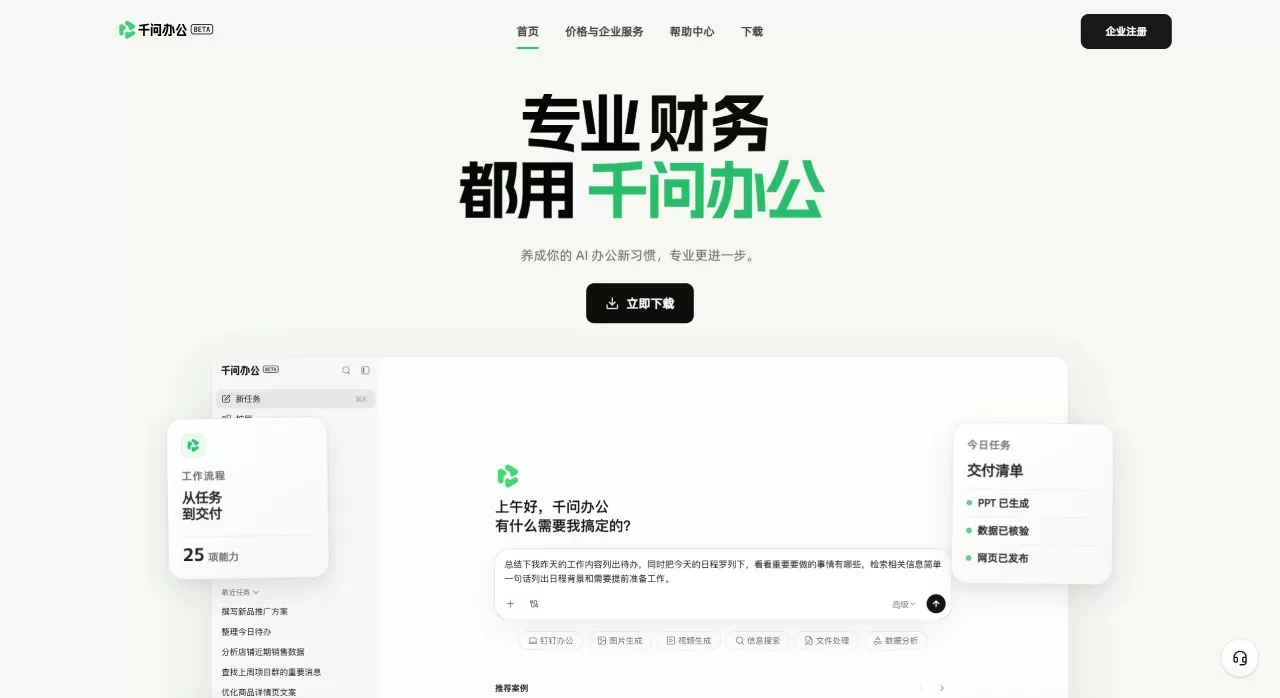
Core Features of Qianwen Office
Enterprise IM Collaboration: Connects 25 enterprise collaboration capabilities including group messaging, attendance approval, meeting scheduling, email, and knowledge base. You can search for information, write materials, and complete approvals without switching back and forth—everything can be done in one conversation.
Office Generation and Editing: Outputs formats such as PPT, Word, Excel, and HTML. After generation, files can be previewed and edited in real time directly within Qianwen Office, completing the entire process from content and layout to delivery in one stop.
Multimodal Understanding: Capable of reading images, listening to audio, and watching videos. Beyond mere recognition, it can summarize, analyze, and recreate based on the source material.
Full-Stack Webpage Delivery: Generate an independent webpage with database and interactive logic from a single sentence. The entire process—design, development, data integration, and online publishing—is handled end-to-end, with no need to deploy your own server.
Data Aggregation: Integrated with the 1688 e-commerce backend and social media platforms such as Xiaohongshu, pulling scattered operational and content data from various platforms together into a unified view.
Skill Marketplace and Expert Suites: You can customize skills or select expert suites directly from the platform. It currently covers more than ten professional scenarios, including lawyers, finance, bloggers, merchants, teachers, tour guides, advertisers, analysts, and engineers.
Application Scenarios of Qianwen Office
Lawyers: Use civil and commercial litigation, contract management, and corporate legal affairs suites to complete the entire workflow from fact organization to document generation.
Finance: The corporate finance and taxation suite merges financial analysis, budget preparation, VAT handling, report generation, and monthly closing into a single workflow, reducing repeated reconciliations.
Content Bloggers: Write marketing copy, track social media trends, and organize performance data for review—quickly producing drafts when a topic emerges.
E-commerce Merchants: Link product planning, marketing campaigns, user feedback, and operational information together so teams no longer work in silos.
Teachers: Lesson plans, courseware, and assignment materials are automatically categorized and organized, freeing up time for the classroom and students.
Engineers/Product Managers: The product management suite can write PRDs, break down user stories, and update roadmaps—documentation evolves with changing requirements.
Pros and Cons of Qianwen Office
Pros:
Generated PPT, Word, and Excel files are not one-time images but native Office formats that can be further edited.
From data retrieval, content generation, layout editing to final delivery, there's no need to switch back and forth between multiple tools.
Beyond text processing, it can read images, watch videos, and connect to e-commerce and social media backends—ideal for roles that need to handle multiple information sources.
Pre-packaged workflows by profession make onboarding easy.
Deep integration with the Alibaba ecosystem holds strong potential for future connectivity with DingTalk, Taobao, Alipay, and more.
Cons:
Currently only the desktop version is available; the web version has not yet opened, limiting coverage to platforms beyond Mac/Windows.
Enterprise deployment details remain to be verified. While data isolation and on-premises deployment have been advertised, actual performance in large-scale commercial use still needs feedback.
ByteDance's Doubao Professional Edition and Tencent's WorkBuddy are pushing hard in the same period, leaving a narrow window for functional differentiation.
Heavy capabilities like full-stack webpage generation and data aggregation still require more user validation for real-world stability and compatibility.
Qianwen Office Pricing
| Item | Free Version | Personal Standard | Personal Premium |
|---|---|---|---|
| Continuous Monthly Subscription | ¥0 | ¥78/month | ¥158/month |
| Target Users | First-time individual users | Professionals completing office tasks stably and frequently | High-intensity, multi-task parallel and large-scale delivery |
| New User Bonus Credits (Valid for 90 Days) | 2,000 | 2,000 | 2,000 |
| Monthly Base Credits | — | 2,000 | 4,000 |
| Daily Login Bonus (Valid Same Day) | 100 credits/day | 200 credits/day | 300 credits/day |
| Queued Parallel Tasks | 10 | Unlimited | Unlimited |
| Output Cloud Storage | 1GB | 10GB | 20GB |
| Publishable Webpages | 5 | 10 | 50 |
| Access Password & Database Storage | — | ✅ | ✅ |
| Credit Pack Add-on Purchase | — | ✅ | ✅ |
Note: The free version is a limited-time benefit; refer to the official website for the specific end date. All continuous monthly subscription plans support cancellation at any time.
How to Use Qianwen Office
Access Entry:
Web: Visit qwenwork.cn and download the desktop installer for your system. Currently Windows and Mac are supported.
Within DingTalk: Access Qianwen Office through the bottom navigation bar in DingTalk.
Register and Log In: Quickly log in with a phone number or an Alibaba account (Taobao/Alipay/DingTalk).
Choose an Expert Suite: After entering the homepage, select an expert suite from the list based on your profession or current task (e.g., "Monthly Closing for Finance," "Marketing Copy," "PPT Generation").
Input Your Requirements: Describe what you want to do in natural language in the dialog box, such as: "Help me create a PPT based on this Q2 sales data, in a clean business style, about 10 pages." File uploads, link pasting, and screenshots are all supported.
Iterate and Edit: After the AI generates the first draft, preview and modify it directly in Qianwen Office. PPTs can switch templates and adjust layouts; documents can add or remove paragraphs; spreadsheets can modify formulas.
Deliver or Collaborate: Once complete, export as Office format, share directly with colleagues via enterprise IM, or initiate an approval workflow.
How Does Qianwen Office Compare to Competitors?
| Comparison Item | Qianwen Office | ByteDance Doubao Professional | Tencent WorkBuddy | Kimi |
|---|---|---|---|---|
| Developer | Alibaba | ByteDance | Tencent | Moonshot AI |
| Core Positioning | Enterprise-grade AI Office Platform | C-end Office Task Agent | PC-side AI Office Agent | Long-text Processing Assistant |
| Office Output | Native generation + real-time editing of PPT/Word/Excel | Supports Office suite operations | Document processing + meeting organization | Long document reading and analysis |
| Multimodal | Full support for image, text, audio, video | Supports image, audio, video | Primarily text + meeting audio | Primarily text |
| Data Aggregation | Integrates 1688, Xiaohongshu, etc. | Limited | Limited | None |
| Enterprise Collaboration | Built-in IM, approval, knowledge base | Requires pairing with Feishu | Deep integration with Tencent Docs/Meeting | None |
| Deployment | Client + future web version | Client | PC + web | Web + client |
| Pricing | Not disclosed (gray testing phase) | Continuous monthly subscription from ¥68 | Not disclosed | Free |
| Target Users | Enterprise teams, professionals | Personal office efficiency | Tencent ecosystem users | Researchers, students |
Why Choose Qianwen Office
If you find yourself switching constantly between DingTalk, Feishu, WeCom, and Office every day, Qianwen Office's value lies in "one less window switch." It puts chat, document writing, data pulling, and workflow handling into a single entry point, and the generated PPTs and Excel files can be edited directly—no need to save as and reopen in WPS. For SMEs, this means not having to buy a stack of SaaS tools and then figure out how to connect them; for individual professionals, the expert suites save the time needed to build workflows from scratch.
FAQ
Q1: What is the relationship between Qianwen Office, Tongyi Qianwen, and the Qianwen App?
Qianwen Office is a vertical product for office scenarios, built on the capabilities of the Qianwen large model but focused on enterprise collaboration and deliverable output. The Qianwen App is more oriented toward a general-purpose AI assistant.
Q2: Can the generated PPT and Word files be used directly?
Yes. Qianwen Office outputs native Office formats that can be previewed and edited directly within the software after generation, or exported locally.
Q3: What file uploads are supported?
Multiple formats are supported, including PDF, Word, Excel, PPT, images, audio, and video. Long documents can also be parsed in segments.
Q4: How is data security ensured?
Qianwen Office has obtained multiple certifications in information security, privacy protection, and cloud security. It supports tiered identity permissions and data path tracking. The enterprise version commits that conversations and uploaded documents will not be used for model training, and supports private deployment.
Q5: Can I use it now?
It is currently in the gray testing and desktop version download phase; the web version has not yet opened. You can visit the official website to download the desktop client and try it out.
Q6: What is the relationship between Qianwen Office and DingTalk?
Qianwen Office is led by DingTalk CEO Chen Yusen and is expected to integrate deeply with DingTalk in the future, but it is currently an independent product.















