
 Script Planner Assistant▸
 AI Apps
 AI News

Miora Design: Tencent's All-Scenario AI Creative Agent Studio
Miora Design: Tencent's All-Scenario AI Creative Agent StudioIntroduction
Miora Design is an AI creative tool made by the Tencent WorkBuddy team. Its international version launched in Hong Kong in May 2026 and became fully open to everyone in late July—no invite code required. The official site is miora.design.
Miora Design is positioned not as a simple AI image generation tool, but as an intelligent agent studio that understands natural language, automatically breaks down tasks, and produces images, video, UI, and 3D all on a single canvas. It helps creative workers skip tedious steps while remembering your aesthetic preferences, getting more useful the more you use it.
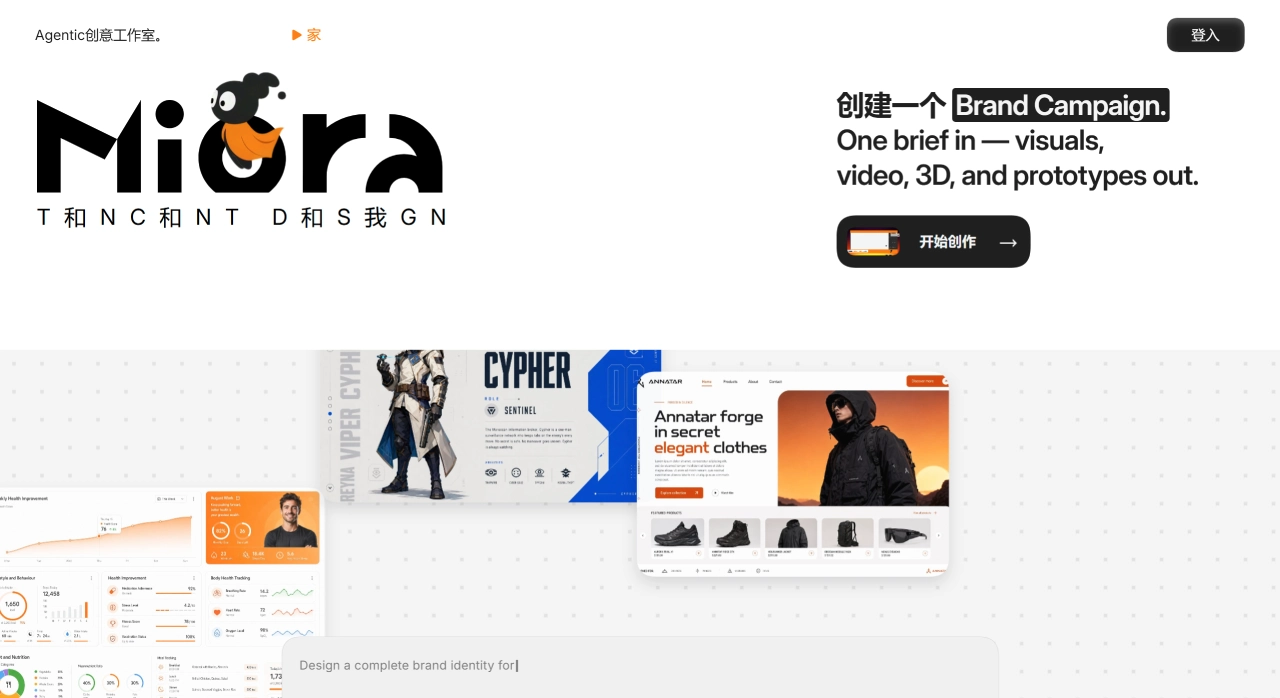
Miora Design Core Features
Full deliverable from one sentence: Enter a description of what you need, and Miora breaks down the tasks, plans the workflow, and finally delivers a complete brand visual package, UI design files, or video—not just a single image.
It has memory: It remembers your aesthetic preferences and brand guidelines, automatically adapting subsequent creations so you don't have to explain everything from scratch each time.
Multimodal generation: It can create images, video, UI/UX, and 3D, with support for switching between different models and reasoning depths.
Free canvas: All elements are placed as nodes on the same canvas. The Agent can read the context to understand your intent, and you can also box-select specific areas to modify directly—no need to regenerate the whole image.
Precise editing: After generation, you can perform local edits, outpainting, angle changes, re-lighting, background removal, 3D multi-view editing, and more, taking you from concept to finished product.
Skills capability platform: Official Skills like full brand packages and creative storyboards are built in, and custom workflows can be created and shared with teams. The community currently has around 120,000 Skills.
Scene quick-switch modes: Five modes can be switched at the bottom—Brand Design, Film & Video Creativity, E-commerce Ads, Interactive Games, and Web Apps—each with commonly used templates.
Miora Design Use Cases
Full brand visual packages: Logo, brand colors, guidelines, and applied materials
E-commerce and marketing: Product images, posters, short videos, social media assets
UI/UX design: Interface mockups, interactive prototypes
Film & 3D: 3D assets, multi-view renders, storyboards
IP and character design: Brand IP, character settings, product concept images
Monetizing creativity with zero background: Non-designers can turn ideas into finished products using natural language
Miora Design Pros and Cons
What It Does Well
All-in-one solution: Images, video, 3D, and UI are completed on a single canvas—no switching back and forth between Midjourney, Runway, and Figma.
Gets to know you over time: A dual memory system records aesthetic and brand guidelines, so long-term projects stay on-style.
Box-select to edit: Circle what you want to change, describe the change in natural language, and you don't need to regenerate the whole image.
Reusable workflows: Common processes can be packaged as Skills for the team and community to use.
Solid foundation: Same origin as WorkBuddy—not a wrapper product.
Low barrier to entry: Operated through natural language conversation; even those with no design background can produce professional content.
Areas That Need Improvement
Video is a weak spot: Supports a maximum of 30 seconds, can't be edited after generation—only regenerated—limiting users with heavy video needs.
Not the strongest in any single area: Single images aren't as good as Midjourney, video isn't as good as Runway—the advantage lies in integration.
Pricing not yet announced: New users get 1,000 credits; how it will be charged after that hasn't been revealed.
Occasional prompt bugs: English prompts are sometimes automatically translated to Chinese, affecting output.
No mobile app: Currently available only on the Web.
Canvas assets become hard to manage at scale: Difficult to distinguish final versions from experimental drafts.
Ecosystem still in early stages: Third-party Skills aren't as plentiful as Figma plugins or Canva templates.
Miora Design Tutorial
Registration & Login
Visit miora.design and log in with your email, Google, or GitHub account—no invite code needed. New users automatically receive 1,000 free credits.
Basic Workflow
Enter the workspace and select a scene mode at the bottom: Brand Design / Film & Video Creativity / E-commerce Ads / Interactive Games / Web Apps.
Describe your needs in natural language in the chat area, for example: "Create a brand visual for an independent coffee shop, Japanese wabi-sabi style, warm earthy tones."
Miora will proactively ask follow-up questions (color temperature, target audience, etc.) and automatically execute after confirmation.
The canvas displays the full set of assets—Logo, posters, color palette, video, etc.—as nodes.
Box-select the area you want to change and describe the modification in natural language, for example: "Make the font 20% bolder and change it to a serif typeface."
Save frequently used styles as Skills for direct reuse later.
A Few Practical Tips
Combined instructions: Describe both layout and copy together, such as 'Generate a three-column product comparison table—left column with product image, middle column with advantages, right column with price, minimalist business style.'
Progressive refinement: First generate a rough layout, then use Refine on selected areas for local optimization—this works better than writing a super-long prompt all at once.
Asset library linking: Upload brand assets to the library and reference them directly in your generation instructions.
Miora Design vs. Competitors
| Comparison | Miora | Canva AI | Figma AI | Adobe Firefly |
|---|---|---|---|---|
| Core Positioning | Multi-Agent creative studio | Template-based design platform | Professional UI/UX design collaboration | Adobe ecosystem AI suite |
| Multimodal Generation | Image / Video / 3D / UI | Image + basic video | No native generation | Image + Video + 3D |
| Agent Memory | Yes | Basic | Style library (manual) | Sensei intelligent learning |
| Workflow Integration | Unified canvas | Template assembly | Design system | Creative Cloud |
| Editing Method | Box-select + natural language | Drag-and-drop editing | Professional vector editing | Traditional tools + AI fill |
| Collaboration | Real-time multi-user | Real-time collaboration | Top-tier collaboration | CC sharing |
| Ease of Use | Relatively easy to start | Very easy to start | Steep learning curve | Requires Adobe basics |
| Single-Image Quality | Meets commercial design needs | Template-based | — | Commercially safe |
| Video Capability | Basic generation (30s) | Basic | d>NoneFirefly Video | |
| 3D Capability | Supported | None | Indirect plugin support | Firefly 3D |
| Price | Free 1000 credits + TBD | Free + Pro $13/month | Free + Pro $12/month | CC $60/month or credits |
Miora isn't "better at drawing than Midjourney"—it solves a different problem: turning creative work from "switching between five tools serially" into "collaboratively completing everything on a single canvas." For an artistic illustration, pick Midjourney; for pixel-level control, pick Figma; for completing an entire set of brand materials in one place, pick Miora.
Reasons to Choose Miora Design
Miora Design is ideal for brand designers, marketing teams, e-commerce operators, independent developers, and product managers who need to quickly and in bulk produce multi-format creative content while maintaining brand consistency. It compresses what used to take weeks of brand visual setup into just hours, uses a memory system to ensure style consistency across projects, and lets one person do the work that previously required an entire creative team. For entrepreneurs and small merchants without a design background but with brand visual needs, it is currently the lowest-barrier solution available.
Frequently Asked Questions
Q: Do I need to download and install it? Is there a mobile app?
A: It's purely web-based—no installation required, and there is currently no mobile app. Just visit miora.design in your computer browser.
Q: Is it free? How do credits work?
A: New users get 1000 free credits, which can be used toward basic features. Advanced tasks consume more credits, which can later be obtained through check-ins, events, or top-ups. Official subscription pricing has not yet been announced.
Q: What does the memory feature do?
A: It automatically records your aesthetic preferences, brand guidelines, and commonly used styles, so subsequent creations adapt automatically and series of works maintain a more unified style.
Q: How do I modify image details?
A: After generation, click the image to bring up the editing tools, which support background removal, text replacement, partial erasing and redrawing, high-definition upscaling, and more. You can also describe your modification needs using natural language.
Q: Does it support Chinese?
A: The official website is primarily in English, but the AI understands Chinese prompts very well—you can describe your needs directly in Chinese.
Q: What is the maximum video length?
A: Currently the maximum is 30 seconds. Editing after generation is not yet supported—you can only regenerate.
Last updated: July 26, 2026Related News:
2026 Poster Design AI Recommendations: Which Is Best Among Xingliu, Lovart, Duiyou, 01Agent?















