
 Script Planner Assistant▸
 AI Apps
 AI News

ClawPanel: AI Assistant-Driven Visual Management Panel for OpenClaw
ClawPanel: AI Assistant-Driven Visual Management Panel for OpenClawIntroduction
What is ClawPanel
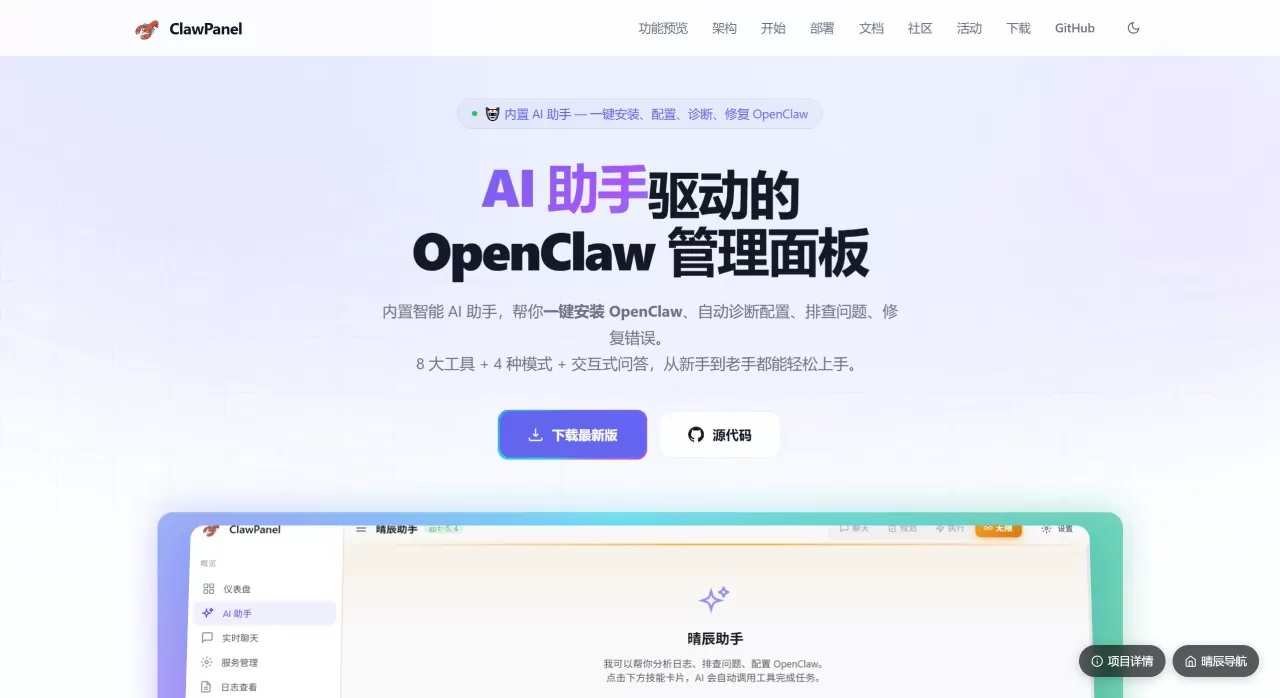
ClawPanel is a visual management dashboard for ai-assistant-driven OpenClaw. It is built with Rust and Tauri v2, runs on Windows, macOS, and Linux, and can also be installed on a server and accessed via a browser. Its core is a built-in AI assistant that helps users automatically install software, fix configurations, diagnose issues, and repair them, making it easy for those unfamiliar with the command line.
Main Features of ClawPanel
AI Assistant: This is the most practical part. It can install or upgrade OpenClaw with one click, and automatically diagnose and fix errors. It can not only chat but also help you type commands, modify files, and browse directories. You can send it images for analysis. You can configure a separate large model for it (such as DeepSeek or Kimi), without sharing with the main program.
Configuration Management: Fill in API Keys directly in the interface, support switching between multiple models at any time, and test connectivity.
Data Management: Directly modify Agent configuration files (like AGENTS.md) in the web page or software, view memory records, and package and download them as backups.
Gateway Management: Set ports, passwords, or configure intranet penetration to allow external network access.
Multi-Account: Create multiple different Agents, each with its own memory and settings, without interfering with each other.
Status Monitoring: Start and stop services, view logs in real time, and check system health with one click.
Use Cases for ClawPanel
Beginners: Don't want to type code to set up the environment, just use the AI assistant with a few clicks to get it installed.
Multi-Model Enthusiasts: Have API keys for several large models and want to switch between them at any time, or configure different models for different tasks.
Operations Personnel: Install the Web version on a Linux server, use a mobile or computer browser to remotely monitor the service, making it convenient to view logs.
Teams: Need to run multiple AI agents with different functions simultaneously (one for writing code, one for writing articles), managing them separately with this tool is very clear.
Emergency: When the program crashes and you don't know what to do, let the built-in AI automatically troubleshoot, it can usually provide a solution.
Pros and Cons of ClawPanel
Pros:
Simple: With AI helping with the work, no need to remember complex commands.
All-in-One: From installation to daily use, monitoring, and backup, it handles everything.
Fast and Stable: Written in Rust, uses little memory, and is not prone to crashing.
Flexible: Any model compatible with the OpenAI interface can be used.
Free and Open Source: Code is public, use freely.
Cons:
Bound to Ecosystem: Mainly manages OpenClaw, if you don't use OpenClaw, most features will be unusable.
Advanced Features Require Learning: Basics are easy to use, but to set up multi-Agent collaboration or complex network configurations, you still need to spend some time figuring it out.
Slow Downloads: Sometimes slow to download installation packages domestically, you have to go to groups to find direct links shared by others.
How to Use ClawPanel
Direct Use on Computer: Go to the ClawPanel official website or GitHub to download an installation package and install it. After opening, first fill in a large model's API Key, then you can let the AI assistant help you install OpenClaw or directly start chatting and managing.
Install on Server:
One-Click Script: Run a command provided officially in the Linux terminal, it will automatically install Node.js, OpenClaw, and the panel, and configure auto-start on boot.
Docker: If you prefer using containers, running a docker command can also get it up and running.
After installation, enter http://IP:1420 in the browser to use it.
Self-Compile: Developers can clone the code, install dependencies, and run development commands to modify it themselves.
Frequently Asked Questions about ClawPanel
Can I use it without installing OpenClaw? Yes. The built-in AI assistant can work independently, chatting with you and managing files. But if you want to manage Agent conversations and those functions, you still need to have the OpenClaw service running.
Which models are supported? Any model whose interface format is the same as OpenAI works. DeepSeek, Kimi, Tongyi Qianwen, etc. are all fine, just fill in the correct address and Key to use.
How to backup? Click in "Data Management", it can package configurations and memory into a ZIP file and save it locally.
What to do if something goes wrong? First click "System Diagnostics" or let the AI assistant "Check Configuration", it can usually fix it automatically. If it can't be fixed, check the error messages in the logs, or ask in the group.
Related Information:
Guide to Connecting WeChat to Openclaw
From Beginner to AI Master with Openclaw: 15 Recommended OpenClaw Skills















