
 Script Planner Assistant▸
 AI Apps
 AI News
Nanobot: An Open-Source Ultra-Lightweight Personal AI Assistant
Nanobot: An Open-Source Ultra-Lightweight Personal AI AssistantIntroduction
Nanobot is an open-source ultra-lightweight personal AI assistant built by the Data Science Lab at the University of Hong Kong. It runs its core functionality with only about 4,000 lines of code, making it 99% smaller than legacy approaches like OpenClaw which has over 430,000 lines, yet it can do just as much.
Nanobot Features
Ultra-lightweight: only about 4,000 lines of core code, fast startup, and low resource usage.
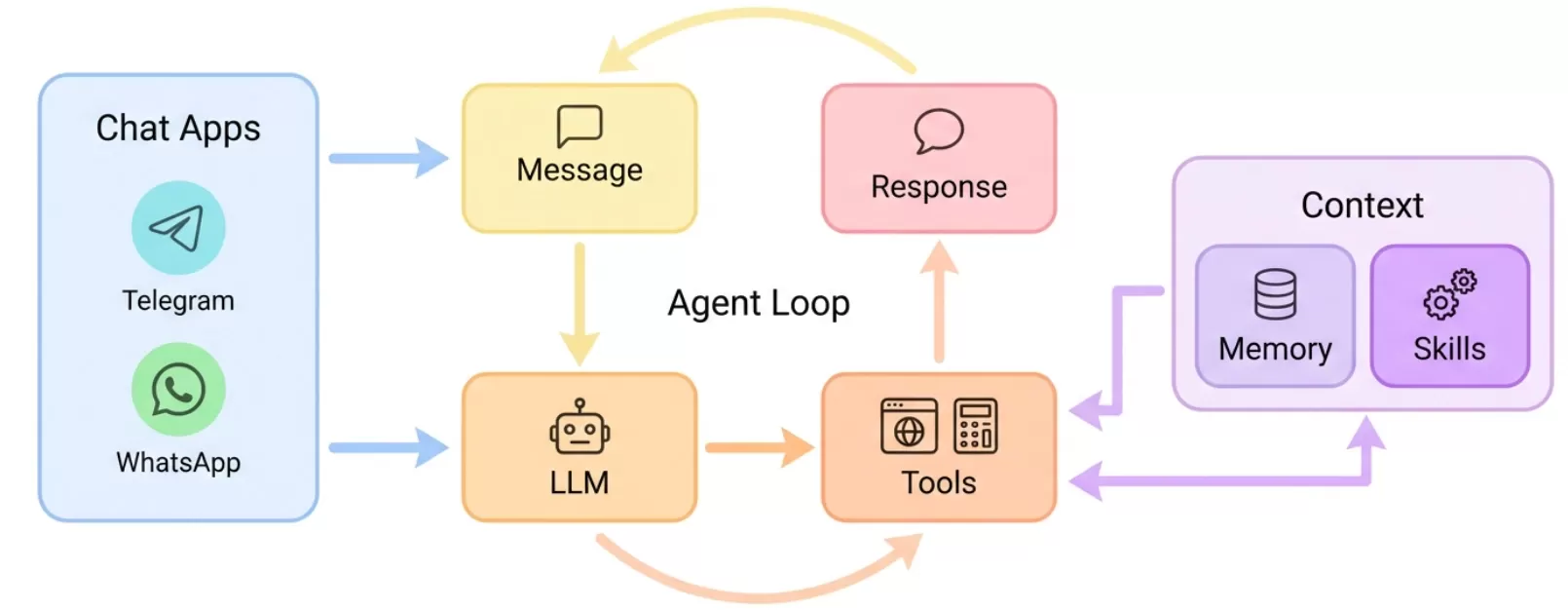
Supports multiple models: connects to OpenAI, Claude, Gemini, vLLM, Groq, and other commonly used models via LiteLLM.
Connects to many platforms: works with Telegram, WhatsApp, Discord, Slack, DingTalk, Feishu, QQ, and email.
Rich toolset: can manipulate files, run Shell commands, search the web, and scrape web pages.
Extensible with skills: write SKILL.md documents along with tools to extend functionality.
Sub-agents: can launch background sub-agents to handle complex tasks without interrupting the main conversation.
Long-term memory: automatically stores memories from different chats and daily notes.
Scheduled tasks: uses Cron expressions to schedule tasks and automate workflows.
Nanobot Use Cases
Personal knowledge management: smart notes, information lookup, schedule management.
Developer assistance: code generation, file operations, system monitoring (e.g., running nvidia-smi commands).
Office automation: scheduled report generation, data scraping, multi-platform messaging.
Always-on availability: deployed on a server, it can respond to messages 24/7.
How to Use Nanobot
Installation:
pip install nanobot-ai
# Or install from source
git clone https://github.com/HKUDS/nanobot.git
pip install -e .
Initial Setup:
nanobot onboard # Creates the ~/.nanobot/ config directory
Configure Models (edit ~/.nanobot/config.json):
{
  "providers": {
    "anthropic": { "apiKey": "your-claude-key" },
    "openai": { "apiKey": "your-openai-key" }
  },
  "agents": {
    "defaults": { "model": "anthropic/claude-opus-4-5" }
  }
}
Start Gateway Service (connects to multiple platforms):
nanobot gateway
Manage Scheduled Tasks:
nanobot cron add --name "Daily Report" --message "Generate daily report" --cron "0 9 * * *"
nanobot cron list    # View tasks
Frequently Asked Questions
Q: How is it different from commercial offerings like Agent Studio?
A: Nanobot is fully open-source and free, but requires some technical background. Agent Studio offers a visual interface but may cost money. Nanobot is ideal for technical users who want to deeply customize it and deploy it to the cloud.
Q: How do I restrict who can use it?
A: Add allowed user IDs in the allow_from field in config.json; leave it blank to allow anyone.
Q: Does it support voice messages?
A: Yes. Telegram voice messages are converted to text using Groq Whisper before being processed.
GitHub Repository: https://github.com/HKUDS/nanobot














