
 Script Planner Assistant▸
 AI Apps
 AI News

Wooden Letterbox Web: A Tiny Yet Feature-Packed Chinese Productivity App
Wooden Letterbox Web: A Tiny Yet Feature-Packed Chinese Productivity AppIntroduction
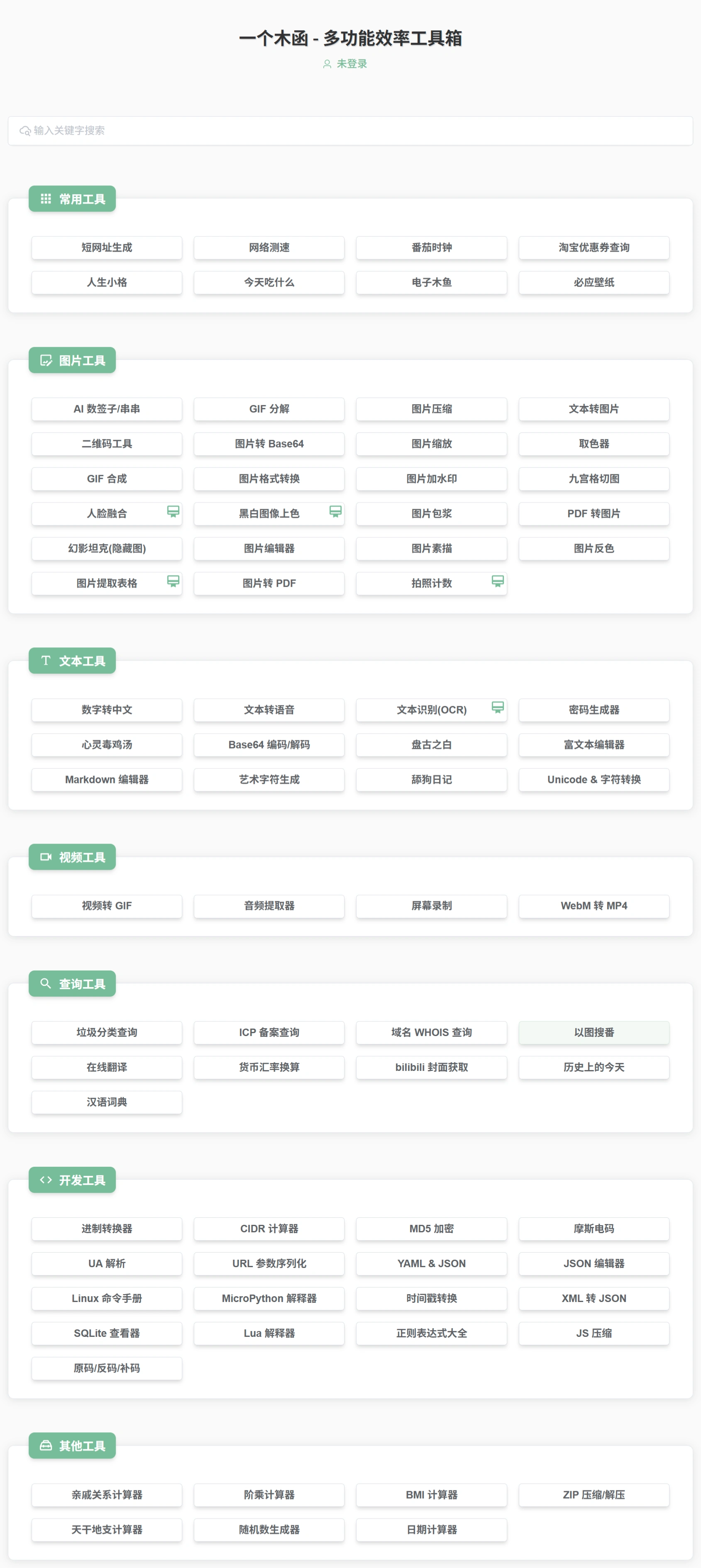
"One Wood Box" (一个木函) is a domestic efficiency app whose main selling points are small size and a wide range of features. There is a web version and a mini-program, packing over a hundred commonly used little tools into an installation package of only about 10 MB, used to replace individual apps one by one, saving desktop space and system resources. Developed by Shanghai Huafa Technology Co., Ltd., it supports Android, iOS, HarmonyOS, and PC emulators.
Main Features
It can perform OCR text recognition, translation, various unit conversions, and currency exchange. It can search by image, stitch pictures together, merge or split GIFs, and convert video to audio. There are also a ruler, app management, QR code tools, timestamps, and encoding conversion. In addition, there are many other common tools, such as MD5 lookup, direct link parsing, vocal isolation, batch image compression, and color picking — enough for everyday use or simple office work.
Main Advantages of One Wood Box
Comprehensive features. Divided into 7 categories — Text, Image, Device, Cleanup, Conversion, Calculation, and Query — with over a hundred tools in total, covering most common digital lifestyle needs.
Small size. The installation package is only 10–17 MB, launches quickly, and doesn't take up much memory.
No ads and no push notifications. The interface is clean, designed with Material Design, and you can customize themes and favorites yourself.
Multi-platform support. The mobile app, WeChat mini-program, and web version are all available, and data is synced across your account.
Flexible pricing. Basic features are always free. A membership unlocks advanced features, with a monthly card at 10 yuan, an annual card at 60 yuan, and a lifetime card at 128 yuan, with no automatic renewal.
Popular Tools
Image tools: 9-grid image splitter, photo collage, GIF merge or split, search by image, OCR text recognition, AI upscaling, and meme maker.
Text tools: Chinese-English translation, Traditional-Simplified conversion, dictionary lookup, text encoding, and Markdown editor.
Media tools: video to audio conversion, paid music download, Bilibili cover and video parsing, QR code and barcode generation.
System tools: app management, permission viewer, LCD density changer, device disguiser, Wi-Fi password viewer, and junk cleaner.
Fun and practical: handheld danmaku (bullet comments), ruler, compass, network speed test, "On This Day in History", decision maker (wheel spinner), and Pomodoro timer.
How to Download and Install One Wood Box
Android: Download the APK from App Store (Tencent), Coolapk, or the official website; both stable and beta versions are available. You can also install it on a PC via an emulator.
iOS: Search for "一个木函" in the App Store to download; the size is about 40 MB, and it supports iPad landscape mode.
Web version: The One Wood Box web version requires no login and can be used right away, offering over twenty common tools including image compression, garbage sorting lookup, and direct link extraction, with day or night mode available.
Basic Usage of One Wood Box
When you open it for the first time, go to "All Apps" and tap the "+" in the top-right corner to add frequently used tools to the home screen.
Long-press an icon to favorite or hide it, and drag to reorder.
Enable "Minimal Mode" in settings to hide categories and show only your favorite tools.
Members can try new tools in the "Lab", such as AI face fusion and table extraction from images.
Membership and Pricing of One Wood Box
The new version added a membership system. Some advanced features, such as OCR text recognition, AI image recognition, coloring black-and-white photos, image resolution enhancement, and the all-in-one unit converter, require a membership. Basic features remain free.
In short, if you want to solve most small problems with just one app, and don't want to see ads or install bulky software, "One Wood Box Toolbox" is one of the smoother-to-use options among domestic apps.
Some online installation packages labeled as "old version" or "no membership, no ads" come from unclear sources, may have different versions, and carry risks. It's best to download from the One Wood Box official website or its official store, so that the version is stable and the permissions are safe.















