Script Planner Assistant▸
 AI Apps
 AI News

Pose Search: An Open-Source Online Pose Reference Tool
Pose Search: An Open-Source Online Pose Reference ToolIntroduction
What is Pose Search?
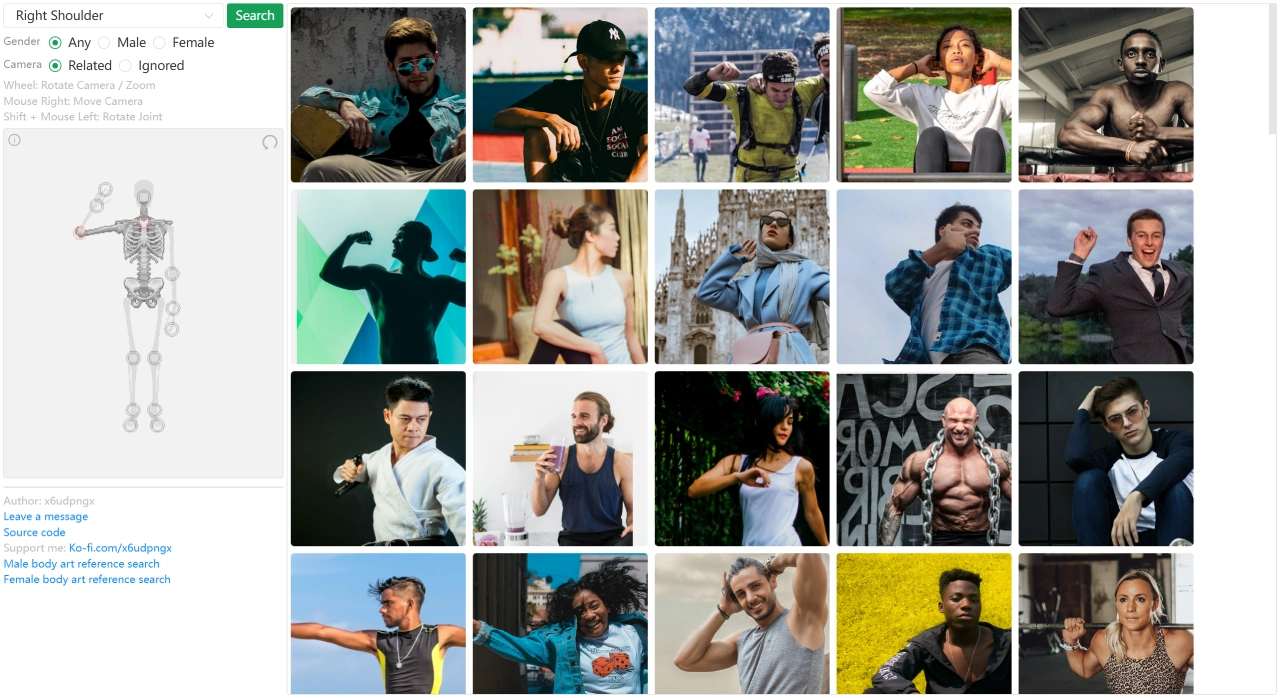
Pose Search is an open-sourcetool for searching human poses, allowing users to filter and find specific pose references by gender, joint, or body part. It is particularly well-suited for artistic creation, providing dedicated entry points for searching male or female figure art references.
Pose Search Official Website:https://x6ud.github.io/pose-search
Pose Search Open Source Repository:https://github.com/x6ud/pose-search
Pose Search Key Features
Precise Filtering
Gender Filtering: Users can select Any, Male, or Female.
Joint / Body Part Filtering: Search for poses based on specific joints or body parts.
Dedicated Search Entries
Provides dedicated entry points for male figure art reference search and female figure art reference search, making it easy for art creators to quickly find the pose references they need.
Flexible Interaction
Camera Control: Use the mouse scroll wheel to rotate the camera and zoom the view; right-click to move the camera position.
Joint Adjustment: By holding the Shift key and using the left mouse button, users can rotate joints to adjust pose angles.
Supplementary Features
Interactive Communication: Users can communicate with the author or other users through the comment feature.
Technical Support: Source code links are provided for tech enthusiasts to review.
Author Support: Users can support the author via the Ko-fi platform.
Pose Search Use Cases
Artistic Creation: Suitable for illustrators, manga artists, and digital artists to help them obtain precise human pose references; commonly used for sketching, manga, and storyboarding.
Design and Teaching: In fields such as fashion design and character design, it helps optimize design plans; in art education, it serves as a visualization reference tool for human anatomy and dynamic poses.
Technical Research:Programming or technical development enthusiasts can learn from the source code how the page's interaction logic and filtering features are implemented.
ai Drawing + ControlNet: Feed the returned reference image back into Stable Diffusion's OpenPose preprocessor to lock the pose.
How to Use Pose Search
Pose Search Operations
Basic Filtering: Select gender and the target joint or body part.
Dedicated Search: Directly click the male or female figure art reference search entry.
Viewpoint and Pose Adjustment Operations
Zoom / Rotate Camera: Use the mouse scroll wheel.
Move Camera Position: Hold the right mouse button and drag.
Adjust Joint Angles: Hold the Shift key and drag with the left mouse button.
Pose Search Limitations
Only identifies poses; clothing, background, and facial features are not considered.
If there are multiple people in an image, it may randomly select one person or provide combined keypoints, and the results may be unstable.
When the subject is lying on its side, viewed from a steep overhead angle, or severely occluded (more than 30% of joints invisible), matching accuracy decreases.
Due to the repository size limit on GitHub Pages, the first load may require downloading relatively large files, so waiting may be necessary on poor network connections.
Key Questions and Answers
Q: What is the core purpose of Pose Search?
A: The core purpose of Pose Search is to serve as a human pose reference search tool, primarily serving scenarios that require human pose references, such as artistic creation. For gender needs, it provides three filtering options — Any, Male, and Female — and additionally offers two dedicated entry points for male figure art reference search and female figure art reference search.
Q: How do you adjust the camera viewpoint?
A: Users can rotate the camera and zoom the view with the mouse scroll wheel, hold the right mouse button to move the camera position, and hold the Shift key while using the left mouse button to rotate joints to adjust pose angles.
Through these features, Pose Search provides a powerful and flexible tool that helps users obtain the human pose references they need in a variety of scenarios.
Related Information: