
 Script Planner Assistant▸
 AI Apps
 AI News

Rebolt AI: A Natural Language-Driven Low-Code/No-Code Platform
Rebolt AI: A Natural Language-Driven Low-Code/No-Code PlatformIntroduction
Rebolt ai is an enterprise-grade AI application development platform that lets teams quickly build custom apps, workflows, and AI agents using natural language. It integrates deeply with mainstream enterprise tools like Salesforce, Outlook, SharePoint, and databases, and offers SOC 2 Type II and ISO 27001 certified security and governance capabilities, accelerating the entire process from idea to launch—even allowing non-technical users to participate in development.
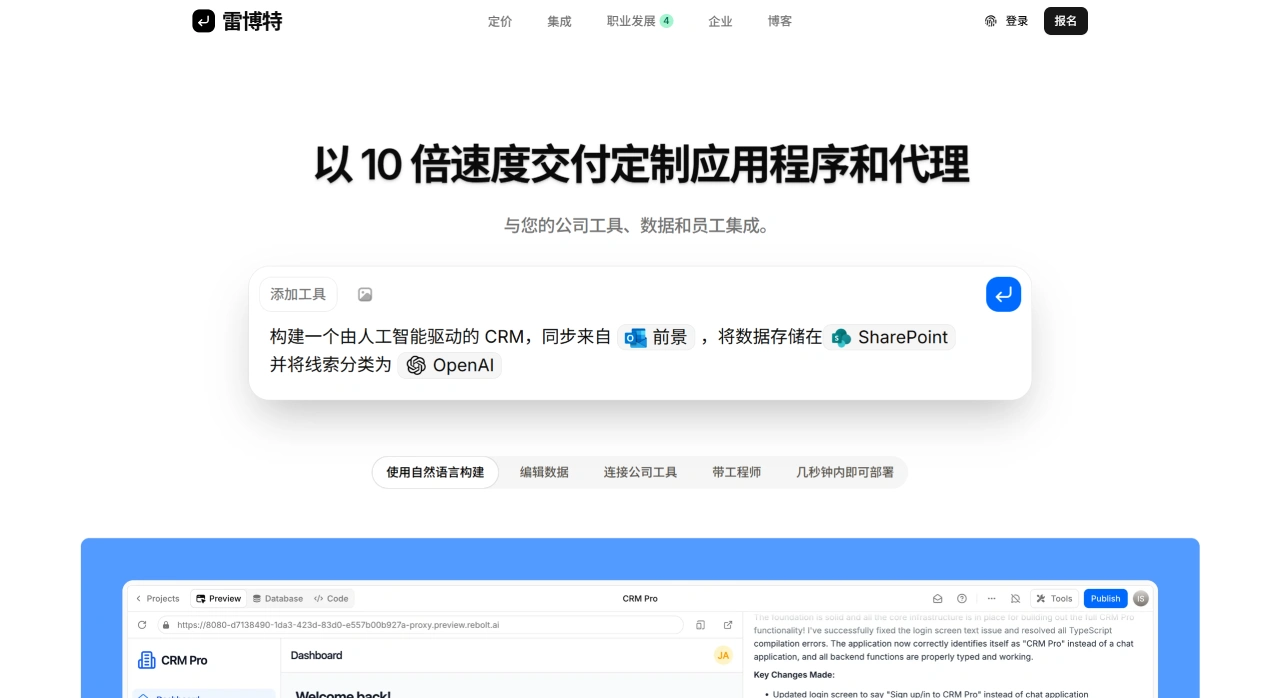
Rebolt AI Core Features
Build with natural language: Tell Rebolt AI what you need, and the AI will generate apps, workflows, or websites.
Strong integration capabilities: Connect directly to your company's existing tools, enabling data and different platforms to run automatically.
Visual and code editing: Non-technical users use the visual interface, while technical users can modify the code themselves.
One-click deployment: Finished products can be put into use very quickly.
Rebolt AI Use Cases
Building internal enterprise tools: Such as CRM, project management, data processing, and other tools tailored to specific business needs, which can be built very quickly.
Automating workflows: Let AI agents handle repetitive tasks, saving manpower and improving efficiency.
Data integration and sharing: Connect various tools and data sources to enable smooth data flow, facilitating team collaboration and optimizing business processes.
Rebolt AI Advantages
Easy to use: Chat with AI to create things, no complex programming required.
Flexible: Connects with many tools and data sources to meet the diverse needs of different enterprises.
Secure: Robust security measures ensure enterprise data is not leaked or altered.
How to Use Rebolt AI?
Register and log in: Go to the Rebolt AI official website to register an account, then log in to the platform after successful registration.
Connect data sources and tools: Select the tools to connect within the platform, such as Outlook, OneDrive, SharePoint, Salesforce, etc., and set up integration parameters so Rebolt can operate these tools and data.
Build apps or workflows:
Use the no-code interface: Tell AI what you need, and it will automatically create an app or workflow. For example, ask Rebolt to build a commission tracker that pulls closed deals from Salesforce.
AI-generated content: During building, AI will generate text, code, and other content based on your description, which you can modify as needed.
Deploy and use: After completion, deploy the app and start using AI-driven apps or workflows. Rebolt AI will automatically execute tasks, such as handling refund disputes and screening resumes.
Optimize and manage: Adjust apps based on actual usage, and use Rebolt AI's audit logs, access control, and other features to ensure security and reliability.
FAQ
Q1: What major enterprise problems does Rebolt AI primarily solve?
It mainly solves the problems of slow development and difficult collaboration across different systems during enterprise digitalization. Using a natural language low-code/no-code platform, business personnel can also participate in building apps, greatly shortening the time from requirement submission to product delivery. In addition, it can connect various internal tools, solving the problem of data silos and enabling automation and collaboration.
Q2: Compared with traditional software development or other low-code platforms, what makes Rebolt AI special?
It stands out in three aspects:
AI-centric: The focus is on directly creating apps with natural language, not just providing a graphical interface.
Developer-friendly: Both non-technical users can use it, and developers can dive deep into the code, enabling business and technical teams to work together.
Enterprise-grade security: Directly meets the strict requirements of large enterprises for security, compliance, and management, which many ordinary tools cannot achieve.
Q3: How should an enterprise start using Rebolt AI?
It's recommended to proceed gradually in three steps:
Pilot first: Choose a specific and urgent problem to solve (such as creating an RFP or following up on sales leads) and start with a small project. This way you can quickly see results, and the team can familiarize themselves with how to use it.
Scale up: After a successful pilot, expand to more departments and establish internal rules (such as who can access data and how projects are named).
Optimize and deepen: Have engineers help optimize core apps better, and try connecting with enterprise core systems (like ERP) to maximize the platform's value.












