
 Script Planner Assistant▸
 AI Apps
 AI News

Workout.cool: A Free Open-Source Fitness Coaching Platform
Workout.cool: A Free Open-Source Fitness Coaching PlatformIntroduction
Workout.cool is a free and open-source fitness guidance platform with a comprehensive exercise database. It's mainly used to help users create training plans, track workout progress, browse a large collection of exercises, and access detailed workout instructions and video demonstrations. This project is an improved version of the previous fitness platform Workout.lol—which was sold and abandoned due to operational issues (such as being unable to find reliable exercise video partners)—when the core developer Snouzy decided to build a better version, which became workout.cool.
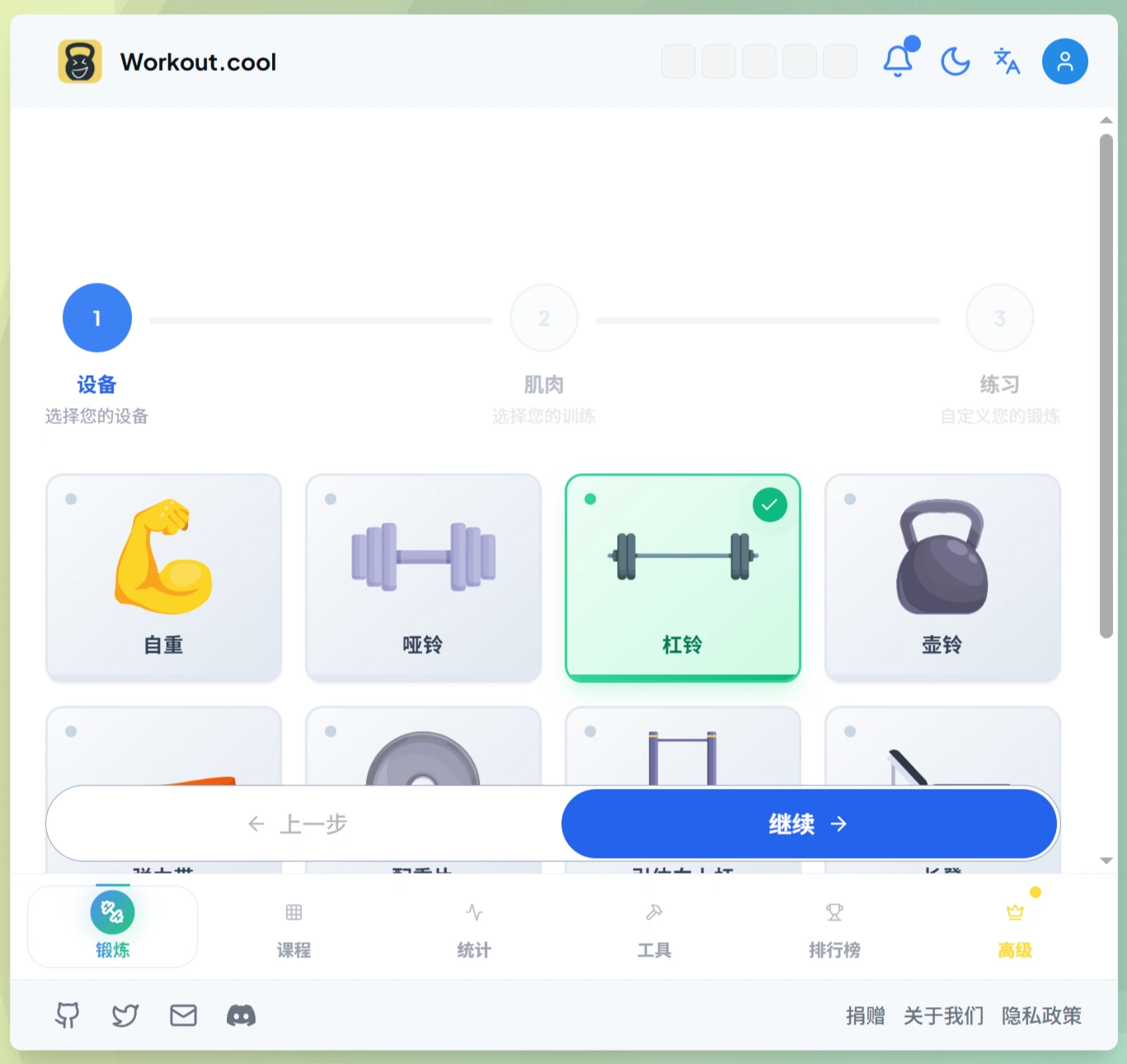
Main Features
Create training plans: Users can design their own workout routines based on their needs and goals.
Track workout progress: Log each session after finishing, view changes in your progress, and generate historical data charts.
Exercise library: Over 200 exercises with video demonstrations, supporting multiple languages (currently English and French, with the ability to add more languages later).
Filter function: Filter exercises based on criteria such as exercise type and primary muscle group targeted.
Language support: Currently supports English and French, making it easy to expand to other languages.
Open source and self-hosted: The code is fully public, allowing users to run it on their own servers and modify the exercise content themselves.
Technical Aspects
It uses popular modern technologies: Next.js for the frontend (for fast page loading), TypeScript as the programming language (for easier code maintenance), Prisma for database operations (for simpler operations), and Tailwind CSS for styling (for faster and more flexible styling).
Who is Workout.cool for?
Individual fitness: Create your own training plans and record every workout.
Fitness trainers: Design professional plans for clients and monitor their training progress.
Fitness enthusiast community: Share workout experiences with others.
How to install Workout.cool
Two installation methods are supported:
Using Docker (one-click deployment, relatively hassle-free).
Manual installation (requires Node.js (version 18 or above), pnpm (version 8 or above), and PostgreSQL database to be installed on your computer).
How to use Workout.cool
Core features
Smart plans: Customize training programs based on the equipment you use and the muscles you want to train.
Health calculations: Includes three calculators—BMI, heart rate, and calories—to help you understand your body condition.
Progress tracking: Manage training progress through a calendar.
Steps to create a training plan
Select equipment: On the "Equipment" page, check off the equipment you can use (such as bodyweight, resistance bands, dumbbells/pull-up bars, etc.).
Select muscle groups: On the "Muscles" page, click the body parts you want to train (you can select multiple; click an already selected one to deselect it).
Select exercises: You can randomly generate exercises or add your own.
Arrange training sets: Set the number of reps, sets, and rest time for each exercise.
Combine supersets: Click "+Add Set → Next Exercise" to link multiple exercises together.
How to use the health calculation tools
BMI assessment: Enter your height and weight to find out your body composition, BMI index, and receive targeted recommendations.
Heart rate zones: Enter your age to calculate heart rate ranges for different training intensities (for example, fat burning is 60%-70% of max heart rate, aerobic endurance is 70%-80%).
Calorie calculation: Based on whether you are a regular person or an athlete, choose the corresponding formula (for example, regular people use the Mifflin-St Jeor formula, athletes use the Katch-McArdle formula), then fill in your activity level to calculate your approximate daily calorie expenditure.
Data management tips
View progress: Dark marks on the calendar indicate days you've trained, giving you an at-a-glance view of your workout frequency; click on a specific date to see the details of that training session (which exercises were performed, how many sets, how long it took).
Prevent data loss: Data is stored in your browser by default; if you're worried about losing it, you can click "Create Account" to sync it to the cloud.
Project Background
The original Workout.lol launched in 2023, with approximately 1,400 stars (followers on GitHub), nearly 100 forks, and around 20,000 monthly visitors. However, due to operational difficulties (mainly the inability to find stable exercise video partners), the project was sold to others and eventually abandoned. Later, Snouzy, the lead developer of the original team, decided to start fresh—with the current Workout.cool—solving the old project's video copyright and community maintenance issues, and continuing to build a better fitness platform using the open-source approach.
Project address:https://github.com/Snouzy/workout-cool














