Script Planner Assistant▸
 AI Apps
 AI News

NiceFont – Clearer, More Comfortable, Easier-on-the-Eyes Web Fonts
NiceFont – Clearer, More Comfortable, Easier-on-the-Eyes Web FontsIntroduction
NiceFont is a Tampermonkey userscript that allows you to freely modify web page fonts, making browsing clearer, more comfortable, and easier on the eyes! It truly adjusts the font rather than scaling the page, making it ideal for users who want to optimize their web reading experience, especially those with high demands for font display.
Features
True font adjustment: It is not a simple webpage zoom, but a genuine adjustment of web fonts, making them clearer and more comfortable.
Easy installation: Although the installation page cannot be accessed directly at the moment, you can install it into the script manager via the Tampermonkey plugin management panel using file import. It can also be installed normally via URL, and if that fails, you can import the shared file content directly into the script manager.
Core Functions
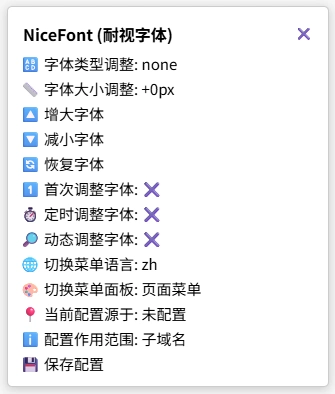
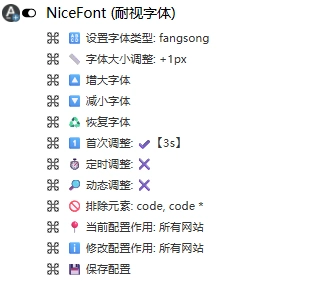
Adjust font size: Displays the current font size adjustment of the page, supports enlarging or shrinking the font, and allows setting font increments, such as adjusting the font size by +2px or -1px.
Set font type: Offers a rich selection of fonts, allowing users to set the web page font to their preferred style according to their tastes. However, the font options are currently labeled in English, so you'll need to try them out yourself or translate them. In addition, it can not only adjust the font instantly but also perform dynamic and timed adjustments based on your settings. For example, you can increase the font size when reading news, and decrease it when browsing pages that require precise operations. It also remembers your settings, so when you visit the same web page again, it will automatically apply the previous font size and style.
Dynamic font adjustment: When new content appears on the page, the font is automatically adjusted, and newly added elements and text on the page can also be replaced, so you don't need to worry about dynamically added content.
Timed font adjustment: You can set the time interval for timed font adjustments, but enabling this feature may cause lag when browsing complex pages.
Memorize settings: It can remember font settings on different pages and automatically apply them on the next visit, improving the efficiency of browsing the web.
Automatic adjustment on first visit: Once enabled, the font will be automatically adjusted three seconds after the first visit to a page.
Multi-language support: The menu supports Chinese, English, Korean, Japanese, Russian, French, German, Spanish, and Portuguese.
Save settings: Supports local save and global save, automatically taking effect after refresh.
Undo feature: If you are not satisfied with the adjusted font effect, simply click "Restore Font" and the web page will revert to its original font state.
Wide compatibility: Whether it's news websites, social media platforms, online documents, or video sites, it can adapt perfectly, covering almost all web browsing scenarios.
Installation Steps
Install the Tampermonkey or Greasemonkey plugin.
Visit the NiceFont script page: https://greasyfork.org/zh-CN/scripts/533232-nicefont
Click the "Install" button, and the script will be automatically added to the Tampermonkey manager.
Refresh the web page, click the script menu, and start using it.