Script Planner Assistant▸
 AI Apps
 AI News
Aotu Workshop: A Free Tool That Converts Word to Handwritten Fonts
Aotu Workshop: A Free Tool That Converts Word to Handwritten FontsIntroduction
凹凸工坊AutoHanding is a free Word-to-handwriting tool that requires no registration. Simply upload a Word document, and it quickly generates realistic handwriting images with authentic paper textures and natural handwriting effects. It supports 600dpi high-definition print output and offers multiple handwriting fonts for different scenarios. In addition, the tool can simulate the messiness, scribbles, and corrections of real handwriting, giving users an authentic handwritten feel.
Core Features of 凹凸工坊
Efficient Conversion: Quickly converts documents into handwritten drafts, saving time.
Document to Handwriting: Supports multiple paper types and fonts with one-click conversion.
Realistic High-Definition Effects: Provides authentic paper texture backgrounds.
Professional Print Support: Outputs ultra-high-definition images at 600dpi, suitable for physical printing.
Multiple Font Options: Meets the needs of different scenarios.
Authentic Detail ai Simulation: Simulates random text positioning and corrections.
How to Use 凹凸工坊 Handwriting
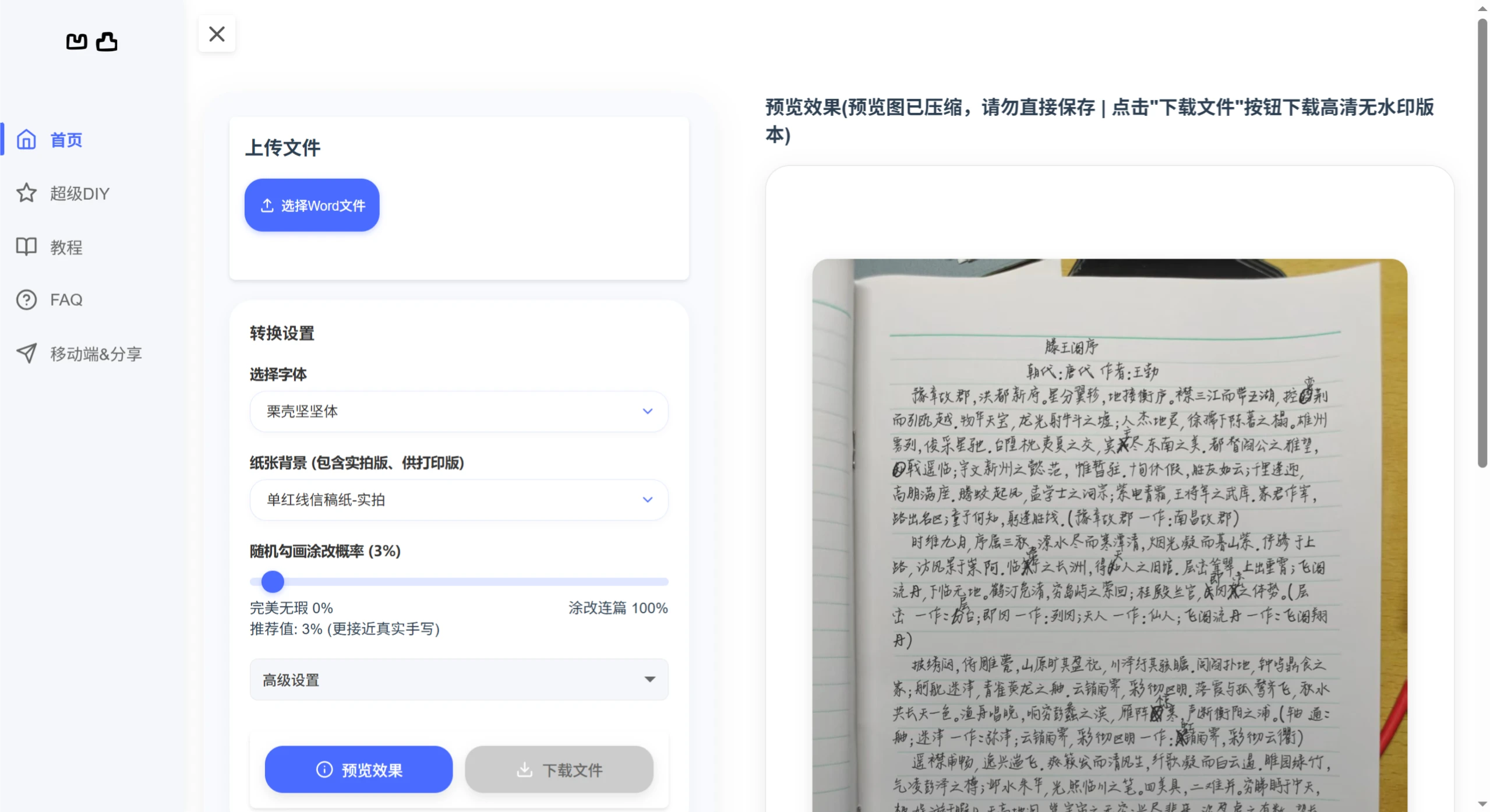
1. Upload File
Click the "Select Word File" button and choose a .doc or .docx file.
After successful upload, the file name will be displayed below the button.
To replace the file, click the "×" next to the file name to clear the current file and upload a new one.
2. Set Conversion Parameters
Select Font: Choose a font style from the dropdown menu.
Paper Background: Choose a background style, such as draft paper - real photo or white background for printing.
Random Scribble/Correction Probability: It is recommended to keep this at a low value (e.g., 3%).
Text Position Randomness: Adjust in the advanced settings, with 20% recommended.
3. Preview and Download
After setting the parameters, click "Preview Effect" to view the result.
The preview image is 100dpi, while the downloaded image is 600dpi high-definition.
The downloaded file is in ZIP format, containing all converted high-definition images without watermarks.
Use Cases for 凹凸工坊
Student Assignments: Quickly generate handwriting assignments.
Teaching Materials: Provide vivid and interesting learning materials for students.
Personalized Letters: Create unique handwritten greeting cards or invitations.
Creative Display: Design personalized business promotional materials.
Frequently Asked Questions about 凹凸工坊
1. How to choose paper type?
Choose the real-photo series or print-ready series based on your needs.
2. How to print handwritten drafts?
Select the "Print-Ready" series, download the high-definition images, and print them.
3. What is the file resolution?
The high-definition images are 600dpi, ensuring clear print quality.
4. File upload failed?
Make sure the file is in .doc or .docx format and does not exceed 10MB.
5. What is the maximum number of pages for output images?
The maximum for a single download is 20 pages.
6. Do the output images have watermarks?
Downloaded images are watermark-free.
7. Some spaces or rare characters are not displayed?
Adjust by using tab characters or spaces, or change the font.