
 Script Planner Assistant▸
 AI Apps
 AI News

Step-Video-T2V: Advanced Text-to-Video Generation Model
Step-Video-T2V: Advanced Text-to-Video Generation ModelIntroduction
Step-Video-T2V is an advanced text-to-video generation model open-sourced through a collaboration between StepFun and Geely Auto. It features many outstanding capabilities and demonstrates powerful performance in the field of video generation.
Highlights of the Step-Video-T2V Model
It employs the DiT model and flow matching training method, achieving 16×16 spatial compression and 8× temporal compression, greatly enhancing the efficiency of large-scale video generation.
With a massive 30 billion parameters, it is capable of generating high-quality, high-resolution videos at up to 544x992 resolution.
It supports Chinese and English prompt input, making it convenient for users from different language backgrounds.
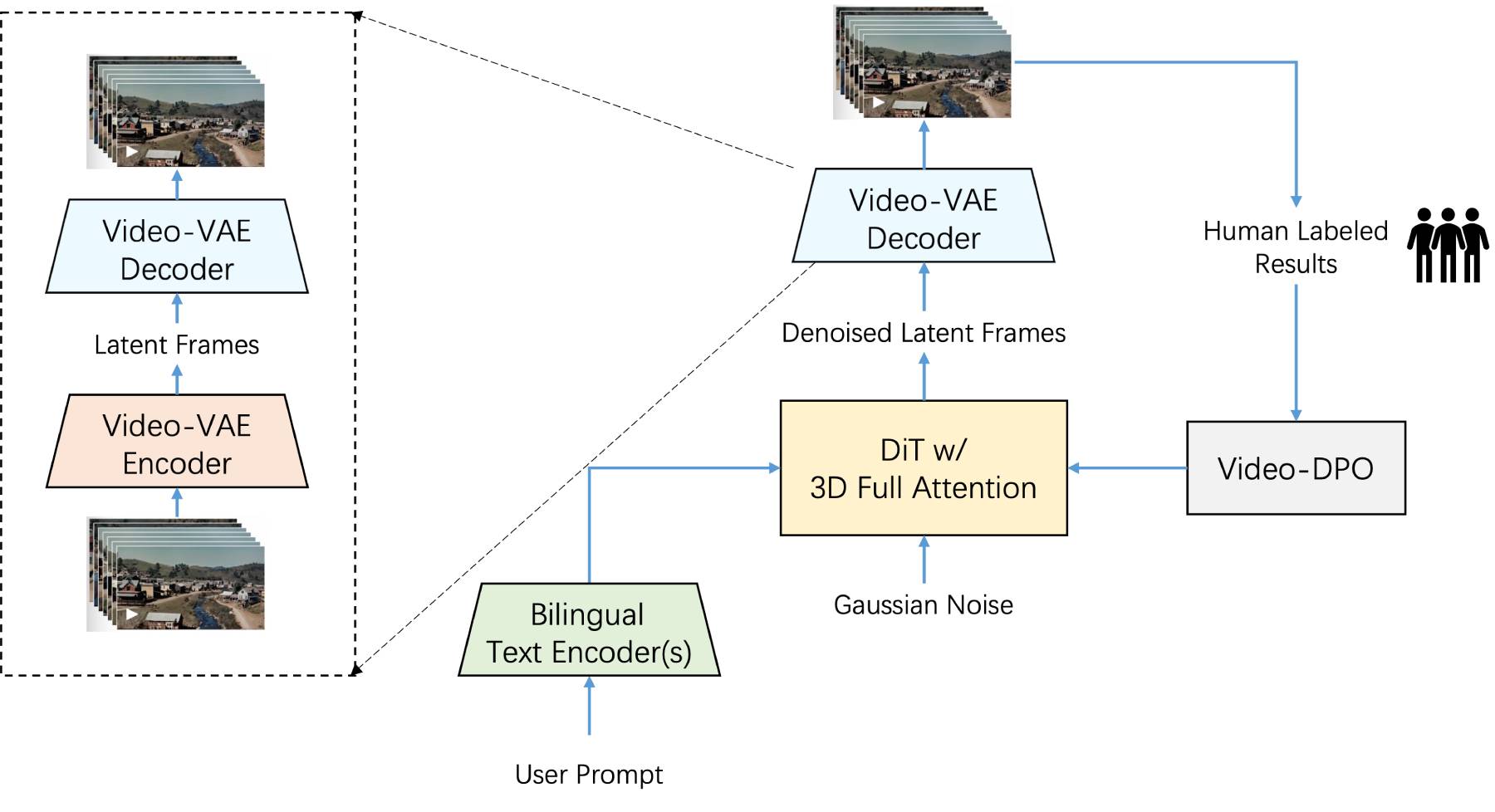
Features of Step-Video-T2V
Large-scale parameters: With up to 30 billion parameters, the model has exceptionally strong generative capability and accuracy, enabling it to more precisely understand text descriptions and transform them into high-quality videos.
Efficient video generation: Supports generating high-quality videos of up to 204 frames (544x992 pixels) to meet diverse creative needs. It adopts a deeply compressed variational autoencoder (Video-VAE), achieving 16×16 spatial compression and 8× temporal compression, which effectively reduces training and inference costs while maintaining video quality.
Bilingual text encoder: Supports Chinese and English input, and is capable of deeply understanding and generating video content that matches text descriptions, allowing users of different languages to use the model conveniently.
Advanced architecture: It uses a 3D full-attention DiT architecture that flexibly adapts to dynamic resolution changes, ensuring stable and high-quality video generation. It introduces Direct Preference Optimization (DPO) for video through human feedback mechanisms, further enhancing the quality and smoothness of generated videos to better match user expectations.
Multimodal fusion: By combining the understanding capabilities of image, speech, and text modalities, the generated content appears more realistic in detail. For example, generated character expressions are more vivid, light and shadow changes are more natural, and the rendering of dynamic objects is smoother and more lifelike.
Flexible operation modes: It offers a base version (50-step generation) and a Turbo version (15-step distillation acceleration) to meet the performance needs of different users in different scenarios. In practice, generating a 204-frame video requires approximately 4 GPUs with 80GB of VRAM and takes about 12 minutes.
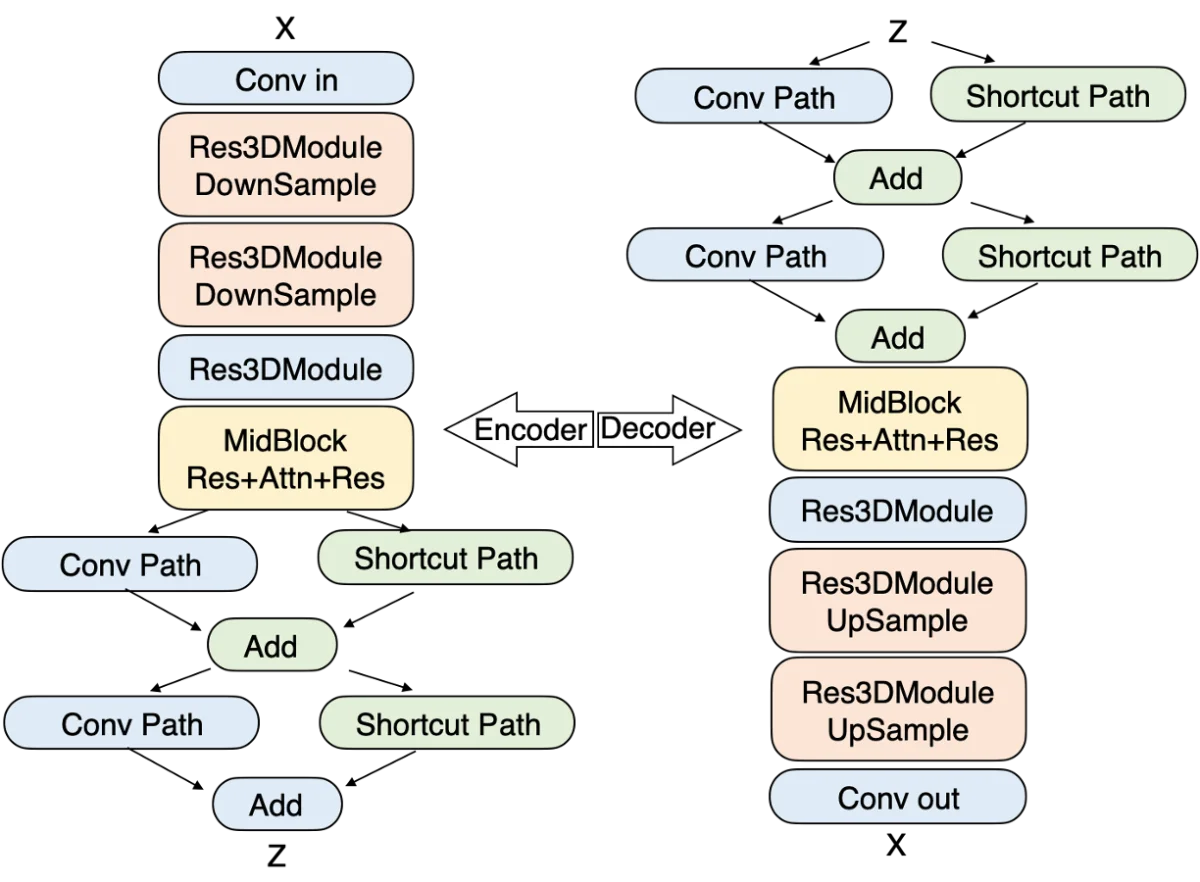
Application Scenarios of Step-Video-T2V
Creative video production: Assists video creators in generating complex scenes and refined creative video content, making it ideal for advertising production, short video creation, and other fields.
Animation and film production: Can be used in the animation and film industries to generate high-quality virtual characters, dynamic scenes, and complex actions.
Education and training: Capable of creating highly interactive teaching videos, making the teaching process more vivid and engaging, enhancing student participation and learning outcomes.
Entertainment industry: Can automatically generate game CG, movie trailers, and other entertainment content, saving significant time and labor costs.
Cultural dissemination: Especially excels in Chinese-style aesthetics, capable of generating ink wash paintings, classical-style scenes, and similar content, aiding the digital dissemination of traditional culture and helping it gain new vitality in the modern era.
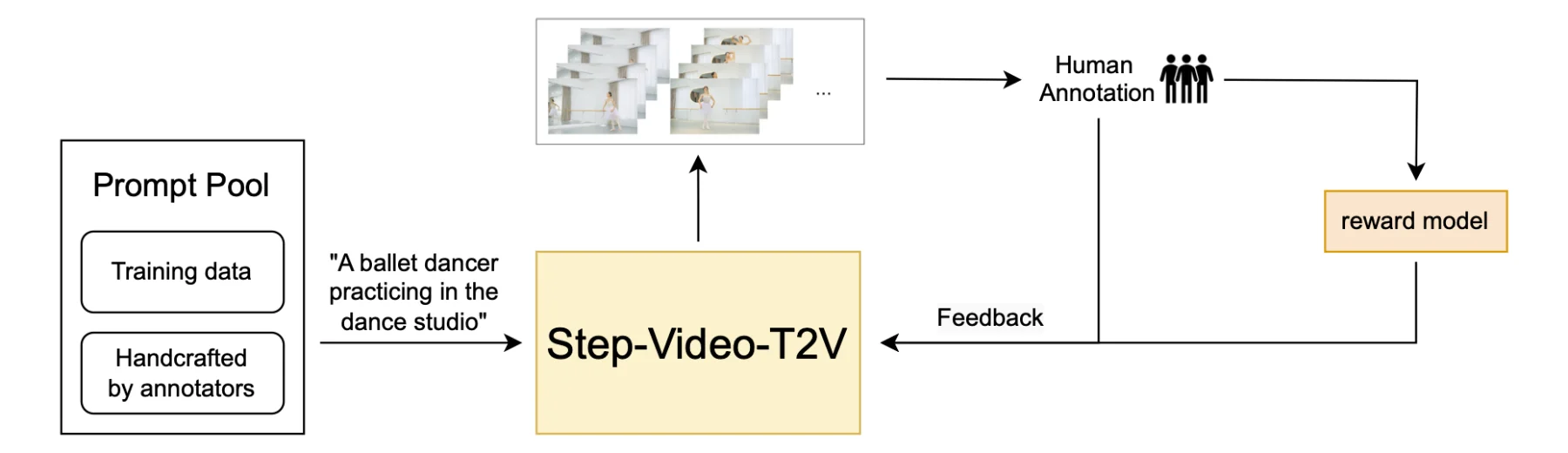
How to Use Step-Video-T2V:
1. Install dependencies:
Install the necessary Python libraries and dependencies. This is typically done via pip or other package management tools.
pip install transformers torch torchvision torchaudio
2. Configure the environment:
Set up the required hardware environment. At least 4 NVIDIA GPUs with 80GB of VRAM each are recommended.
Download and extract the model weight files to the specified directory.
3. Load the model:
Use the Hugging Face Transformers library to load the pre-trained Step-Video-T2V model.
from transformers import AutoModelForCausalLM, AutoTokenizer
model_name = "stepfun-ai/Step-Video-T2V"
tokenizer = AutoTokenizer.from_pretrained(model_name)
model = AutoModelForCausalLM.from_pretrained(model_name)
4. Generate the video:
Prepare the text prompt and convert it into a format usable by the model.
Run the generation script and wait for the output.
input_text = "A red-haired woman performing on stage."
inputs = tokenizer(input_text, return_tensors="pt")
# Generate video frames (this is a simplified example; actual implementation may vary)
outputs = model.generate(**inputs, max_length=204)  # Adjust parameters as needed
# Save or display the generated video frames
5. Post-processing:
Perform post-processing on the generated video frames, such as stitching them into a complete video and adding audio.
Resources:
GitHub repository: https://github.com/stepfun-ai/Step-Video-T2V
Hugging Face demo: https://huggingface.co/stepfun-ai














