Script Planner Assistant▸
 AI Apps
 AI News

LingKe: Prohibited Words Checker
LingKe: Prohibited Words CheckerIntroduction
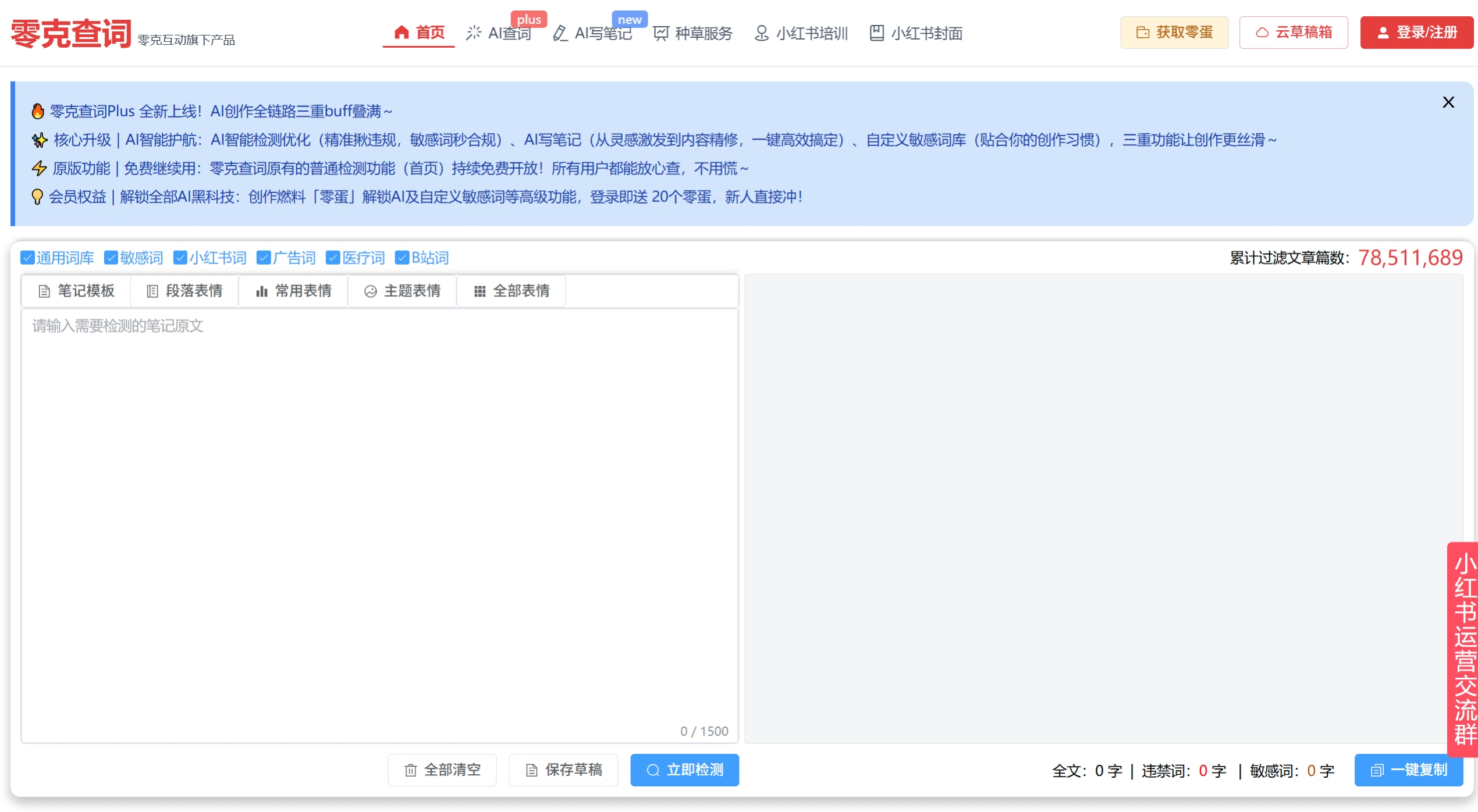
Lingke Word Check is mainly a tool for detecting prohibited words, designed for content creators and e-commerce operators. It helps you filter out sensitive words and prohibited words before publishing on platforms like Xiaohongshu, Douyin, and Bilibili, avoiding notes being throttled or removed. The basic features are free and sufficient for personal self-checking, while the paid version adds AI assistance.
Lingke Word Check Web Version Official Entry:https://www.lingkechaci.com/
Core Features
Multi-platform Word Library: Built-in dedicated word libraries for Xiaohongshu, Douyin, Bilibili, Kuaishou and other platforms, plus general sensitive words, Advertising Law prohibited words, medical extreme words, etc., totaling over 120,000 risk terms.
Highlighting and Statistics: Detection results highlight prohibited words in red and sensitive words in yellow, with counts displayed directly. Edit and copy with one click.
AI Smart Optimization (Plus Version): Paid feature that supports AI auto-rewriting of risky words, custom word libraries, and batch detection, suitable for high-frequency creators or teams.
Content Editing Assistance: Built-in emoji selector, cloud draft box, and note preview. No need to switch between apps—you can handle Xiaohongshu-formatted layouts right on the webpage.
Multi-format File Detection: Supports uploading images, Word, and PDF files. Hidden risky words in posters or screenshots can also be scanned.
Use Cases
Before posting Xiaohongshu notes: Use the platform-sourced word library as a final check to avoid throttling or removal.
Cross-platform content distribution: When posting the same copy to multiple platforms, detect separately according to each platform's rules without stepping into the same pitfalls repeatedly.
E-commerce detail pages and live streaming scripts: Filter out advertising extreme words like "the first" or "the best" and medical claim words to reduce the risk of complaints or penalties.
Team content review: Use cloud drafts and custom word libraries to unify external copywriting standards and avoid individual oversights.
Pros and Cons
| Pros | Cons |
|---|---|
| High accuracy rate for Xiaohongshu word library, sourced from the platform's violation word library | Advanced AI rewriting and batch features require the paid Plus version |
| Basic detection is completely free, ready to use on the webpage without downloading | Some features (such as cloud drafts) require registration and login |
| Clean interface with no ads, supports Xiaohongshu native formats like emoji/preview | Main advantages focus on Xiaohongshu, with less depth on other platforms |
How to Use
Visit the official website http://www.lingaochaci.com, register and log in.
Paste the copy into the input box on the left, select the corresponding platform, and click "Detect Now".
Risky words will be highlighted on the right side. Edit as prompted, and you can detect repeatedly until clear.
Click "Copy with one click" or retrieve from the cloud draft box, and post directly to the target platform.
Comparison with Similar Tools
| Tool | Core Advantage | Detection Scope | Cost |
|---|---|---|---|
| Lingke Word Check | Sourced from Xiaohongshu word library, leading in accuracy | Xiaohongshu, Douyin, Bilibili, Kuaishou, advertising/medical words | Basic free / Plus paid |
| Ju Wuyou | Supports detection of images, videos, URLs, and documents | Advertising Law, various e-commerce platforms | Free + value-added features |
| Ju Yi Wang | Dual text and image detection, rich material library | Sensitive words, beauty prohibited words, news prohibited words | Free |
| Ci Zhua Wang | E-commerce oriented, supports web page crawling | Taobao, JD, Pinduoduo and other e-commerce word libraries | Free |
| Qianmo Word Check | No login required, no ads, minimalist experience | Xiaohongshu dedicated | Completely free |
| Reditor Editor | Integrated AI viral writing, auto-formatting, traffic optimization | Full-chain Xiaohongshu operations | Primarily paid |
Related News: