
 Script Planner Assistant▸
 AI Apps
 AI News

HelloMeme: AI Expression Cloning & Motion Transfer for Photos and Videos
HelloMeme: AI Expression Cloning & Motion Transfer for Photos and VideosIntroduction
HelloMeme is an ai project focused on generating high-fidelity images and video content, particularly expression cloning technology. This technology is based on the SD1.5 architecture and supports ComfyUI. With simple operations, users can transfer the expression from one image to another image or video, and the generated results surpass those of similar tools such as Liveportrait. It can be used for AI digital humans, making memes/emoji packs, and photo revival generation.
What makes HelloMeme unique is its diffusion model with spatially woven attention, which enables it to handle facial expressions in images and videos with fine detail, producing smoother, more refined, and natural expressions in both still images and dynamic videos.
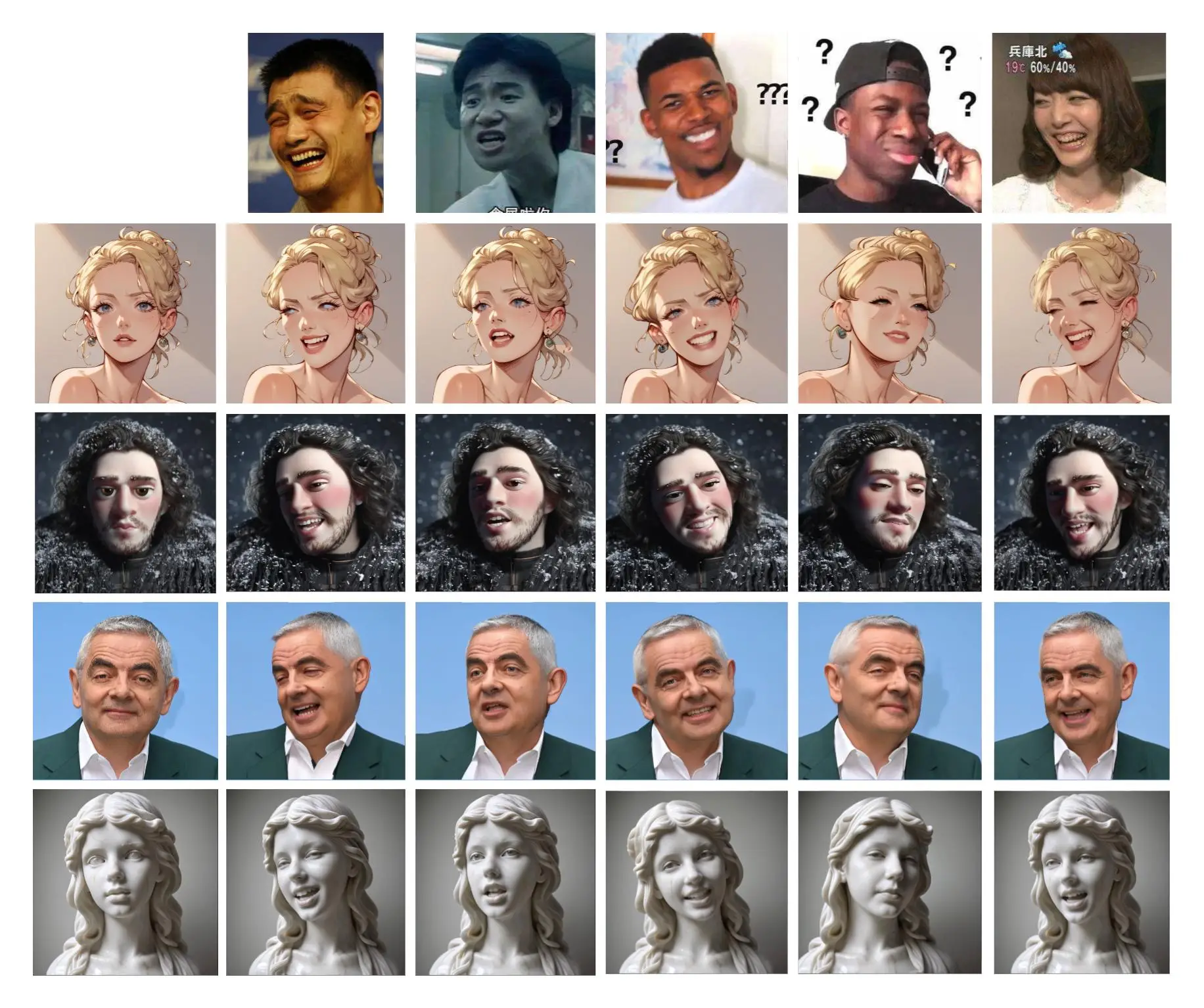
HelloMeme Core Features:
Expression Transfer: HelloMeme can accurately transfer one person's facial expressions onto another individual's face while maintaining a high degree of consistency in facial expressions. This is highly significant for digital content creation, virtual character animation, and personalized video production.
Compatibility and Ease of Use: Its compatibility with the SD1.5 ecosystem means users can leverage existing LoRa or Checkpoint resources and operate easily through the ComfyUI interface, without requiring complex programming knowledge.
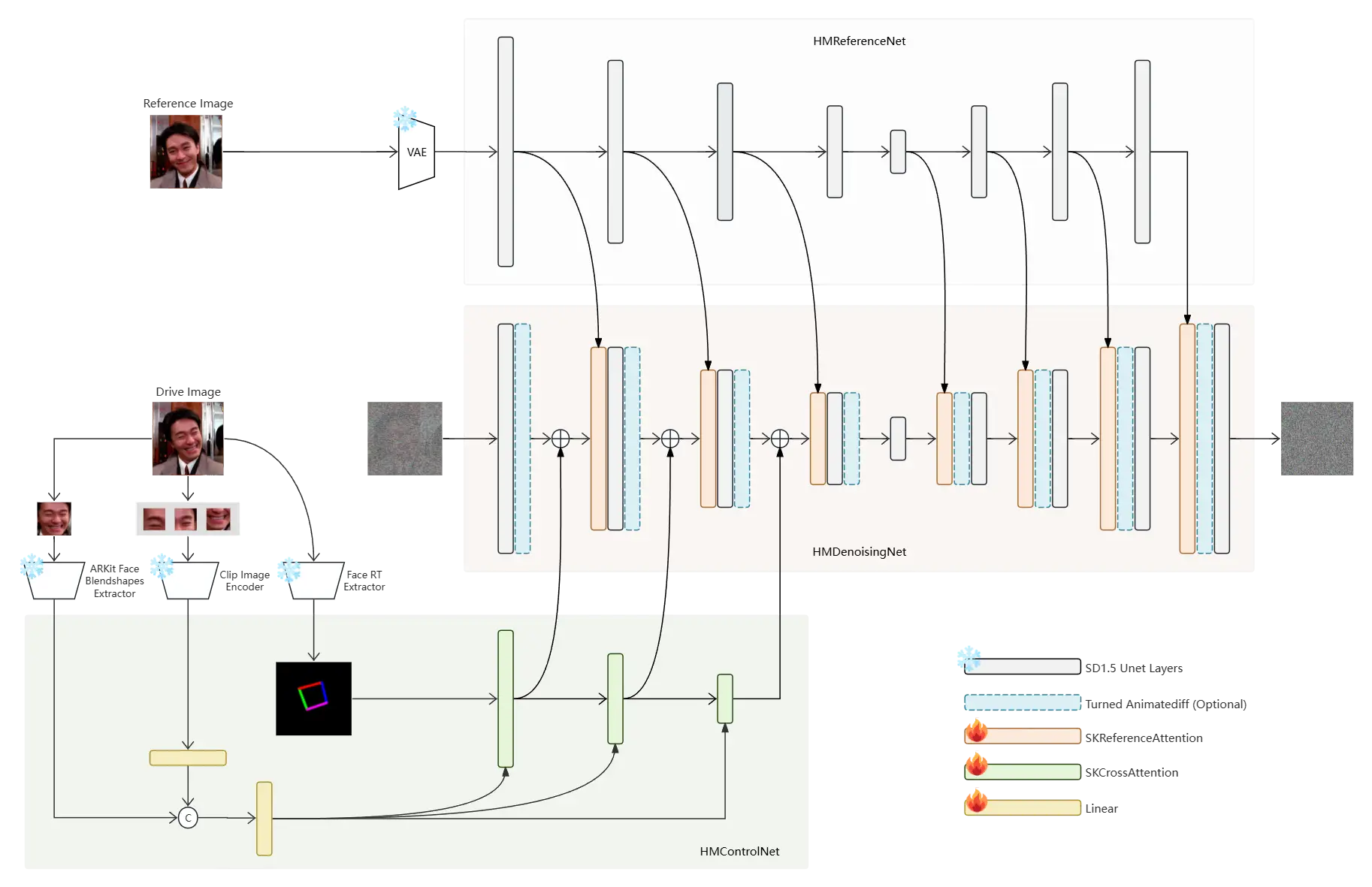
Technical Architecture: HelloMeme employs a diffusion model with integrated spatially woven attention, which is an innovative point in the field of AI-generated content. It optimizes detail handling during image and video generation processes, improving the quality of generated content.
HelloMeme ComfyUI V2 Latest Update
Main Improvements:
Improved expression consistency between the generated video and the driving video.
Optimized the algorithm, adding VAE selection and super-resolution features.
Added the HMControlNet2 module, optimizing VRAM usage.
Provided a simplified HMVideoSimplePipeline, suitable for devices with less VRAM.
HelloMeme New Features:
Introduced an expression enhancement module, making the generated facial expression movements smoother and more refined.
How to Use HelloMeme for Video Generation?
Prepare the Environment: Make sure Python and the necessary libraries are installed on your computer. HelloMeme supports PyTorch and FFmpeg, and you need to install these dependencies.
Clone the Code Repository: Clone the HelloMeme project code from GitHub. You can use the following command:
git clone https://github.com/HelloVision/HelloMeme
cd HelloMeme
Install Dependencies: In the project directory, create a new Python environment and install the required libraries. You can use the following command:
pip install diffusers transformers einops opencv-python tqdm pillow onnxruntime onnx safetensors accelerate
Prepare Input Files: You need to prepare a reference image and a driving video. The reference image is used to extract features, while the driving video is used to generate new video content.
Run the Video Generation Script: Use the inference_video.py script to generate videos. Enter the following command in the terminal:
python inference_video.py
This script processes the input files and generates the output video.
View the Results: The generated video will be saved in the specified output directory, where you can view and download these files.
Introduction to Key Modules
HMReferenceNet: Extracts high-definition features from the reference image.
HMControlNet: Extracts facial information, such as head pose and expressions.
HMDenoisingNet: Responsible for denoising and generating the final video frames.
The emergence of HelloMeme not only enhances the stability and naturalness of AI-generated videos, but may also have a profound impact on many fields such as entertainment, advertising, and education, especially in scenarios that require high-quality digital content.











