
 Script Planner Assistant▸
 AI Apps
 AI News

Boximator: Generating Rich and Controllable Motion for Video Synthesis
Boximator: Generating Rich and Controllable Motion for Video SynthesisIntroduction
Boximator is a tool for video editing released by ByteDance. It enables users to control the motion trajectory of subjects in generated videos through simple operations. Objects will move strictly according to the positions and paths drawn by the user. The innovation of this tool lies in its intuitive interaction: you can select the object you want to move, then draw its ending position and motion path, and it will move strictly according to the position and path you draw. Compared with Runway's Motion Brush, Boximator allows for more precise control over the ending position of an object's motion.
Boximator paper: https://arxiv.org/abs/2402.01566
Boximator demo: https://boximator.github.io/#Demo
Boximator project: https://boximator.github.io/
Boximator Core Features:
Trajectory Control: Users can simply and intuitively set the motion trajectory of subjects in a video by drawing boxes.
Multi-subject Support: Boximator supports users in drawing boxes around multiple subjects at the same time and setting different motion paths for each subject.
Path Customization: In addition to basic point-to-point movement, users can also set specific movement paths for subjects in the video.
Plugin Compatibility: Boximator is compatible with SD video models and can be used as a plugin, enhancing the versatility and flexibility of video editing.
User-friendly: Boximator is simple and intuitive to operate, requiring no complex video editing knowledge, allowing users to control video content.
High Compatibility: Compatible with the currently popular SD video models, it can be provided as a plugin for broader application possibilities.
Innovative Interaction: The innovative box-drawing interaction makes video editing more intuitive and convenient.
Boximator Application Scenarios:
Video Content Creation: For video creators, Boximator provides a new means of producing dynamic videos.
Animation Creation: For animators, it simplifies the design process for character or object motion trajectories.
Educational Demonstration: In the education field, teachers can use this tool to create intuitive dynamic demonstration materials.
How to Use Boximator:
The method released by ByteDance: first draw a box around the subject in the image, then draw a box around the position to which it should move, and it will generate a video of the subject moving from the start point to the end point. It supports setting movement paths and drawing boxes around multiple subjects. It is compatible with SD video models and can be used as a plugin.
Introduction to Boximator:
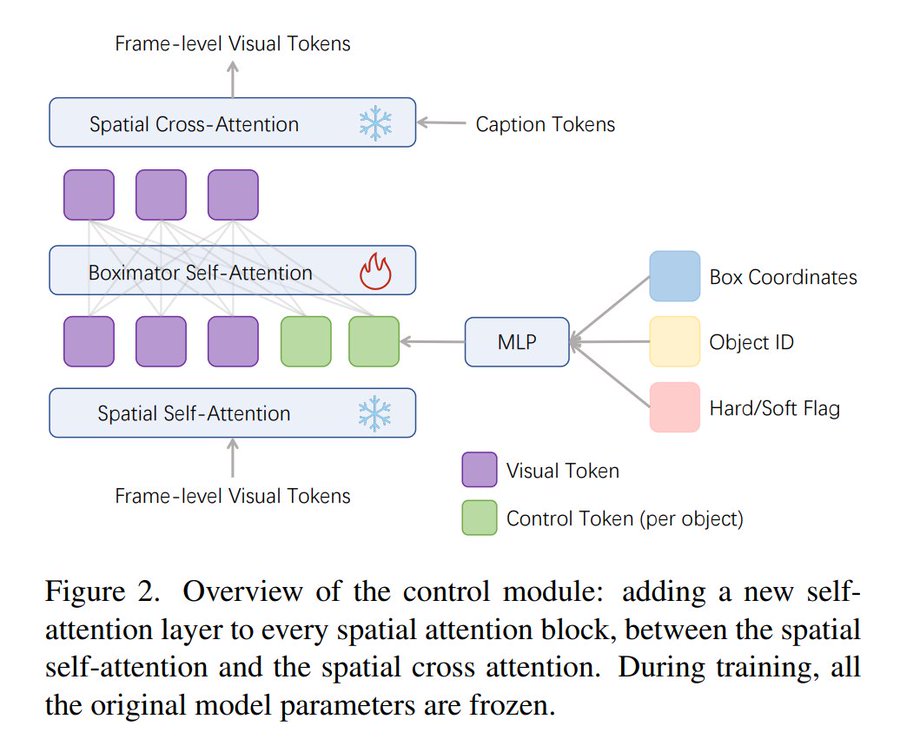
We propose Boximator, a novel method for fine-grained motion control. Boximator employs two constraint mechanisms: hard box and soft box.
Users can use the hard box to select a specific object in a certain frame of the video (called the conditioning frame), and then roughly or strictly specify the object's position, shape, or motion trajectory in future frames through these two constraint methods. Boximator can serve as an add-on to existing video synthesis models. During training, in order to preserve the knowledge of the original model, we chose to freeze the original weights and only train the control module.
To address the challenges during training, we introduced an innovative self-tracking technique, which greatly simplifies the process of learning the association between boxed objects and their references.
Experiments have proven that Boximator achieves industry-leading levels in video quality (i.e., FVD, a video quality evaluation metric), showing improvement over two baseline models, and the effect is further enhanced after introducing box constraints. Its powerful capability in motion control has been verified by significant improvements in the bounding box alignment metric.
Evaluations also show that users prefer the video effects generated by Boximator over the output of the baseline models.












