
 Script Planner Assistant▸
 AI Apps
 AI News

easyScholar: A Must-Have Plugin for Researchers
easyScholar: A Must-Have Plugin for ResearchersIntroduction
The easyScholar extension is a browser extension available on the Chrome Web Store. easyScholar lets you view journal impact factors and分区, filter literature, and display various journal rankings; it supports lightweight translation on any website; and it allows you to bookmark literature and more. A workman must first sharpen his tools if he is to do his job well. Good scientific research tools can boost your learning efficiency several times over. You can download the latest installer from this page and install it on browsers such as Chrome and Edge.
It currently supports Firefox, Safari, Edge, and Google. As well as other browsers running a Chrome kernel version higher than 95, such as 360 Speed X Browser, 360 Security Browser, QQ Browser, and so on. Other browsers such as Soghi High-Speed Browser, 360 Speed Browser (without the X), Lenovo Browser, etc. are not supported because their kernels are too old.
easyScholar currently supports more than ten websites including CNKI, Google Scholar, Baidu Scholar, Web of Science, ScienceDirect, PubMed, and Aminer. It supports dozens of different datasets including SCI分区, CAS SCI分区, SCI Impact Factor, CCF, Peking University Chinese Core, Nanjing University Core, Southwestern University of Finance and Economics, Southwest Jiaotong University, and Renmin University of China.
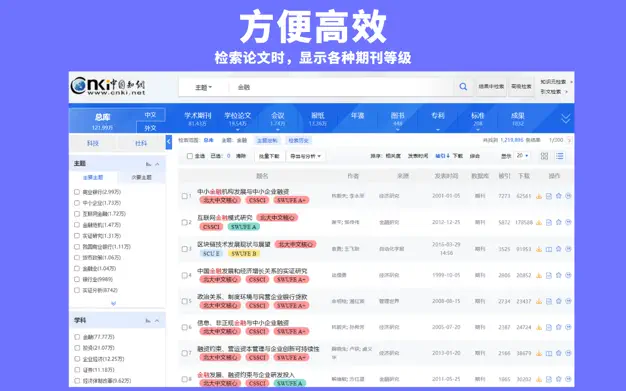
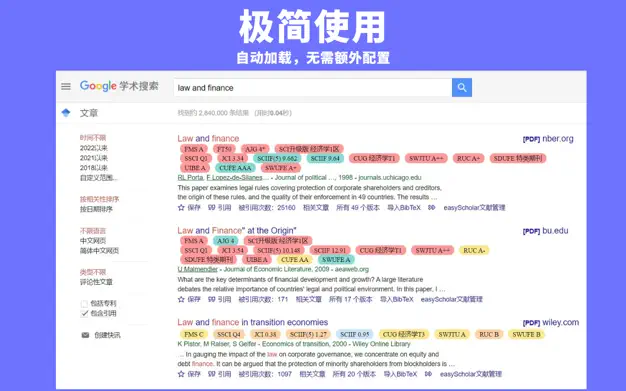
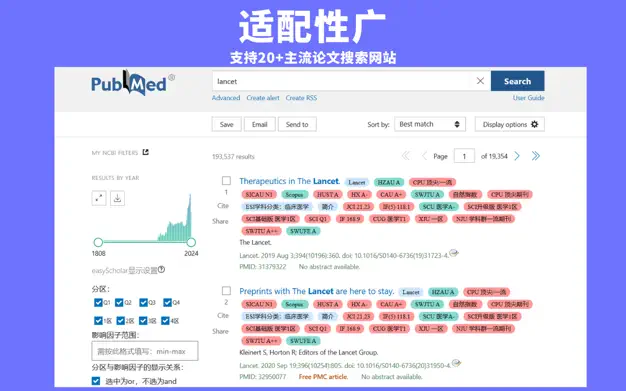
Display Journal Rankings
Supports displaying the source journal ranking of articles on 20+ mainstream paper search websites, including Google Scholar, CNKI, PubMed, Web of Science, Scopus, Aminer, and ScienceDirect.
The rankings displayed include: SCI分区 (Clarivate), SCI Impact Factor (Clarivate), SCI分区 (CAS), SCI Journal Warning List (CAS), CCF, Nanjing University Core, Peking University Core, and 30+ other data rankings. More than enough to meet the needs of everyday research, work, and award evaluations.
Custom datasets: If you have your own target journals, you can customize a dataset that belongs to you. In addition, in the custom dataset community, you can also choose from 100+ datasets created by users, such as "Important Journals Recognized by the Management Science Department of the National Natural Science Foundation of China", "Southwest Jiaotong University Academic Journal Classification Catalog (2022 Edition)", "Australia ABDC Journals 2022", "Jilin University Reference Catalog of High-Level Chinese Academic Journals in Philosophy and Social Sciences (Trial)", "China Computer Federation Recommended International Academic Conferences (2022)", and "China Humanities and Social Sciences A-Journal Citation Database".
Online Translation
On any website, select a piece of text, press T to translate, and press Y to hide it. (Edge users are advised to hide the mini menu that pops up after selecting text, in order to better trigger the translation event.)
You can choose from multiple mainstream translation sources including Google Translate, Sogou Translate, Youdao Translate, Caiyun Xiaoyi, and Niutrans.
Literature Management
On the detail page of a paper search, an "easyScholar literature bookmark button" is provided to quickly add categories to the literature. There is no longer any need to use browser bookmarks to save web pages.
One-Click Access to English Full Text
Click the logo on the page to jump to the PDF full text. Anyone who frequently reads English papers will know that when we finally find a suitable paper, more often than not we have to pay to read it. SCI-HUB has been a great help in providing free English paper resources. However, because SCI-HUB website links change frequently, users need to update the URL themselves. easyScholar provides a list of common URLs for reference, and after searching for a foreign-language paper, clicking the logo on the page will take you to the PDF full text on SCI-HUB. (This feature can be disabled, or you can set your own URL.)
Thank you for reading this far. If you like this product or appreciate our efforts, please share it with your friends around you. When you use an invitation code or share it on your WeChat Moments, you will receive certain rewards. The specific rules can be viewed in the website backend (https://www.easyscholar.cc/console/user/invite).















