
 Script Planner Assistant▸
 AI Apps
 AI News

Haikei SVG Background Generator
Haikei SVG Background GeneratorIntroduction
Haikei is a powerful online SVG background generator that lets you create backgrounds in a variety of styles for free, with no registration required. It offers numerous unique background layouts, such as waves, circles, rings, triangles, and five-pointed stars—each one visually stunning. You can customize, randomize, create, and export SVG backgrounds to meet your imagery needs for article illustrations, website interfaces, ppt presentations, social media, and other scenarios.
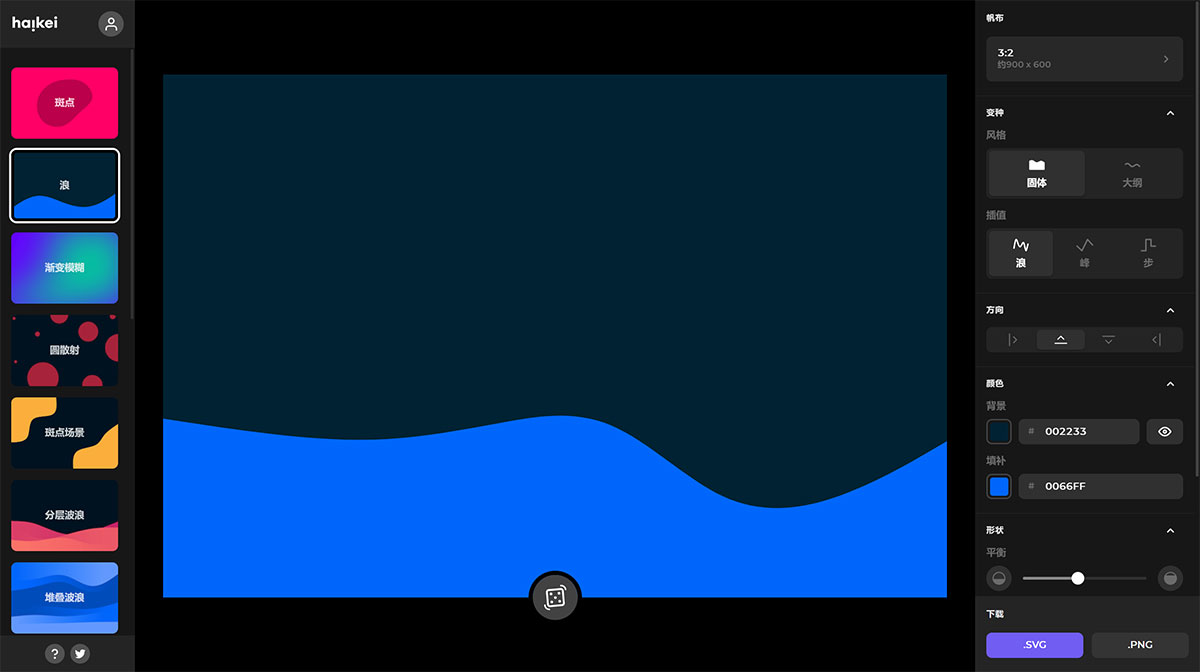
Haikei features a three-column interface: templates on the left, the image workspace in the middle, and parameter adjustment on the right. The right-hand panel provides a rich set of background image parameters to tweak—such as size, background color, pattern color, pattern style, shape size, and more. If you have a specific background in mind, you can configure all these parameters directly within Haikei. Once your design is complete, you can download it in SVG or PNG format. If you prefer not to adjust anything yourself, simply click the button in the center of the canvas to instantly generate a random background.
How to Use the Haikei Background Generator:
01. Select a template;
02. Change the canvas size of the image;
03. Change the graphic style;
04. Change the shape of the outline;
05. Change the orientation of the shapes;
06. Change the color parameters;
07. Customize the appearance of the shapes;
08. Choose to download as an SVG or PNG file;
With the Haikei background generator, you can discover, customize, randomize, and export generative SVG design assets. You can also use it alongside your favorite design tools:
Haikei Background Shape Description:
Blob
A classic! This generator is derived from Blobmaker and allows you to generate cool organic SVG shapes within your selected contrast and complexity parameters.
Wave
The wave generator uses an algorithm focused on creating harmonious visual effects using one or more waves. These waves can be positioned at the top, bottom, left, or right of the canvas.
Blurry Gradient
The blurry gradient generator makes it easy to create modern, blurred gradients. Add any two colors and randomize—you'll get a different gradient composition every time.
Circle Scatter
Use this generator to create simple backgrounds with scattered circles. Constrain the circles to the canvas to use as a pattern generator, or adjust density and contrast to create a unique design asset each time.
Blob Scene
Inspired by simple blobs, this generator allows you to create elegant backgrounds with organic shapes placed in two opposite corners of the canvas, with beautifully transitioning colors.
Layered Waves
The layered wave generator follows logic similar to simple waves, but with additional options. You can add multiple waves, determine the wave's complexity and contrast, and color them with a gradient using one or two colors of your choice.
Stacked Waves
The stacked wave generator helps you create visual effects that fill the canvas with elegant waves and soft color transitions. Align the waves horizontally or vertically for either subtle or bold visual effects.
Blob Scatter
The blob scatter generator lets you determine the quantity, size, and contrast of scattered organic shapes. Use it to create cool backgrounds or to generate patterns for your next project.
Low Poly Mesh
The low poly mesh generator uses an algorithm to create a crumpled paper effect. Adjust the resolution of the triangles and the distortion of the background to create cool, vibrant backgrounds.
Layered Peaks
Similar to the wave generator, the layered peaks generator enables you to create outstanding visual effects that can be used as article covers, backgrounds for social media posts, or as part of illustrations.
Stacked Peaks
The stacked peaks generator is a variant of stacked waves, with similar options for generating visual effects where peaks fill the canvas. Align them from left to right or top to bottom to create stunning visuals.
Polygon Scatter
From triangles to hexagons and beyond, choose a polygon with 3 to 9 sides and generate cool visual effects. Use the number, size, and contrast to create a variety of visual effects and add a cool background to your designs.
Layered Steps
While similar to the wave and layered peaks generators, the simple steps generator allows you to create visually very different stylized assets. Use them as backgrounds for text, images, illustrations, or simply as background patterns.
Stacked Steps
A generator that allows you to create colorful textured backgrounds using shades of a given color. Use it to add texture to an otherwise solid-colored background.
Symbol Scatter
Just like the circle, blob, and polygon scatter generators, this generator allows you to create single visual effects or cool patterns. Choose from a growing list of symbols to create awesome visual effects.















