
 Script Planner Assistant▸
 AI Apps
 AI News
Quark AI Super Box: A One-Stop AI Productivity Platform by Alibaba's Quark App
小编 ·

Quark AI Super Box: A One-Stop AI Productivity Platform by Alibaba's Quark App
What is Quark AI Super Box?
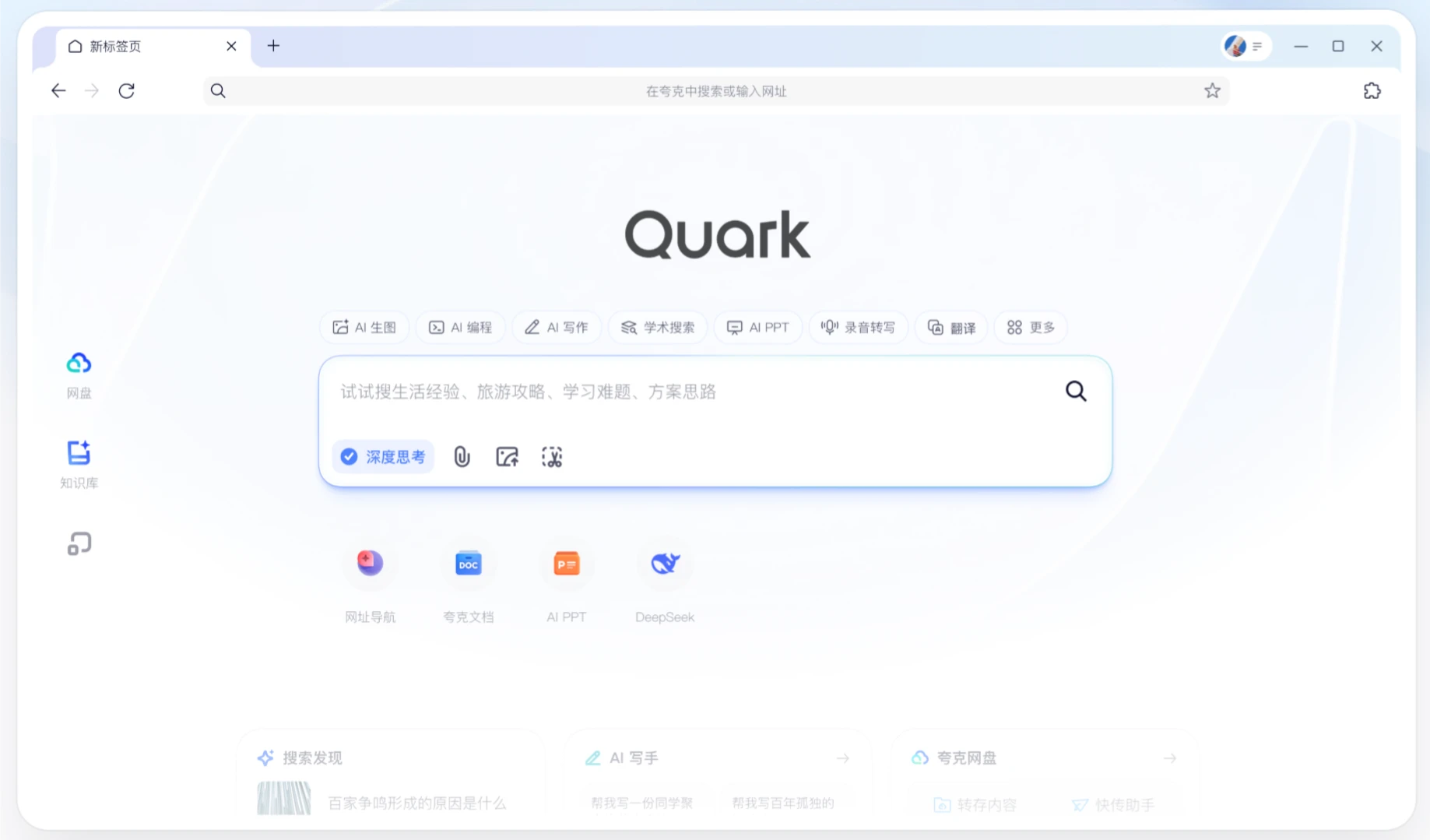
The Quark AI Super Box is a brand-new product form fully upgraded and launched in March 2025 by Quark, the intelligent search platform under Alibaba, based on Alibaba's Tongyi reasoning and multimodal large models. It integrates AI conversation, deep thinking, deep search, deep research, deep execution, and other functions into an extremely minimalist "box" form, providing users with borderless one-stop intelligent services to meet their AI needs across various scenarios such as work, study, and life.
For example, if a user inputs "Help me make a monthly report PPT about AI," the system will use models such as Tongyi Wanxiang 2.1 to generate relevant data charts or illustrations based on the content, and then through the AI PPT module, integrate the text and charts into a structured PPT with automatic layout design. Finally, the user can directly download a complete file package containing the analysis report, data charts, and beautified PPT.
Features of Quark AI Super Box
Multimodal Interaction: The AI Super Box not only supports text input, but also supports image input through the "Snap a photo and ask Quark" function, which can accurately recognize image content and provide relevant information.
Intelligent Intent Recognition: It can intelligently determine the actual needs based on user input, quickly identifying and invoking appropriate AI capabilities whether for simple questions or complex tasks.
Deep Thinking Mode: Equipped with reasoning large models, it can perform in-depth analysis and reasoning on complex problems, providing more comprehensive and in-depth answers.
Multi-AI Agent Collaboration: Integrates over a hundred professional Agents and atomic capabilities, covering fields such as search, health, learning, travel, and creation.
Technology
It integrates Alibaba Tongyi's latest multimodal and reasoning large models, such as the Qwen2.5-VL visual language model, QWQ-32B code model, etc., providing industry-leading generation and reasoning capabilities. The latest achievements of the Tongyi series models will be integrated into Quark as soon as possible in the future, allowing users to experience new features.
Quark AI Super Box Application Scenarios
Travel: It can serve as a "professional tour guide," providing cultural relic explanations and attraction strategies through photos.
Work: Assists in analyzing data charts, optimizing code logic, and generating work summary documents.
Learning: Provides AI writing, AI question-searching, and other functions, supporting various writing genres and learning tutoring.
Health: Interprets physical examination reports, provides analysis of abnormal indicators and rehabilitation plan suggestions.
Entertainment: Supports fun functions such as card game guidance, screenshot-based drama search, and couple avatar matching.
How to Use Quark AI Super Box
Mobile
Download and install the Quark APP
If you have not yet installed the Quark APP, you can search for "Quark" in your phone's app store (such as the Apple App Store or Android app market), then download and install it.
Open the Quark APP
After launching the Quark app, you will see a clean main interface with a search box in the center, which is the core entry point of the Quark AI Super Box.
Use the AI Super Box
Text Input: Directly enter text in the search box, ask questions or input commands, and Quark will invoke the corresponding AI capabilities based on your input.
Snap a photo and ask Quark: Click the "camera" icon next to the search box to enter the photo-taking or image upload mode, and ask questions by taking a photo or selecting a local image.
Voice Input: Click the "microphone" icon next to the search box to input questions or commands through voice.
Desktop
Visit Quark Web Version
If you are using a computer, you can access Quark's web version through a browser. Open the browser, enter the Quark official website, and go to the Quark homepage.
Use the AI Super Box
In the top search box of the Quark web version, enter text or use the AI Super Box function by uploading images.
Function Entry
Mobile: The search box on the main interface and the camera and microphone icons next to it.
Desktop: The search box at the top of the web version.
Operation Examples
Text Input: Enter "How to make a PPT" in the search box, and Quark will invoke the AI PPT function to help you quickly generate a PPT template.
Snap a photo and ask Quark: Take a photo and upload an image of a cultural relic, and Quark will recognize the relic and provide relevant historical background information.
Voice Input: Click the microphone icon and say "Help me translate a passage of English," and Quark will translate your words in real time.
The Quark AI Super Box is currently free to use, with no fees charged, no advertisements, and no usage limits.
Users can freely use functions such as AI search, AI writing, AI image generation, AI PPT creation, academic research, AI question-searching, AI health Q&A, and travel planning through the Quark AI Super Box.









