
 Script Planner Assistant▸
 AI Apps
 AI News

Motiofy AI - Online AI Image-to-Video Tool
Motiofy AI - Online AI Image-to-Video ToolIntroduction
What is Motiofy AI
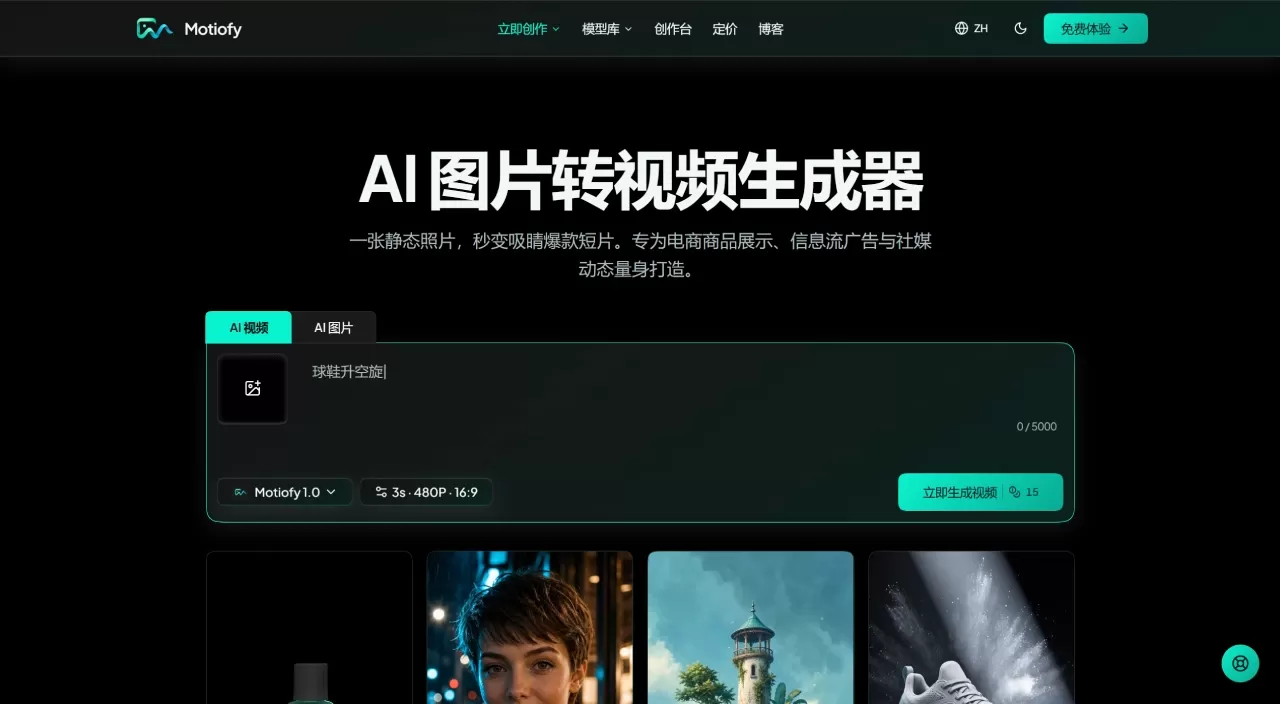
Motiofy is an online AI image-to-video tool that can quickly turn static photos into dynamic videos. Upload an image, enter a simple description of the scene, and generate a video in minutes. It's mainly aimed at e-commerce displays, in-feed ads, and social media content creation.
Core Features
AI Image to Video: Upload a static image, describe camera movement, subject motion, or lighting effects in natural language, and AI will automatically generate a dynamic video.
AI Text to Video: No image on hand? Just type a text description and generate a video directly.
Camera Motion Control: Supports controlling subject motion, camera trajectory, and depth of field effects, such as camera push-in, hair movement, and other fine details.
Start & End Frames and Reference Images: Specify the start and end frames of the video separately, and AI automatically fills in the transition; upload reference images to lock product appearance, character look, or visual style.
Multi-Model Aggregation: Integrates mainstream AI video models such as Seedance 2.0/2.5, MiniMax H3, Kling 3.0, Wan 3.0, Nano Banana, Seedream 5 Pro, GPT Image, allowing free switching on one platform.
Smart Parameter Panel: Automatically displays available control options based on the selected model, with a clean interface.
Cost Estimate: Shows the estimated credits consumed before generation, with no hidden charges.
Work Management: All generation records are archived chronologically, supporting HD download and secondary adjustments.
Motion Control: Supports real-person motion capture, allowing complex performances to be transferred into generated content.
Why Choose Motiofy AI
Low Barrier: No video editing experience needed. If you can describe the scene in plain language, you can create videos—no keyframing or timeline editing required.
Multiple Models: Aggregates several top-tier mainstream models, eliminating the need to switch platforms or pay separate monthly subscriptions for each tool.
Low Cost: Start with free credits, pay as you go, and see cost estimates before generating.
High Efficiency: One product photo can be used to test multiple video versions, batch-create ad variants, and eliminate the need for production costs.
Full-Device Support: Works on mobile and tablet browsers.
Privacy & Security: Uploaded assets are only used for the current generation request and will not be used to train AI models.
Use Cases
E-commerce Product Display: Convert product images and white-background images into detail page animations or product showcase short videos without re-shooting.
Social Media Content: One-click conversion of daily photos into short videos, providing continuous content for accounts.
Illustration and Anime Animation: Animate static works while preserving original details and style.
Film Concept Pre-visualization: Quickly batch-produce ad variants to test different camera movement plans.
Product Form Display: Use the start & end frame feature to create creative transitions such as new product reveals and before/after comparisons.
How to Use Motiofy AI — Step by Step
Upload Image: Import a product image, photo, or illustration—one image is all you need to get started.
Write a Scene Description: Describe the effect you want in plain language, e.g., "camera slowly pushing forward, soft light bands swirling around the bottle." No need to learn professional prompt techniques.
Select Model and Generate: Choose a model based on your needs, confirm the cost, and click Generate. The finished video is automatically saved to "My Works," supporting download and secondary adjustments.
FAQ
Q: What is Motiofy?
A: An online AI image-to-video tool. Upload an image, write a description, choose a model, and generate in minutes.
Q: What image formats are supported?
A: JPG, PNG, and WebP are supported.
Q: Can a single photo be turned into a video?
A: Yes. Upload a photo, write an action prompt, choose a model, and generate directly.
Q: What is start & end frame control?
A: Specify the first and last frames of the video separately, and AI automatically fills in the transition in between—great for seamless transitions or before/after comparison effects.
Q: Which AI video models are available on the platform?
A: Integrated mainstream models include Seedance 2.0/2.5, MiniMax H3, Kling 3.0, Wan 3.0, and more.
Q: How are credits deducted?
A: Consumption depends on the model, duration, and resolution. The estimated credits are shown before generation; if the task fails, credits are automatically refunded.
Q: How long does it take to generate one video?
A: Usually 1 to 3 minutes, depending on model queue conditions and quality settings. You can leave after submission and it will be auto-saved upon completion.
Q: Is there a free trial?
A: New registered users get 20 free credits—no card required, and no automatic paid subscription will be enabled.
Q: What happens when the free credits run out?
A: You can purchase one-time credit packs (valid forever), or subscribe to monthly/annual plans for higher concurrency and 4K quality.
Q: Can I use it without editing experience?
A: Absolutely. Just be able to upload photos and write simple descriptions.
Q: Can I use it on mobile?
A: Yes, it works normally on mobile and tablet browsers.
Q: Where are the videos stored?
A: After logging in, check progress, preview, and download in "My Works."
Q: Can the generated videos be used commercially?
A: Videos generated during a paid subscription can be used commercially (you must have legal rights to the input assets); works generated with free credits are limited to personal, non-commercial use.
Q: Are my assets safe?
A: Assets are only used to process the current generation request and will not be used for AI model training. Free account works are retained for up to 14 days.
Competitor Comparison
| Motiofy | Kaiber | OpenClips | Adobe Firefly | |
|---|---|---|---|---|
| Positioning | Multi-model integrated workspace | AI video creation | AI video clips | Full-stack creative platform |
| Image to Video | Supported | Supported | Supported | Supported |
| Models | Seedance, Kling, MiniMax, Wan, etc. | Proprietary | Proprietary | Firefly |
| Start & End Frames | Supported | Partial | Not supported | Partial |
| Reference Image Lock | Supported | Limited | Not supported | Supported |
| Cost Preview | Supported | Not supported | Not supported | Not supported |
| Free Trial | New user credits | Limited | Limited | Limited |
| No-Watermark Export | Supported | After payment | After payment | After payment |
| Commercial Use | Supported | Paid plan | Paid plan | Paid plan |
| E-commerce, Marketing, Independent Creators | Music Videos, Art | Short Video Editing | Enterprise Creative Teams |












