
 Script Planner Assistant▸
 AI Apps
 AI News

Renoise AI: An AI Creation Platform Integrating 20+ Leading Models
Renoise AI: An AI Creation Platform Integrating 20+ Leading ModelsIntroduction
Renoise aiis an AI video generation platform for creators, brands, and e-commerce teams. Rather than training its own models, it brings together the best video and image models on the market into a single workspace, including video models like Seedance 2.0, Kling 3.0 Omni, and HappyHorse 1.0, as well as image models like GPT Image 2, Midjourney V8.1, and Nano Banana Pro. Its positioning is clear: "Professional AI video generation for creators, brands, and e-commerce teams."
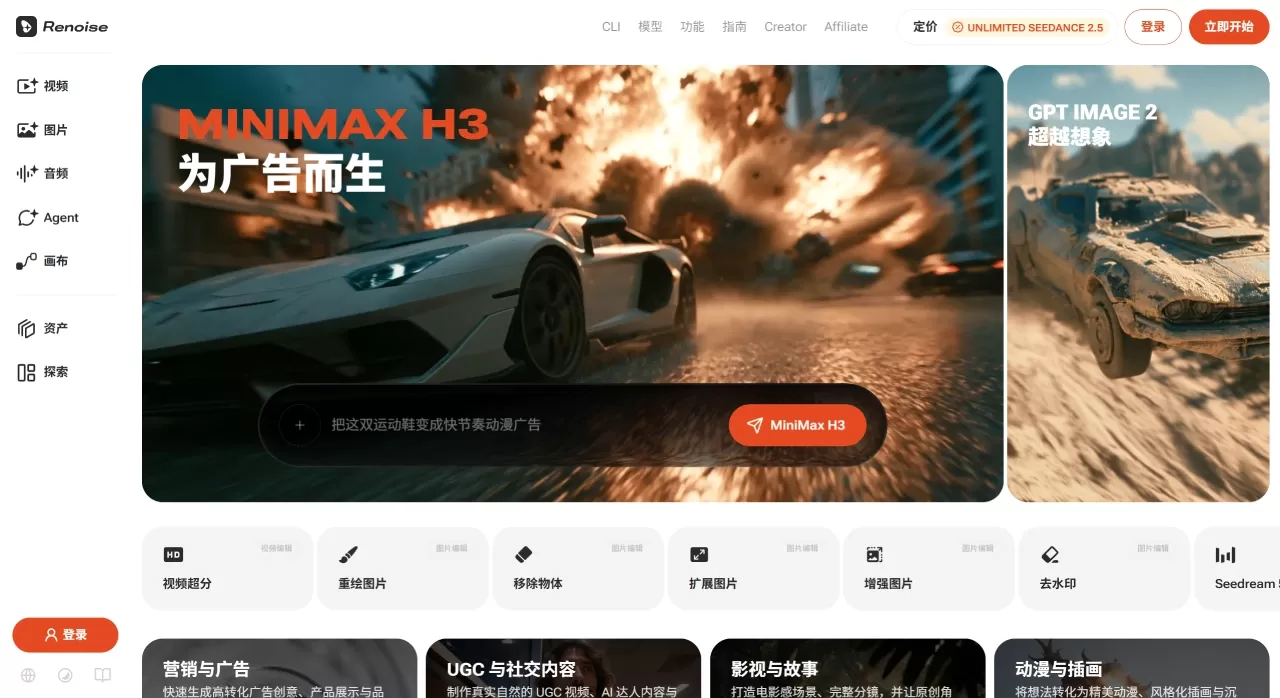
Renoise AI Features
Unified multi-model canvas—This is Renoise's biggest differentiator. You can switch between video models like Seedance 2.0, Kling 3.0 Omni, and HappyHorse 1.0, as well as image models like GPT Image 2 and Midjourney V8.1, all within one interface—no more bouncing back and forth between platforms.
FacePass face consistency—AI video models by default block real-face reference images. Renoise's FacePass lets you upload an authorized real-face photo, and after a one-time review, that face stays consistent across all subsequent generations. Ideal for digital avatars or commercial use with a model's written consent. Public figures and minors are not allowed.
Product video generation—Upload a product image, pick a scene template (model try-on, lifestyle UGC, scene showcase, food branding, etc.), set the duration and aspect ratio, and get output in 3-5 minutes. Built on Seedance 2.0, it locks colors, label text, and packaging outlines, with solid cross-frame consistency.
AI lip sync—Powered by Kling 3.0 Omni, supporting presenter narration, scene dialogue, character voiceover, etc. Mouth shapes stay in sync with the voiceover, even through heavy costumes or scene changes.
Canvas Timeline—Single clips are typically 5-15 seconds; longer videos need to be manually stitched together on the timeline. A music video, for example, generally requires 6-10 clips.
Multimodal reference input—Supports images, video, audio, and first/last frame as references, with automatic MD5 deduplication. You can also upload brand kits to maintain visual consistency.
Native output in 14 aspect ratios—Common ratios such as 9:16, 1:1, and 16:9 are all supported. Each ratio is generated independently rather than cropped, so framing and camera movement remain undistorted.
4K output—Seedance 2.0 Standard supports native 4K, but at a high cost (100 credits/sec). Fast mode only supports 720p, suited for quick iteration.
Agent integration—Supports Claude Code, Codex, OpenClaw plugins, and MCP, allowing you to describe shots directly in your code editor and have Renoise generate them.
API and batch generation—Offers a single API key, supports parallel batch generation with webhook callbacks. E-commerce teams commonly use it to batch-generate images and videos for new product SKUs.
Renoise AI Use Cases
E-commerce ads: Generate model try-on, lifestyle UGC, and scene showcase videos from a single product image
Social media: 9:16 short videos for TikTok, Instagram Reels, YouTube Shorts
Brand marketing: Brand promos, food/beauty story videos, with consistent brand color tones
Music videos: Stitch 6-10 clips into a complete MV; quick previews (use Seedance 2.0 Fast mode to quickly validate ideas, then switch to Standard for the final version)
Digital humans/presenter videos: Presenter/explainer videos using FacePass + Kling lip sync
Batch production: Automatically generate product videos for hundreds or thousands of SKUs via the API
Renoise AI Pricing
Renoise uses a credits system; all models are available across all plans—the differences are the monthly credit allowance and the per-unit discount.
| Plan | Monthly Fee | Credits/Month | Seedance 2.0 | Kling 3.0 |
|---|---|---|---|---|
| Lite | $5 | 300 | — | — |
| Starter | $20 | 1,200 | ~$0.083/sec | ~$0.267/sec |
| Standard | $60 (promo $48) | 3,600 | ~$0.057/sec | ~$0.181/sec |
| Advanced | $200 (promo $140) | 14,000+2,000 bonus | ~$0.035/sec | ~$0.112/sec |
Consumption reference: Seedance 2.0 (720p/1080p) is roughly 20 credits/sec; 4K is 100 credits/sec, so a 5-second clip = 500 credits; GPT Image 2 has a 50% discount on paid plans. All paid plans are watermark-free.
Note: Credit consumption is determined by three factors: model, resolution, and duration. 4K video and image generation consume credits at very different rates, so when choosing a plan, calculate based on your own actual content mix rather than relying solely on the official site's "approximately X videos" estimate.
Renoise AI Pros and Cons
Pros
One-stop multi-model: No switching back and forth between Seedance, Kling, and Midjourney
FacePass is very practical: Real-face consistency is a must-have for many creators—one review for long-term use
Transparent pricing: All models are open to all plans, with no "pay extra to unlock" tricks
Watermark-free export: Paid plans export clean assets directly
Agent-friendly: Claude Code, Codex, OpenClaw plugins + MCP, suited for developer workflows
Native 4K output: Seedance 2.0 Standard outputs 4K directly, no need for post-production upscaling
Mature API: Batch generation + webhook, e-commerce teams can plug it directly into their pipeline
Cons
No proprietary models: Output quality depends entirely on the underlying model you choose; Renoise itself has no model moat
Short single clips: Each clip is 3-15 seconds, so longer videos must be manually stitched together—no one-click long-form output
4K burns credits fast: At 100 credits/sec, the Starter plan can only produce 2-3 five-second 4K videos
Ends at render: No subtitle burn-in, brand voice system, multi-platform publishing, or scheduling features; you'll still need other tools for post-production and distribution
Quota
How to Use Renoise AI
Three Basic Steps
Add references: Drag reference images, brand kits, and first/last frames into the upload area; the system automatically deduplicates via MD5
Write a prompt: Describe the shot in natural language—Renoise's prompts are compatible with Runway and Pika, so you can copy them over directly
Pick a model and generate: Switch between Seedance 2.0, Kling 3.0 Omni, and HappyHorse 1.0, then hit generate
Product Video Workflow
Upload product photos to Canvas
Choose a scene template (model try-on / lifestyle UGC / product showcase / food brand)
Set duration (5-15 seconds) and aspect ratio (9:16 / 1:1 / 16:9)
Click generate; get your first clip in 3-5 minutes
For multiple versions, tweak the prompt or switch models and regenerate
Long Video Stitching
Generate multiple 5-15 second clips separately
Arrange them in order on the Canvas Timeline
Unified check of each frame's fidelity score (Renoise flags frame drift)
Once confirmed, batch export
Developer Workflow
Install the renoise-gen skill in Claude Code (unofficial but functional)
Describe the shot directly in the editor; Renoise calls the model in the backend to generate
Or integrate into your own system via API Key, with webhooks for completion notifications
Renoise AI vs. Competitors
| Dimension | Renoise | Runway Gen-4 | Pika | Kling 3.0 Omni | MagicLight AI |
|---|---|---|---|---|---|
| Positioning | Multi-model integrated workspace | Cinematic workflow + API | Social effects + easy to use | Realistic motion in long clips | Long video storytelling (up to 50 minutes) |
| Video models | Seedance 2.0, Kling 3.0, HappyHorse 1.0, etc. | Gen-4.5, Gen-4, Aleph | In-house Pika models | Kling 3.0 Omni (in-house) | In-house long video pipeline |
| Image models | GPT Image 2, Midjourney, Nano Banana, etc. | No native image generation | None | None | Integrated image generation |
| Face consistency | FacePass (review-authorized real faces) | No comparable workflow | None | Real faces blocked by default | Nano Storyboard adjustments |
| Lip sync | Natively supported by Kling 3.0 Omni | Requires post-processing | Limited | Native lip sync in 5 languages | Integrated voice cloning |
| Single clip length | 3-15 seconds | Up to 120 seconds | Up to 5 seconds | Up to ~180 seconds | Up to 50 minutes in one click |
| 4K output | Seedance 2.0 native 4K | Requires upscale step | Not supported | Supported | Up to 1080p |
| Aspect ratios | 14 native generation options | Multiple | Multiple | Multiple | Multiple |
| Agent integration | Claude Code, Codex, OpenClaw + MCP | REST API only | Pika MCP | API available | None |
| Entry pricing | $20/month (1,200 credits) | ~$15-95/month | ~$10-35/month | From ~$10/month | ~$6/month (annual) |
| No watermark | Full support on paid plans | Paid plans | Paid plans | Paid plans | Paid plans |
| Post-production/Distribution | None (stops at render) | Director Mode, color grading | None | None | Full pipeline: script → storyboard → export |
| Best for | E-commerce ads, UGC, multi-model comparison creators | Indie film, commercial ads | Social creators, beginners | Long shots, character scenes | Kids' stories, narration, YouTube series |
Why Choose Renoise AI
If you switch between Seedance, Kling, and Midjourney every day, Renoise can save you that switching overhead. The $20/month entry tier unlocks all models, FacePass makes it possible to feature real people on camera, and the API and Agent plugins make batch production effortless. For e-commerce teams, short-form video creators, and advertisers who need to compare across multiple models, it's a hassle-free "model supermarket"—not a walled garden that forces you to learn yet another new model.
Frequently Asked Questions
Q: What's the difference between Renoise AI and using Seedance or Kling's official sites directly?
A: Renoise AI doesn't train its own video models—its value lies in workflow integration. What you're paying for is the convenience of not having five tabs open, plus upper-layer features like FacePass, Canvas Timeline, and brand kits.
Q: Is Renoise AI free?
A: There's no free tier. The minimum is the $5 Lite plan (300 credits), good for a trial run. For regular use, we recommend the Starter plan starting at $20/month.
Q: How many 4K videos can I generate?
A: Seedance 2.0's 4K costs 100 credits/second. The Starter plan's 1,200 credits can produce roughly two 5-second 4K videos, or sixty 720p short clips. If 4K is essential, the Advanced plan is recommended.
Q: Can I upload celebrity photos to FacePass?
A: No. Only yourself or models with written authorization are supported; public figures and minors are strictly prohibited.
Q: Can I post directly to TikTok/Instagram after generating?
A: Renoise stops at rendering and export—it has no subtitle burning, platform-specific formatting, or scheduled publishing features. After exporting, you'll need to use editing or social media management tools for post-production.
Q: How do I use the API?
A: A single API Key covers it all, with support for batch parallel generation and webhook notifications upon completion. E-commerce catalog teams commonly use it to bulk-generate images and videos for new SKUs.
Q: Is the Claude Code plugin official?
A: The renoise-gen skill is a third-party, unofficial integration, but it works. Claude itself doesn't generate video—it calls Renoise's backend models through the plugin.
Q: Can product videos preserve the text on packaging?
A: Yes. Renoise is built on Seedance 2.0, which can lock colors, label text, and packaging outlines; cross-frame drift is flagged with a fidelity score.











