
 Script Planner Assistant▸
 AI Apps
 AI News

AIVideomaker AI: No Signup Required, Unlimited Free Video Generation
AIVideomaker AI: No Signup Required, Unlimited Free Video GenerationIntroduction
aiWhat is Videomaker AI?
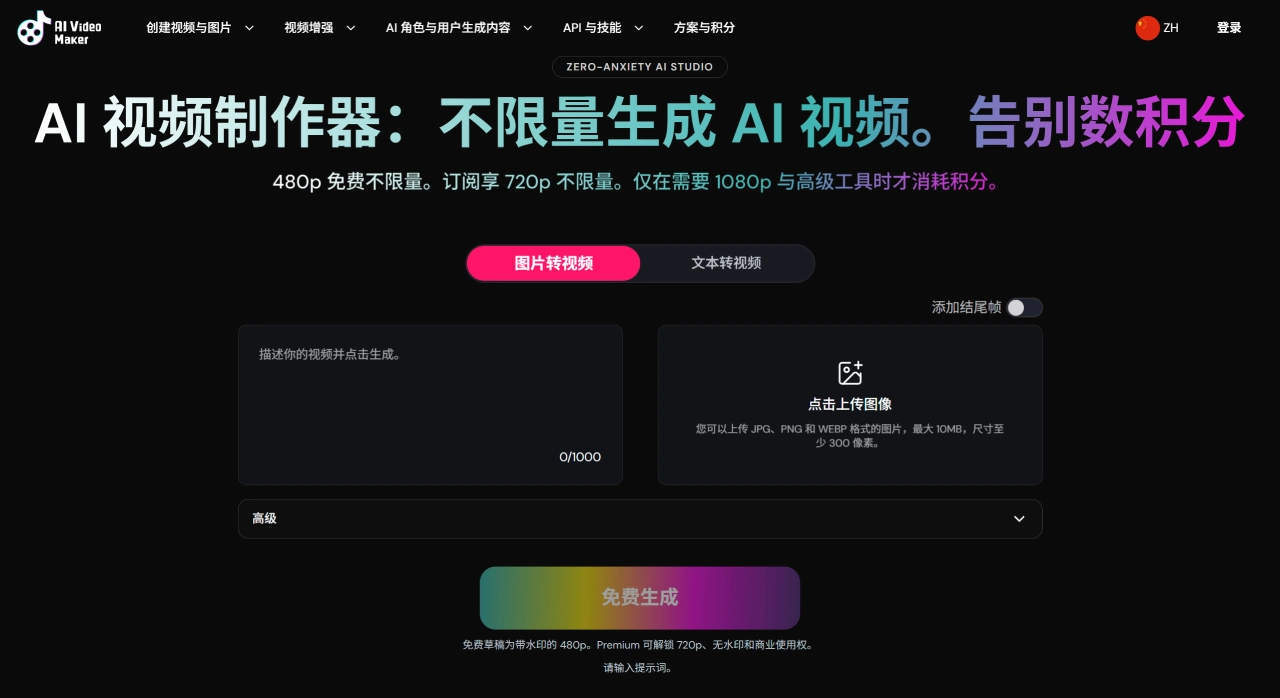
AIVideomaker AI is an easy-to-use AI video generation tool that requires no prior experience. It's suitable for anyone who wants to quickly create short videos, experiment with creative ideas, or doesn't know how to edit. Its biggest advantage is that it can be used without registration, and you can generate videos for free indefinitely, though there are limits on video length and resolution.
Main Features of AIVideomaker AI
Text-to-Video / Image-to-Video: You can input text only, upload images only, or provide both, letting the AI combine them to generate. You can also upload the first frame, last frame, or center frame to control the video structure. Aspect ratios supported are 16:9, 9:16, and 1:1.
Seedance 2.0 Model: This version supports real-shot footage, failed generations don't deduct credits, and you can retry for free. The platform has a large number of Seedance templates; after previewing the effect, you can clone it with one click and replace it with your own images and prompts.
Long Video Generation (up to 30 seconds): The V1 model supports videos up to 30 seconds long, with a maximum of 5 segments, each 5 seconds long, each with its own prompt, pieced together into a complete story.
Video Extension: Based on the visuals and rhythm of the original video, the AI automatically continues the content, rather than simply repeating or cutting.
AI Image Editor: Modify clothing, change backgrounds, and adjust lighting using natural language descriptions, no design background required.
Quality Enhancement (Upscaler): Analyzes frame by frame, upscaling from 480p to 720p, 1080p, or 2K, with details re-processed.
Digital Human / Product Avatar: Upload multiple-angle photos of a product, and the AI synthesizes a talking avatar that responds to text or voice input, ideal for marketing presentations.
AIVideomaker AI Applications
Product Promotion: Quickly create promotional videos for products.
Social Media Content: Short videos for platforms like TikTok (Douyin), Instagram, and TikTok.
Lectures and Explanations: Create educational or science popularization videos.
Marketing Ads: Quickly generate commercial advertising materials.
Creative Experimentation: Quickly preview the effect of video ideas.
How to Use AIVideomaker AI
Choose input method: upload images (image-to-video) or input text (text-to-video). Images support JPG, PNG, WEBP, max 10MB, minimum size 300 pixels.
Choose style (optional): realistic, 3D animation, cyberpunk, cinematic, or artistic style.
Set resolution, quality, and duration.
Click generate, wait about 90 seconds.
Download the video; you can later use the upscaler to enhance quality or add voiceover.
Differences between the free and paid versions:
The free version requires no registration; you can go straight to the site and generate videos, but the videos are limited to a maximum of 5 seconds with a resolution of 480p; the paid version extends this to 8 seconds and also provides 720p HD resolution.
Pros and Cons of AIVideomaker AI
Pros
Generous free quota: unlimited 480p video generation, no registration required.
No credit anxiety: the free tier doesn't spend credits, only 1080p and advanced tools require them.
Low barrier to entry: no login required, direct interface, beginners can get started quickly.
Many templates, one-click cloning is very convenient.
Flexible payment: supports WeChat and Alipay, subscriptions can be canceled at any time.
Relatively fast generation speed, averaging around 90 seconds.
Cons
Free tier is only 480p; after upgrading, 720p is unlimited, but 1080p requires additional credits.
The free version defaults to 5 seconds, paid version 8 seconds; longer videos require the V1 model separately.
Quality and motion logic are not industry-leading, falling short of Sora, Gen-3, etc.
Membership is a virtual product and does not support refunds after activation.
AIVideomaker AI vs. Competitors
| Comparison Item | AI Video Maker | Runway | Pika | Kling AI | Synthesia |
|---|---|---|---|---|---|
| Free Quota | 480p unlimited | Limited | Limited | Daily free attempts | Limited |
| Max Resolution | 1080p (requires credits) | 4K | 1080p | 1080p | 1080p |
| Video Length | Up to 30 seconds | Longer | A few seconds | Up to 2 minutes | Longer |
| Digital Human Feature | Yes | No | No | No | Core feature |
| Commercial Use Rights | Included in paid plan | Paid plan | Paid plan | Paid plan | Paid plan |
| Monthly Fee Threshold | Lower (from $29.99) | Higher | Medium | Medium | Higher |
| Suitable For | Beginners / High-frequency iteration | Professional creators | Creative enthusiasts | Professional creators | Enterprise training |
AIVideomaker AI FAQs
Do I need to register an account? The free version requires no registration; you can go straight to the site and generate videos.
What are the limits of the free version? Videos up to 5 seconds, resolution 480p; the paid version goes up to 8 seconds, with 720p resolution.
Is there a watermark on generated videos? The free version has no watermark, but has limits on duration and resolution.
Can it be used commercially? The free version is for personal use only; commercial use requires upgrading to the paid version for a commercial license.
Which languages are supported? Supports multiple languages, including a Chinese interface and generating content in Chinese.
How is the generation quality? Testing shows the free version has mediocre clarity and relatively basic visual effects, suitable for quickly making simple short videos; for higher-quality output, it's recommended to upgrade to the paid version or use other professional tools.
Related News:
">Text to Video Tools











