
 Script Planner Assistant▸
 AI Apps
 AI News

CGTrader: The World's Leading 3D Model Marketplace
CGTrader: The World's Leading 3D Model MarketplaceIntroduction
CGTrader is a globally renowned 3D model trading and service platform, founded in 2011 by senior 3D designer Marius Kalytis. It is currently one of the world's largest platforms for licensable stock and custom 3D model resources, primarily providing 3D model-related services to designers, developers, and enterprise clients worldwide.
CGTrader Core Features
Massive Model Resources
The platform hosts over 2 million 3D models, covering a wide range of fields including gaming, AR/VR, advertising, animation, film, architecture, industrial design, and 3D printing. It supports common file formats such as MAX, OBJ, FBX, 3DS, STL, C4D, BLEND, MA, and MB, meeting diverse needs.
Dual Service Model
There are two ways to obtain models: free models, suitable for learners or projects with limited budgets; and paid models, which are professional-grade high-precision models that can be used for commercial purposes.
Community-Driven Platform
CGTrader has over 6 million active users. Designers can showcase their work in the community, exchange technical experiences, and receive feedback. The platform also regularly organizes design contests and challenges to foster better interaction among creators and help them grow.
CGTrader Main Functional Sections
Marketplace
Designers can upload and sell their original 3D models themselves. Buyers can quickly find the resources they need through category filtering and keyword search functions. The platform supports real-time 3D model preview, and designers can earn a 70%-80% sales commission.
Enterprise 3D Modeling
Provides customized 3D modeling solutions for enterprise clients, capable of meeting large-scale modeling needs, and offers one-stop services from modeling and optimization to format conversion.
AI Integration and API Access
The platform has launched the Modelry AI service, which can automatically convert images into 3D models. It also integrates with e-commerce platforms such as Shopify and Amazon, making it more convenient to use.
CGTrader Target User Groups
Creators: including 3D designers (to showcase and sell their work), game developers (to find high-quality game models), architects (to obtain architectural visualization models), animation producers (to find character and scene models), and 3D printing enthusiasts (to obtain printable models).
Enterprise Clients: companies or teams with customized 3D modeling needs.
CGTrader Advantages
Models are highly professional and reliable in quality; the community atmosphere is active with strong interaction; flexible choice between free and paid models; compatible with major 3D design software formats; and offers commercial authorization protection.
How to Use CGTrader
Using CGTrader mainly involves browsing and downloading models, purchasing paid models, uploading and selling models, and using enterprise customization services or AI tools. Specific operations are as follows:
1. Browse and Download Models
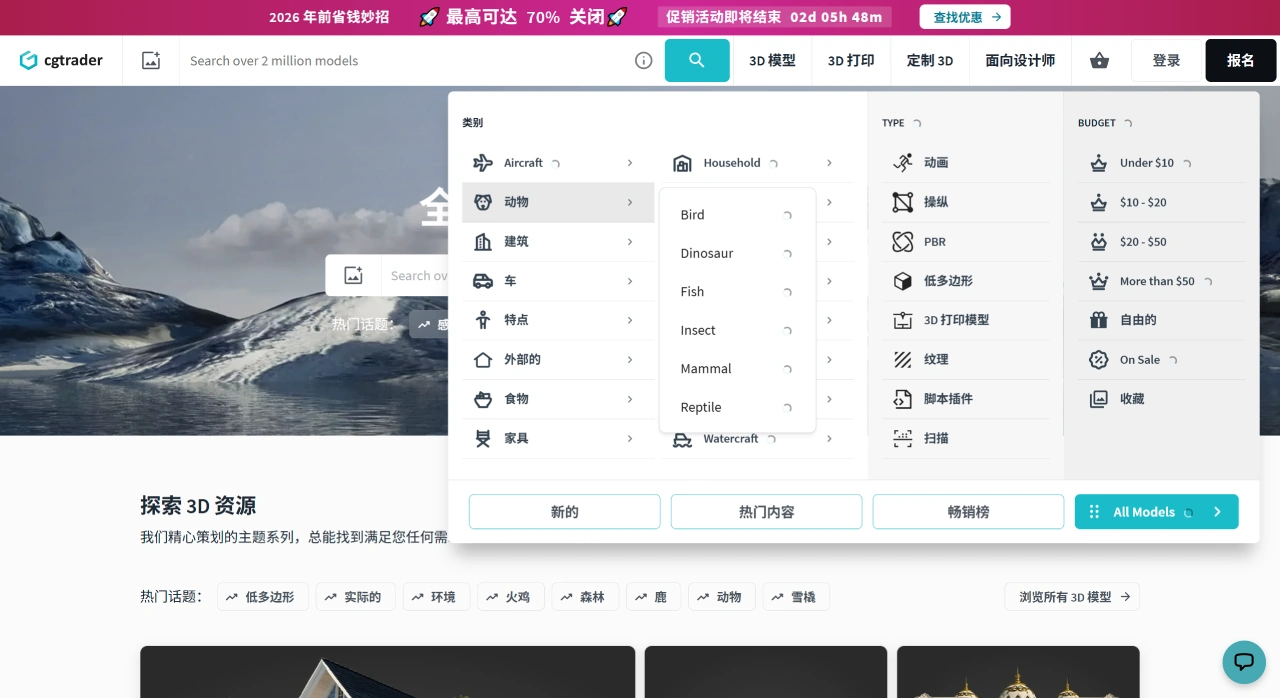
Visit the official website: Go to the CGTrader official website. The homepage displays popular model categories as well as the latest or best-selling model recommendations.
Search for models: Enter keywords in the search bar at the top, such as "car," "furniture," "animal," etc. You can also directly browse the platform's preset categories, such as architecture, characters, furniture, machinery, etc. There are more than a dozen major categories, each subdivided into many subcategories.
Filter resources: On the search results page, you can further filter by conditions such as "free/paid," "file format (e.g., OBJ, FBX, etc.)," "usage (e.g., gaming, architectural visualization)," and "rating."
View details: Click on the target model you want to enter the details page, where you can see high-definition preview images, real-time 3D preview, model parameters, applicable scenario descriptions, user reviews, and other information.
Download or purchase:
Free models: Click the "Download" button directly, and after completing a simple registration (requiring email verification) as prompted, you can download them for free.
Paid models: Click "Buy," select the license type (e.g., personal use, commercial use, etc.), and download after payment via credit card or PayPal.
2. Upload and Sell Models
Register a professional account: If you want to upload and sell models, you need to register an account and complete your personal information (such as contact details, bank account, etc., which are used for subsequent earnings settlement).
Prepare model files: Ensure that the models meet the platform's requirements (such as compatible file formats, no copyright issues, and meeting precision standards). It is recommended to provide multiple format versions (e.g., OBJ + FBX), along with high-definition rendered images.
Upload the model: After logging in, go to the "Sell" page, fill in the model title and description (such as usage, parameters, detailed specifications), tags (keywords, such as "modern," "low poly"), upload the model files and preview images, and set the price (you can also choose the platform consignment commission model).
Submit for review: The platform will review the model (checking quality, copyright compliance, etc.). Once approved, the model will be displayed on the marketplace and available for other users to search and purchase.
Earn revenue: When buyers make a purchase, designers can receive a 70%-80% sales commission (the specific ratio is based on the contract), and the earnings will be settled periodically to the linked bank account.
3. Use Enterprise Customization Services
If an enterprise has large-scale or special 3D modeling needs (such as product visualization, industrial design prototypes), they can contact the platform team through the "Enterprise 3D Modeling" section to submit specific requirements (such as model type, quantity, usage, delivery time, etc.). The platform will provide customized modeling, optimization, and format conversion as one-stop services.
4. Use AI Tools
CGTrader's Modelry AI service can automatically convert images, such as hand-drawn sketches or photos of real objects, into 3D models. Users can upload images through the relevant entry point, select generation parameters, and the system will generate the model, which can be directly downloaded or further edited. Some features may require linking an enterprise account or subscribing to premium services.
Notes
Free models: Generally can only be used for personal learning or non-commercial purposes. Before commercial use, confirm the licensing scope. Some free models also allow commercial use, but check the description on the details page.
Paid models: When purchasing, clarify the license type (such as single use, unlimited commercial use, etc.) to avoid infringement risks.
File formats: Before downloading, confirm the supported formats of the model, such as whether it is compatible with common software like Blender, Maya, and C4D.
As an important platform in the 3D design industry, CGTrader greatly improves the circulation efficiency of 3D model resources by connecting creators with demanders, and promotes the development of the entire industry ecosystem.















