
 Script Planner Assistant▸
 AI Apps
 AI News

Music Tag Web: A Web-Based Music Tag Editor
Music Tag Web: A Web-Based Music Tag EditorIntroduction
What is Music Tag Web
Music Tag Web is an open-source web-based music tag editor that can directly edit audio metadata on a server or local machine, suitable for managing music servers such as Navidrome. It supports multiple formats including FLAC, APE, WAV, aiFF, WV, TTA, MP3, M4A, OGG, MPC, OPUS, WMA, DSF, DFF, MP4, and offers features such as batch editing, music fingerprint recognition, lyrics and cover art management, format conversion, full-track splitting, simplified/traditional Chinese conversion, text replacement, operation history, and mobile adaptation. The project's backend uses Python + Django, with Vue on the frontend, and its image is hosted on Docker Hub (xhongc/music_tag_web:latest).
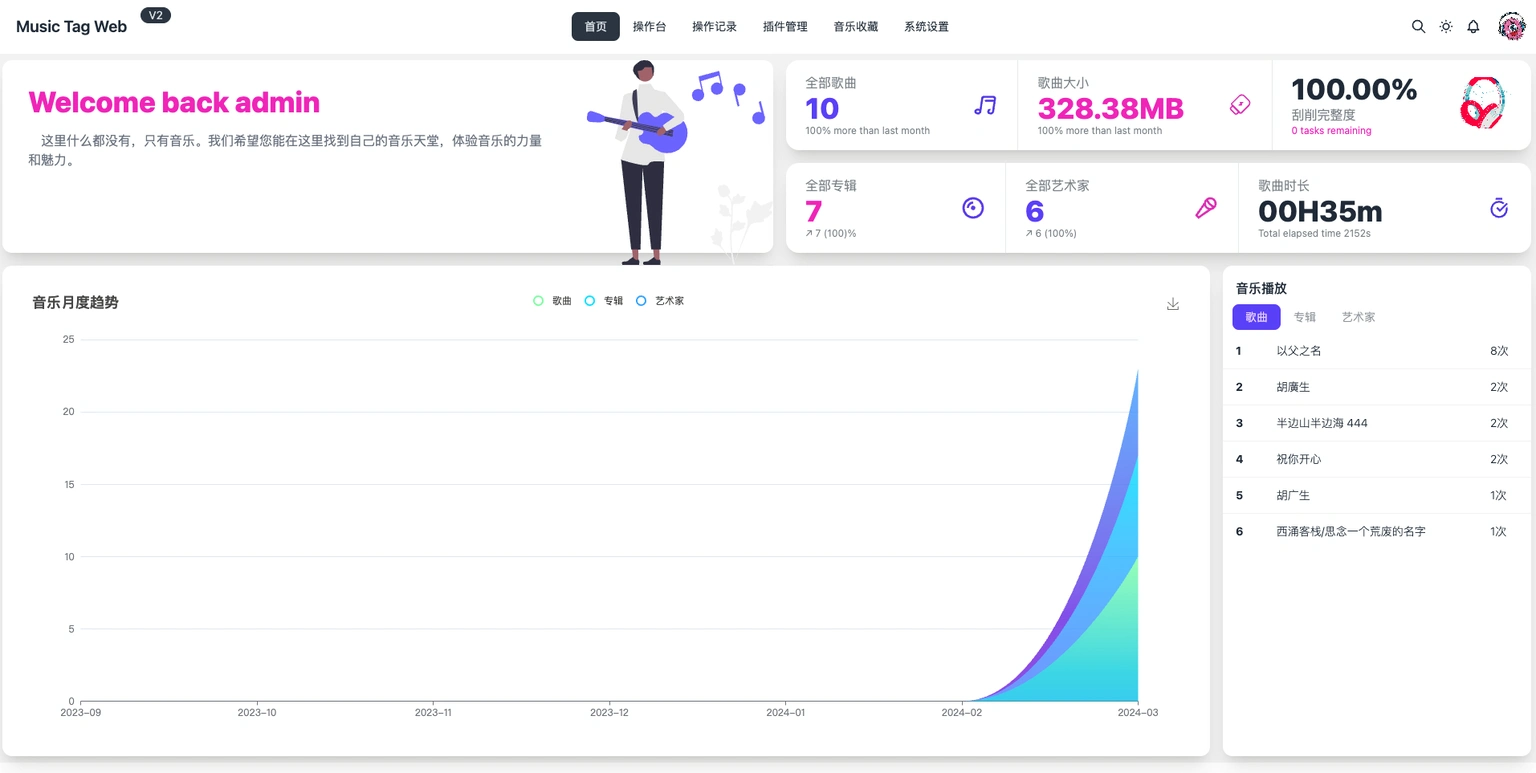
Music Tag Web Core Features
Tag Editing
Basic tags: covers song title, artist, album, release year, genre, track number, and cover image.
Advanced tags: includes embedded lyrics, composer, arranger, copyright information, and record label.
Batch processing: supports batch importing multiple audio files and uniformly modifying tag rules, such as batch adding album names or unifying covers, thereby improving efficiency.
Format compatibility: supports common audio formats such as MP3, FLAC, AAC, WAV, OGG, APE, etc. Some tools can read and write different tag standards, such as ID3v1, ID3v2, and Vorbis Comment.
Cover management: allows uploading local images as album covers, and supports cropping and scaling to ensure the cover matches the audio.
Export and save: after editing, you can directly download the modified audio file, or export the tag data as text (such as CSV) for backup.
How to Use Music Tag Web
First upload the music, then check the folder in the directory tree on the left. Next, click "Auto Scrape" on the right side, select "Loose Mode", "All Sources", and "Overwrite Old Tags", then save. For items displayed in red that failed, you need to edit them manually—enter the correct album or artist, perform a search, click the matching result, and save. You can also organize everything with one click: click "Organize Files" at the top, select the template artist/{album}/track{title}, and execute.
Quick Deployment
# 1. Create directories (music library + configuration)
mkdir -p /volume1/music /volume1/docker/music-tag
# 2. Start container (port 8002, image ~300 MB)
docker run -d --name music-tag-web \
  -p 8002:8002 \
  -v /volume1/music:/app/media:rw \
  -v /volume1/docker/music-tag:/app/data \
  --restart unless-stopped \
  xhongc/music_tag_web:latest
Visit http://NAS-IP:8002 in your browser, use the default account/password admin/admin to start scraping.
To upgrade or roll back, simply run docker pull xhongc/music_tag_web:latest and recreate the container; configuration and music files are in the host's mapped directories and will not be lost.
Music Tag Web Use Cases
Personal music library organization: uniformly edit tags for scattered downloaded songs, making it easier for players to categorize and search.
Self-media / podcast production: add titles, authors, and covers to original audio to meet platform upload requirements.
Music enthusiast sharing: when organizing lossless music albums, complete the tag information to enhance the sharing experience.
FAQ
Port conflict: change the parameter to -p 8011:8002.
Chinese garbled characters: first "Clear All Tags", then scrape again; or set the ID3 encoding to UTF-8.
Full tracks cannot be split: confirm that the corresponding .cue file is in the same directory, upload it, and click the "Split" button.
External network access: set up port 8002 mapping on the router, or use reverse proxy or intranet penetration methods.
Music Tag Web Related Resources
Source code / documentation / changelog: https://github.com/xhongc/music-tag-web
Online Demo: https://xiers-organization.gitbook.io/music-tag-web-v2













