
 Script Planner Assistant▸
 AI Apps
 AI News

Yandex Games: Free Online Gaming Platform by Russia's Yandex
Yandex Games: Free Online Gaming Platform by Russia's YandexIntroduction
Yandex Games is a free online gaming platform launched by Yandex, Russia's largest search engine. It aggregates a large number of games in various styles, covering different audiences. The primary language is Russian, though some games are in English and some incorporate Chinese elements. Users don't need to download or install any software—they can play games directly in the browser.
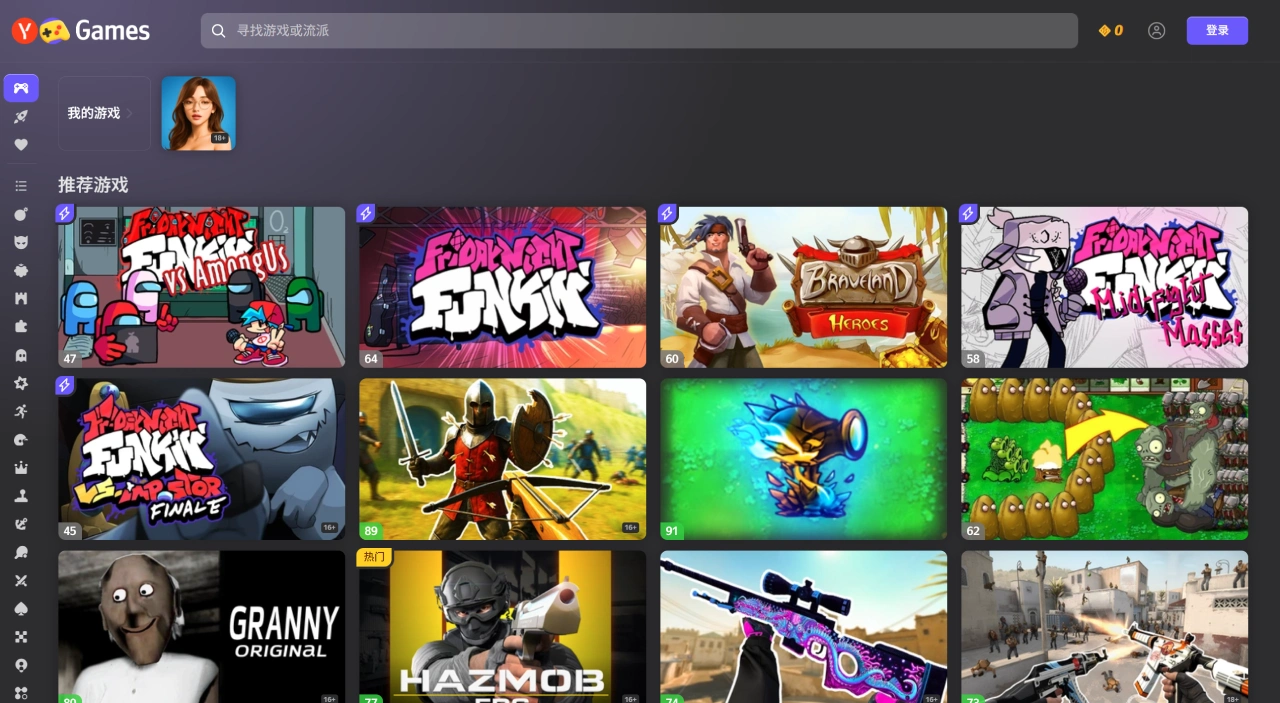
Game Categories on Yandex Games
Yandex Games hosts over 15,000 free browser games across a wide range of genres:
Action games: Such as ninja battles and shooting games, offering players thrilling combat experiences.
Puzzle games: Featuring various puzzles and intellectual challenges to exercise the brain.
Racing games: Including car simulators and driving games for high-speed excitement.
Card games: Single-player solitaire games as well as online battles with friends.
Music games: Players can dance to musical rhythms or compose melodies on piano keys.
Simulation/management games: Run a farm, a city, or a business.
Features of Yandex Games
Broad audience: Clearly marked age ratings of 12+, 16+, and 18+—ranging from educational puzzles for children (such as "Kids Learning Puzzles") to meme-style and light competitive games for adult players, meeting the needs of different age groups.
Easy gameplay: Most games feature simple controls (such as tapping, merging, and puzzle-solving), require no learning curve, and are suitable for playing in short bursts—fitting the casual gaming positioning.
Diverse elements: Incorporates popular elements like meme culture, classic IPs, regional culture (such as Soviet-era elements), and cute pets (cats, pugs, capybaras), making the games more engaging and aligned with player interests.
Language blending: Game names are primarily in Russian, with some in English, and Chinese characters such as the "福" (fortune) symbol also appear. This reflects a certain cross-cultural fusion that may cater to users in Russian-speaking regions and multilingual audiences.
Advantages and Disadvantages
Advantages: No download or installation required, so you can start playing quickly; a wide variety of games to satisfy different players; most games are free.
Disadvantages: Because games run in the browser, graphics and gameplay may be relatively simple; social interaction features are limited.
How to Use Yandex Games
For Players
Visit Yandex Games: Go to the Yandex Games homepage.
Choose a game category: The homepage features popular and new games, and you can also use the navigation bar to select categories such as "Puzzle Games" or "Action Games."
Sign in (optional): To save progress, participate in leaderboards, or enjoy personalized services, click "Sign In" in the upper right corner and enter your Yandex account credentials.
Start playing: Click the icon of a game you like to enter its page, then click "Start" to begin playing.
For Developers
Create an account: Visit the Yandex Games developer console and follow the instructions to create a developer account.
Add a game: Add a game in the console, fill in the description, attach promotional materials, set localization languages, and upload the game archive to Yandex servers.
Install the SDK: Integrate the Yandex Games SDK into the game code—this is a required condition for the game to pass review. You can choose to add it synchronously or asynchronously.
Enable monetization: Create an account on Yandex Partners and accept the agreement, fill in payment details and contact information, then enable ad monetization in the developer console.
Test the game: You can test on a local server or configure a local server using an npm package.
Submit for review: After completing the steps above, submit the game to the Yandex Games platform for review.















