
 Script Planner Assistant▸
 AI Apps
 AI News

UXbot: Turn Product Ideas into Interactive Designs Fast
UXbot: Turn Product Ideas into Interactive Designs FastIntroduction
UXbot is an AI product design tool centered on the concept of "Imagine, and it's Designed," helping users quickly turn product ideas into high-fidelity interactive designs. Users simply describe their product concept, and the AI automatically designs user flows as well as attractive, well-laid-out pages.
UXbot helps product teams solve problems such as slow idea implementation, tedious revisions, and difficulty with multi-platform adaptation. It uses a unified tool to boost efficiency, ensure consistent design style, and make the product journey from idea to detail optimization more fluid, avoiding development delays and turning ideas into real products faster.
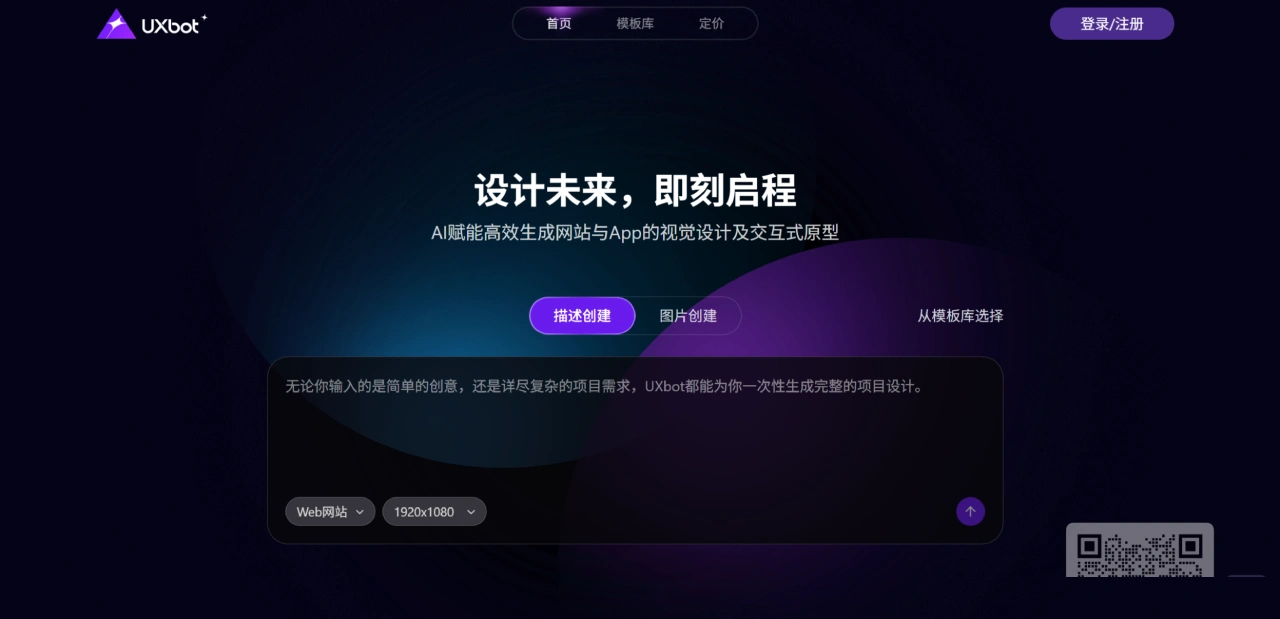
UXbot Main Features
Design Generation and Style Adaptation
AI Auto Generation: Enter a product description or upload a reference screenshot (PNG/JPG format), and UXbot will automatically design well-laid-out, attractive pages. It supports two approaches: "from requirement to design" and "from screenshot to design."
Multi-Style Prototype Generation: After entering requirements, UXbot generates multiple mainstream style prototypes (such as light skeuomorphism, frosted glass, dark mode, etc.) with one click. Users can compare and choose freely without repeated revisions.
Smart Image Filling: UXbot can add images to the current screen or all screens, and you can set a style (changing styles will consume page quota; the default usage is 20/300).
Editing and Optimization Capabilities
High-Precision Editor: UXbot lets you adjust everything from the overall layout down to element specifics (such as layout, dimensions, font type/size/color, etc.), clarifying the design intent of every part.
Smart Regeneration: Breaking through the limits of local edits, UXbot can reconstruct anything from a single element to an entire design with one click, giving you more design freedom.
Local AI Optimization: You can optimize specific local areas of a design individually without adjusting the whole thing.
Multi-Platform Adaptation and Compatibility: Supports automatic adaptation across multiple platforms, eliminating the need for repeated development for different devices.
Workflow and Collaborative Output
Visual Workflow: UXbot can build the main product flow and provide editable, high-quality workflows that clearly present business logic.
Interactive Demo Preview: Convert designs into interactive demos with one click to intuitively showcase dynamic effects. It supports precise permission control, enabling seamless collaboration.
Sharing and Export: Supports two sharing modes—"View Only" (browse only) and "Allow Import" (editable but does not affect the original project). Designs can also be exported as Sketch or HTML files with one click to push projects forward.
UXbot Usage Advantages
Startup teams or independent developers can quickly build a minimum viable product, saving time and cost while accelerating product launch.
Users without a professional design team or experience can also generate high-quality design solutions, lowering the design barrier.
By leveraging AI technology to quickly generate design prototypes, UXbot supports modification and iteration, improving design efficiency.
UXbot Target Users
Product Managers: Quickly turn product ideas into visual prototypes with UXbot, making it easier to communicate with the team and validate concepts.
Designers: Use UXbot as an辅助 tool to quickly generate initial design drafts, saving time for creativity and detail optimization.
Startup Teams and Independent Developers: When resources are limited, use UXbot to quickly build prototypes, validate the market, and attract investment.
UXbot Application Scenarios
Homestay Category: For example, "Secret Retreat Homestay" and "Sifan Homestay," designing homepages (showcasing the brand and featured homestays), exploration pages, booking interfaces, etc., with a focus on scenario-based descriptions (such as "270° viewing terrace").
Service Category: For example, "Moving Butler" (provides moving quotes and one-stop services), "Little Umbrella Insurance" (industry solutions, corporate group insurance), "Pet Xiaomeng" (pet anti-loss, medical subsidies, etc., with 68,000+ members).
Education Category: For example, higher education platforms (course categories: online 1-on-1, in-person 1-on-1, etc.) and product management education platforms (providing practical skill learning).
Community and Tool Category: For example, "Smart Community" (supports bill payment, free physical exams for the elderly, and other services), "Time Restorer" (AI photo restoration), and OA office management systems.
UXbot Basic Usage Steps
Register and Log In: Visit the UXbot official website to register, or use authorized login via WeChat, DingTalk, or other accounts.
Create a Project: After logging in, click to create a project, enter a name, select the project type (such as Web, App, etc.) and design style, then click Create.
Generate Designs
Text Generation: Select the "AI Text-to-Product" mode and enter a detailed description of your product idea (such as target users, core features, etc.). UXbot will build a scenario flow and generate page designs.
Upload Reference Image Generation: When you have a reference image, upload it and UXbot will quickly replicate and innovate to generate new designs.
Edit and Modify: The generated interface can be adjusted freely. After selecting a module, tell the AI your modification ideas in natural language (such as "change the button to blue"), or perform pixel-level fine edits (such as adjusting button placement).
Preview and Export: Click Preview to see interactive effects. Once satisfied, export as Sketch, HTML, or other formats for further refinement or collaboration.
Frequently Asked Questions
How does multi-platform design achieve "no repeated development"?
It is achieved through "built-in mainstream device resolutions + automatic adaptation algorithm," supporting four platforms: Web sites (responsive design adapted to various browsers), mobile APP (native-level experience, ready to publish directly), desktop (immersive professional experience), and tablet (touch-optimized). All four platforms are generated based on the same project, with no need to build separate frameworks.
What are the advantages of "Smart Regeneration" over traditional local edits?
Traditional tools can only modify a single element (such as text color), while UXbot supports one-click reconstruction ranging from a single element to an entire design. It automatically matches design logic (for example, when changing a button, it synchronizes other similar buttons), reducing repetitive operations and providing more design freedom.
How do team collaboration features ensure permissions and version consistency?
Sharing modes: "View Only" (can only view) and "Allow Import" (editable but does not affect the original project).
Interactive Demo Preview supports precise permission control, allowing specific members to view specific flows.
Unified export formats (Sketch/HTML) prevent version confusion. The visual workflow keeps the team aligned, ensuring consistent design logic.












