
 Script Planner Assistant▸
 AI Apps
 AI News

PeiDuWa: An Open-Source Immersive Translation Browser Extension
PeiDuWa: An Open-Source Immersive Translation Browser ExtensionIntroduction
🐸 Read Frog is an open-source immersive translation browser extension that helps you learn a language deeply from any website. It supports popular browsers like Chrome and Edge. It can translate content as you browse web pages, automatically identify the key points of an article, and explain words, phrases, and sentences according to your language level, helping you learn a language by reading web pages you are interested in. In addition, it can also use AI models like Openai and DeepSeek (users in China can use DeepSeek, or the default 4omini model).
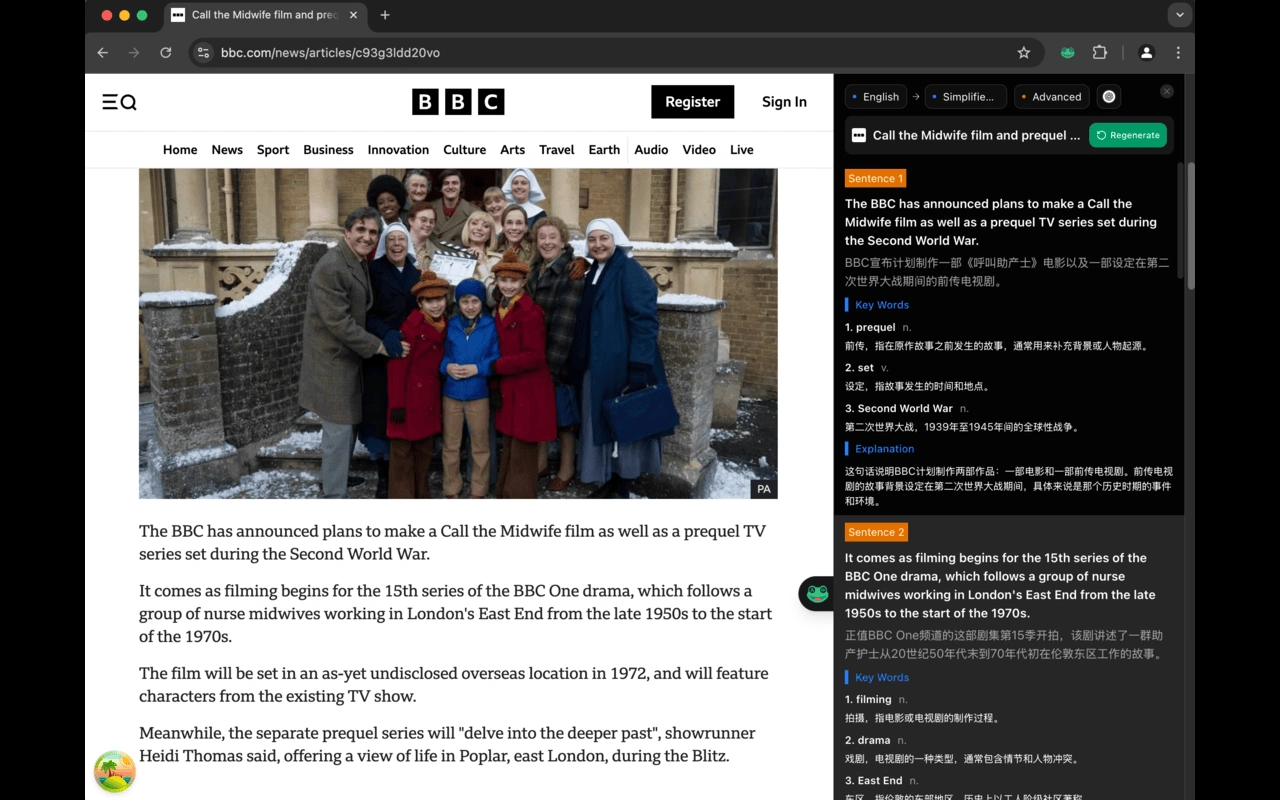
✨ Read Frog's main features are as follows:
Translate while reading: Translated content is displayed right next to the original text on the web page (such as next to text or images), without interrupting your original reading flow.
Identify key points: Automatically find important information in the article and organize it into simple summaries, helping you understand it faster.
Detailed explanations: Based on your language level (such as a beginner or someone who has been learning for a while), it tells you what words mean, how sentence grammar works, and also provides example sentences.
Learn through real-life context: Based on the web content you browse (such as news or academic articles), it helps you design learning scenarios so you can learn the language in authentic contexts.
Multiple AI models: Uses DeepSeek by default (available for users in China) or models like OpenAI, and you can also add other translation services.
✨ Read Frog is suitable for the following situations:
Learning a foreign language: If you are learning foreign languages like English or Japanese, you can improve your reading ability by reading authentic web content such as news and academic papers.
Reading academic materials: When reading foreign-language literature, it can automatically identify key information and translate it, saving time.
Understanding different cultures: Translating content from different backgrounds, such as international news and cultural articles, helps you understand other cultures.
Learning during spare time: For example, while commuting or resting, browse the web and learn at the same time, making good use of fragmented time.
✨ How to use Read Frog:
Installation:
Chrome or Edge browser: Go to the Edge Add-ons store or Chrome Web Store, search for "Read Frog" and install it.
Other browsers: Go to GitHub to download the corresponding version and install it yourself following the instructions.
Start using:
After opening a web page, click the extension icon, select the "Immersive Translation" mode, and the translated content will appear next to the original text.
If you want to see the key points of the article, click the "Smart Extract" button, and it will organize a summary for you.
Adjust settings:
In the extension settings, you can choose the AI model (such as DeepSeek or 4omini), language level (beginner or advanced), and adjust the translation style.
Supports adding your own dictionaries, such as technical terms or uncommon words, to make translations more accurate.
Read Frog is developed by mengxi-ream, a former ByteDance software engineer. As of July 2025, this project has received 500+ stars on GitHub.
🌟 Github (open source code): https://github.com/mengxi-ream/read-frog















