
 Script Planner Assistant▸
 AI Apps
 AI News

CDKM: Online File Converter
CDKM: Online File ConverterIntroduction
CDKM is an online file converter built on several open-source projects such as Ghostscript, LibreOffice, and FFMpeg. Its standout feature is "offline conversion—no need to upload files."
The conversion process is simple: batch-select local files, or enter the URL of an online file; choose the target format, and optionally set some conversion settings as needed; click "Start Conversion" and wait. Target formats include JPG and more. Once conversion is complete, you can view the file name, size, and download it.
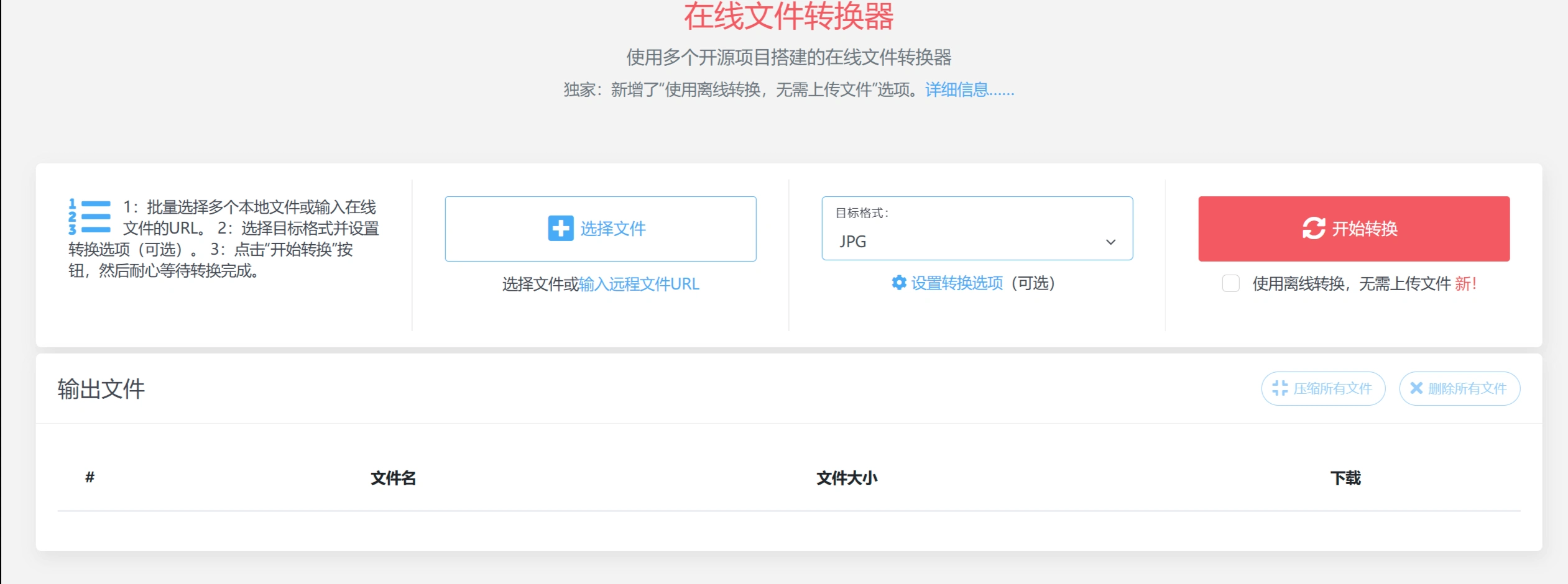
Website Features and Highlights
File Conversion: Supports multiple formats, including documents (PDF, Word, Excel, etc.), images (JPG, PNG, etc.), audio (MP3, etc.), and videos (MP4, etc.).
Offline Conversion: Newly added "offline conversion—no need to upload files," applicable to images, videos, and audio; documents are not currently supported. It relies on modern browser technology to perform conversions locally, making it ideal for large files or sensitive data.
Easy to Use: No registration required, all operations are completed on a single webpage, up to 10 files can be selected at a time, and all output files can be packaged and downloaded or deleted with one click.
Broad Compatibility: As long as your device has a browser, it works on any system, including Windows, Linux, Mac OS, Android, iOS, etc., with no software to download.
Security and Privacy Protection
Data Encryption: All data transmission uses TLS encryption, with 128-bit SSL protection.
File Storage and Deletion: Files are stored in random private directories and are automatically deleted after a maximum of 2 hours, or you can delete them manually at any time.
Server Security: Servers are housed in high-security data centers with electronic monitoring and multi-factor access control.
How to Convert Files?
Select local files or enter the URL of an online file.
Choose the target format and set conversion options as needed.
Click "Start Conversion" and wait for it to finish; the output files will be listed on the same webpage.
Conversion Limits
Quantity and Size: Up to 10 files per session; documents up to 40MB, other formats up to 200MB.
Time: Each file can take a maximum of 10 minutes to convert; it will stop automatically if it times out.
Server: Limits may be adjusted during overload, and some conversions may fail.
Frequently Asked Questions
✅ What formats does CDKM support?
You can check at https://cdkm.com/cn/format. Only some popular formats are listed, but many more are actually supported—even uncommon ones can be converted.
✅ What platforms does CDKM support?
Any system with a browser works, such as Windows, Linux, Mac OS, Android, iOS, etc. No software download is required.
✅ What are the conversion limits?
Up to 10 files per session; documents up to 40MB, other formats up to 200MB; each file can take a maximum of 10 minutes to convert, stopping automatically upon timeout; limits may be adjusted during server overload.
✅ What does "Always convert documents using open-source projects" mean?
By default, official software (such as Microsoft Office) is used for conversion; checking this option switches to the open-source LibreOffice instead.
✅ I accidentally closed the page—can I still download?
The history page shows all output files, which are stored in the browser's local storage. You can click "Delete All Files" to clear the history.
✅ Why did the conversion fail?
It's usually due to server overload; try again later. It may also be because the file is unsupported, corrupted, encrypted, etc. Click "Why it failed?" to see the specific reason.
✅ How do I download all output files as a single ZIP?
Click the "Compress All Files" button in the "Output Files" area. Cross-system conversions may generate two ZIPs.
✅ How do I delete all files?
Click the "Delete All Files" button in the "Output Files" area. Files will be deleted immediately and cannot be recovered; if not manually deleted, they will be automatically deleted after 2 hours.













