
 Script Planner Assistant▸
 AI Apps
 AI News

n8n: An Open-Source Workflow Automation Platform
n8n: An Open-Source Workflow Automation PlatformIntroduction
What is n8n?
n8n is a powerful workflow automation software designed for technical teams. It supports precise building through code and also enables rapid workflow construction via drag-and-drop. It can be deployed locally or hosted in the cloud, and integrates with over 500 applications. Its capabilities cover scenarios such as IT operations (e.g., onboarding account provisioning for new employees), security operations (e.g., security incident ticket enrichment), DevOps (e.g., converting natural language commands into API calls), and sales (e.g., generating insights from customer reviews). n8n has 101.4k GitHub stars, a 4.9/5 G2 rating, and a community of over 200,000 members. It combines the strengths of code-based and UI-based building, offering enterprise-grade security, performance, and collaboration features.
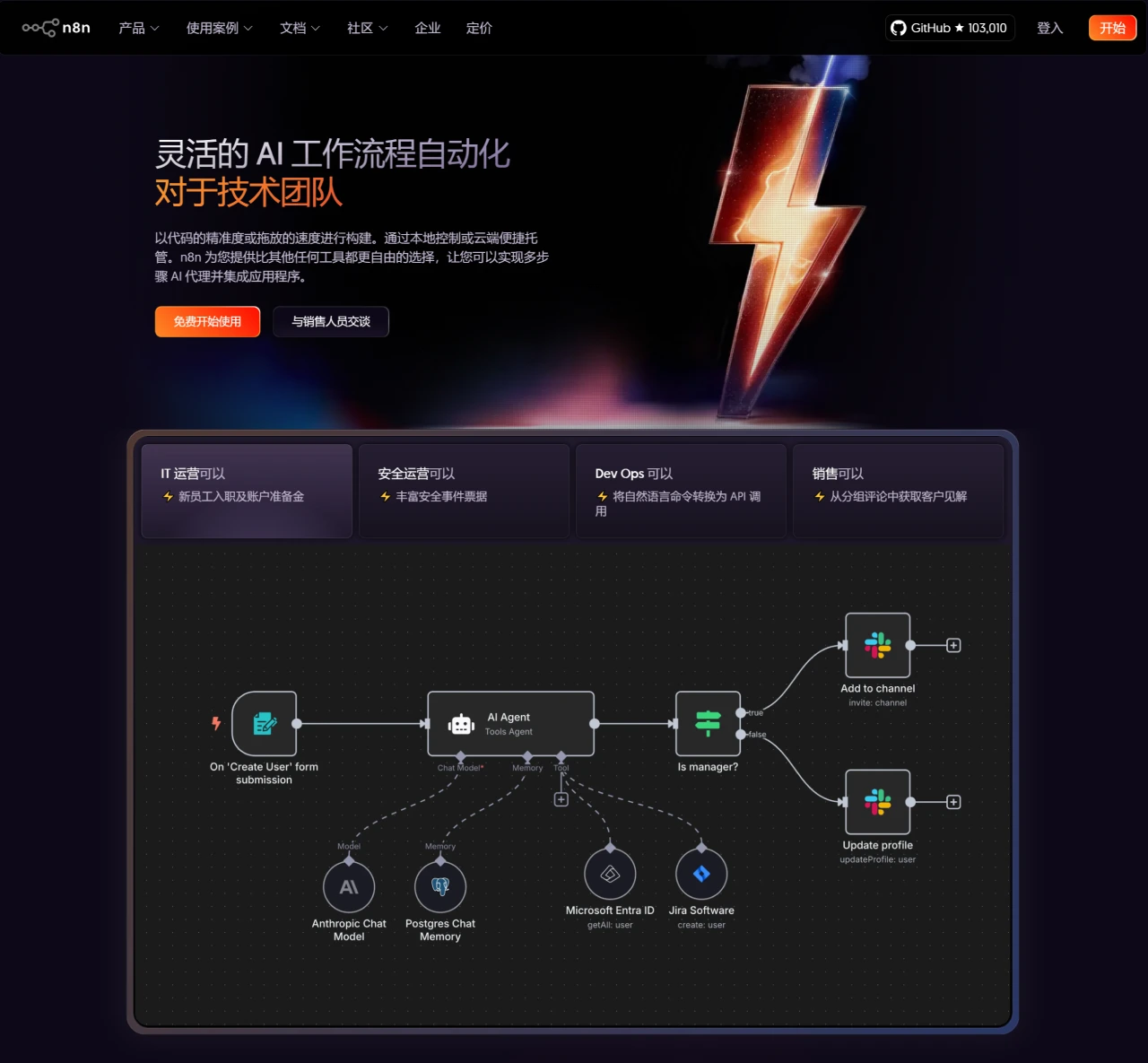
n8n Features
Highly Customizable: With strong customization capabilities, it meets the automation needs of complex business scenarios. Users can quickly build workflows using a rich node library and implement more complex business logic by writing custom functions and nodes.
Rich Integration Capabilities: It offers over 400 integrations that seamlessly connect with numerous popular tools and services, such as Google Sheets, Slack, GitHub, AWS, Twitter, and more. For each service, n8n provides built-in nodes, allowing users to achieve data exchange and automated operations between systems with simple configuration. If a service without native support is encountered, users can also perform custom integration through the HTTP Request node.
Visual Operation Interface: Equipped with an intuitive visual workflow editor, users can define workflows by dragging and dropping connections between different nodes, which significantly lowers the barrier to automation development and makes it easy for non-technical personnel to get started. At the same time, it also provides rich API and script support, making it convenient for developers to write custom code.
Flexible Deployment Options: It supports both self-hosted deployment and cloud service. Users can deploy n8n on their own servers for full control over data and the deployment environment, or choose the cloud service for a convenient and quick user experience.
Powerful Template Library: It has over 900 ready-to-use templates covering various common workflow scenarios such as marketing automation, data processing, and project management, helping users quickly kick off automation processes.
Fair-Code License: This license allows users to freely view, modify, and distribute the code, while setting specific terms for commercial use, ensuring the visibility and extensibility of the source code. The enterprise license additionally provides advanced features and support.
n8n Use Cases
Business Process Automation: Can be used to automate processes in enterprise operations such as order processing, customer relationship management, and supply chain management, improving work efficiency and accuracy.
Data Processing and Analysis: Able to automatically retrieve data from multiple data sources, perform cleaning, transformation, and analysis, and store or visualize the results.
Marketing and Customer Service: Enables automation of marketing activities, such as email marketing and social media promotion; in customer service, it can automatically handle customer inquiries and complaints, assign tasks to customer service staff according to preset rules, and boost customer satisfaction.
Other Scenarios: Can also be used for scheduled tasks and planned jobs (e.g., daily/weekly report generation, system maintenance tasks, automated data backups), business approval process automation (e.g., expense reimbursement approval, leave request processing, content publishing review), anomaly monitoring and alerting systems (e.g., website/API health checks, business metric early warnings, security incident response), customer service and interaction automation (e.g., intelligent customer service routing, satisfaction survey follow-ups, personalized marketing campaigns), as well as DevOps automation (e.g., code merge and deployment pipelines, anomaly log analysis), and more.
n8n Installation Methods
Install Using Docker:
Install Docker.
Run the n8n container: docker run -d --name n8n -p 5678:5678 n8nio/n8n. This command runs n8n in the background and listens on local port 5678, accessible via the browser at http://localhost:5678.
If you wish to persist data, you can use the command: docker run -d --name n8n -p 5678:5678 -v ~/.n8n:/home/node/.n8n n8nio/n8n. Workflows and configuration information will be saved in the local ~/.n8n directory.
Install Using npm:
Global install: npm install n8n -g.
Start n8n: n8n. By default, it listens on http://localhost:5678. If you need to customize the port or configure the database, you can adjust using parameters, for example n8n --port 8080.
Source Code Deployment:
Clone the repository: git clone https://github.com/n8n-io/n8n.git.
Enter the directory: cd n8n.
Install dependencies: npm install.
Build the project: npm run build.
Start n8n: npm run start.
n8n User Guide
Create a Workflow: After starting n8n, click the "Create Workflow" button to create a new workflow.
Add Nodes: Click the "+" button on the left, select the required nodes (such as API, database, file storage, etc.), and drag them onto the workflow canvas.
Configure Nodes: After clicking a node, configure its specific parameters, such as the connected service, API URL, request method, etc. For example, to send a Slack message, select the Slack node and enter the API Token and message content.
Connect Nodes: Connect different nodes by dragging to define their execution order. For example, when an HTTP request is received, trigger a database query and send the results to a specified Slack channel.
Execute Workflow: After completing the configuration, click the "Execute Workflow" button to run the workflow and verify that it runs as expected.
Project Link
https://github.com/n8n-io/n8n














