
 Script Planner Assistant▸
 AI Apps
 AI News

Precise Screenshot: A Smart Web Screenshot Tool
Precise Screenshot: A Smart Web Screenshot ToolIntroduction
What is Precision Screenshot?
Precision Screenshot is an intelligent webpage screenshot tool that solves the problem of users having to frequently adjust the screenshot area ratio when capturing webpages, thanks to its one-click intelligent precision screenshot feature. It supports intelligent recognition, auto-alignment, continuous screenshot, and more, making it suitable for various scenarios such as designers, content creators, e-commerce sellers, and social media operators.
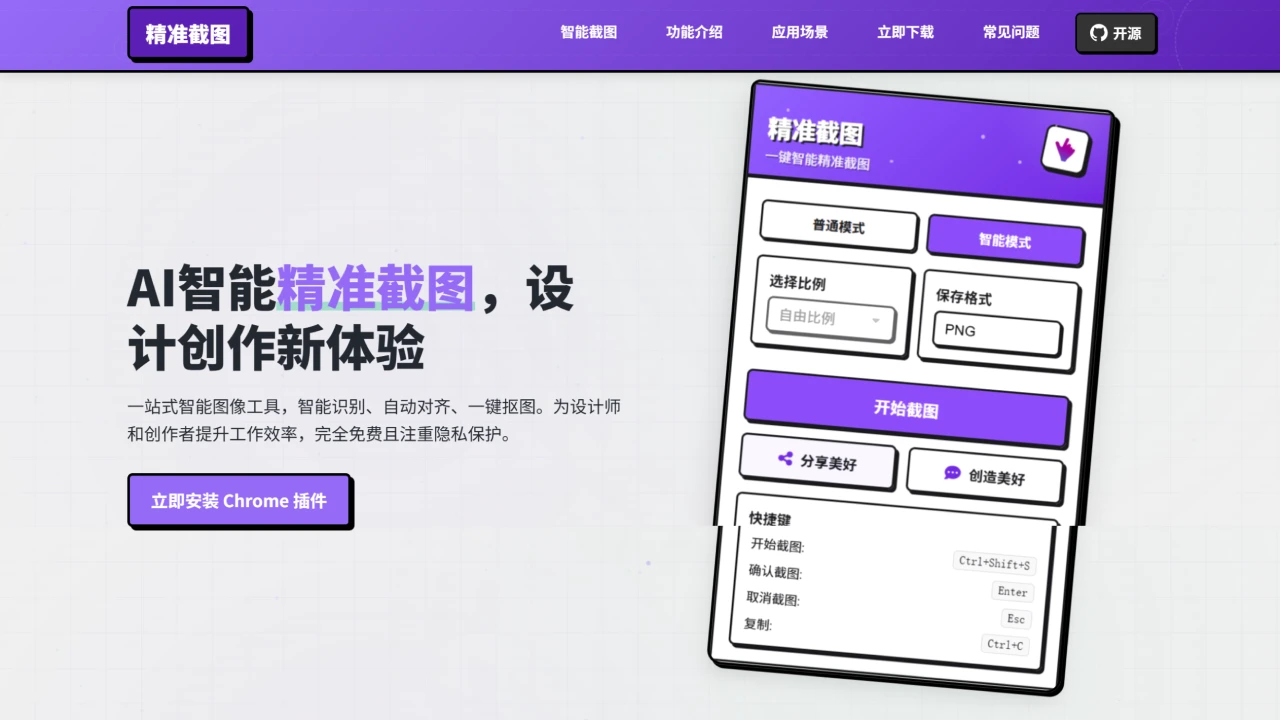
Precision Screenshot Features
Intelligent Recognition: Automatically identifies webpage content. Hover your mouse to see the area to be captured, click to capture precisely—no manual framing required.
Auto-Alignment: The screenshot area automatically aligns to the edges of the page content, displaying guide lines to help adjust the position for neater screenshots.
Ratio Settings: Preset commonly used ratios (such as square, landscape, portrait, etc.), with support for custom ratios to meet different needs.
Continuous Screenshot Mode: Scroll the page to take continuous screenshots without exiting screenshot mode.
Free Drag Adjustment: Supports dragging to adjust the size and position of the screenshot area while keeping the selected ratio unchanged.
Keyboard Shortcut Support: Provides convenient shortcut operations to make the screenshot process smoother and more efficient.
Intelligent Content Recognition: Automatically identifies buttons, images, text, and other webpage content, accurately displaying the capture range.
Real-Time Preview: Displays the content size in real time on hover, helping you quickly find the part you want to capture.
One-Click Capture: Click to capture the currently highlighted content.
Precision Screenshot Applications
Designers: Quickly obtain webpage materials at specific ratios to collect inspiration and reference materials for design projects.
Content Creators: Prepare image assets that meet specifications for different platforms, improving content production efficiency.
E-commerce Sellers: Create product images with uniform specifications to maintain visual consistency in the store.
Social Media Operators: Quickly capture images suited to the size requirements of each platform, optimizing publishing results.
Designer Inspiration Collection: Through the intelligent recognition feature, designers can quickly collect webpage references, improving collection efficiency.
Product Display Optimization: With continuous screenshot mode and ratio presets, e-commerce sellers can quickly process large volumes of product images while maintaining visual consistency.
Social Media Content Creation: Using intelligent screenshot mode and preset ratios, content creators can quickly capture images suited to different platforms, improving publishing efficiency.
How to Install This Precision Screenshot Tool?
Install via Chrome Extension (Online Installation)
Open Chrome browser and go to the extensions management page (enter chrome://extensions/ in the address bar).
Enable "Developer mode".
Click "Load unpacked".
Select the unpacked folder (see the offline installation section for unpacking steps).
Offline Installation
Visit the GitHub Release page of Precision Screenshot.
Download the latest version of the ZIP file.
Extract the ZIP file to a local folder.
Open Chrome browser and go to the extensions management page (enter chrome://extensions/ in the address bar).
Enable "Developer mode".
Click "Load unpacked" and select the unpacked folder.
Usage Tutorial
After installation, click the extension icon in the browser toolbar or use the shortcut Ctrl+Shift+S to start a screenshot.
In screenshot mode, you can switch between continuous screenshot mode, magnetic snapping, and locked dimensions via the toolbar buttons.
In intelligent element detection mode, webpage elements are automatically highlighted when hovering with the mouse.
Precision Screenshot FAQ
1. What is the intelligent recognition feature?
Through automatic analysis of webpage content, the intelligent recognition feature allows users to capture content without manual framing.
2. Is it free?
Precision Screenshot is a completely free Chrome browser extension.
3. Privacy protection?
Screenshot content is processed locally only and will not be uploaded to any server.
4. How to switch screenshot modes?
Users can select different modes in the extension popup, or switch modes during the screenshot process.
5. Which browsers are supported?
Compatible with all Chromium-based browsers, such as Google Chrome, Microsoft Edge, Opera, etc.
Github:https://github.com/zhushen12580/short















