
 Script Planner Assistant▸
 AI Apps
 AI News

V0.dev: AI-Powered Generative UI Tool & How to Use It
V0.dev: AI-Powered Generative UI Tool & How to Use ItIntroduction
v0.dev is a generative user interface tool based on AI launched by Vercel. It aims to simplify the design engineering workflow by generating React UIs from simple text prompts and images. The tool leverages the shadcn/ui and Tailwind CSS libraries to generate code, and supports copying and pasting this code directly into projects for use. The launch of v0.dev received widespread attention and interest, with 100,000 people signing up for the waitlist within just three weeks.
v0.dev works by generating UIs based on text prompts submitted by users. It can automatically produce several interface options based on user input for selection and customization, after which users can copy the code into their own projects.
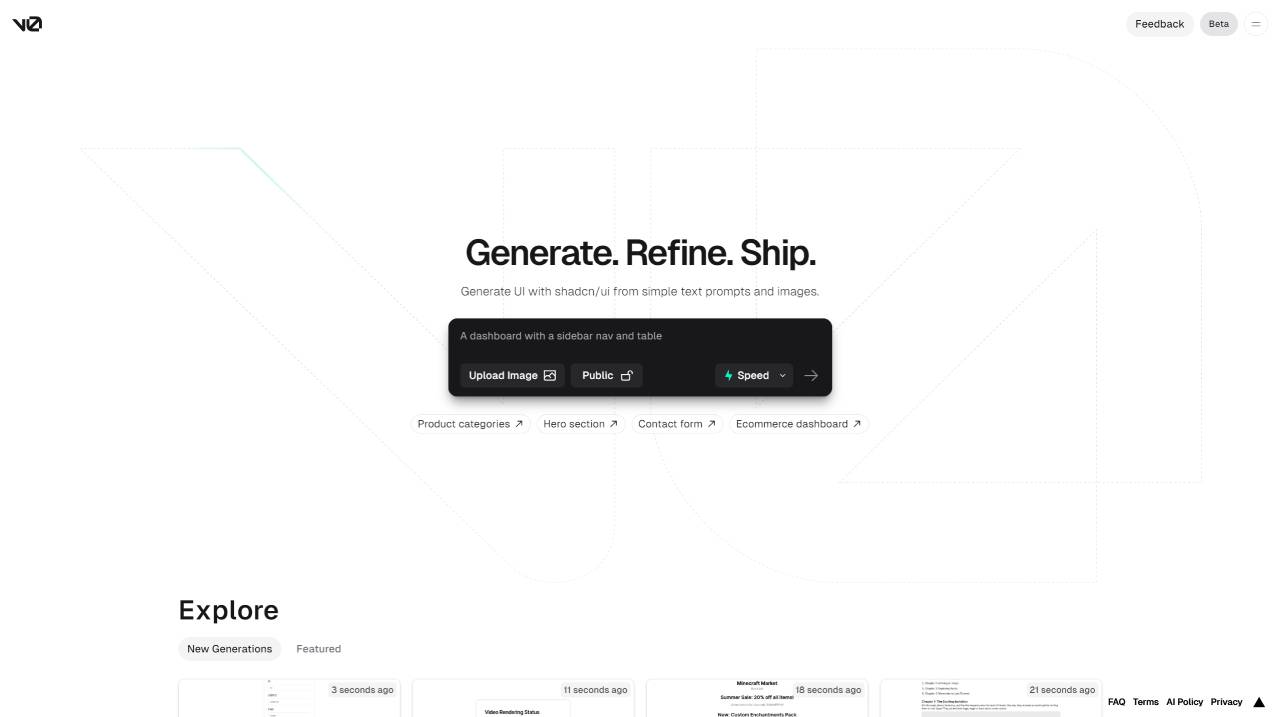
Key Features of v0.dev:
UI Generation: v0.dev is an online tool that can generate various UI interfaces through simple text input, helping users quickly create websites, applications, and other interfaces without writing complex code. It generates ready-to-use React component code based on the popular UI frameworks Shadcn UI and Tailwind CSS.
AI-Powered Technology: v0.dev is launched by Vercel and utilizes artificial intelligence technology to automatically generate web UIs. It enables users to create user interfaces through simple text prompts, providing a fast and efficient way to build various UI elements.
Instant Generation and Real-Time Modification: v0.dev can instantly generate UI components based on text prompts and supports real-time modification, providing users with rapid real-time feedback and iteration capabilities.
Copy-Paste Friendly: The React code generated by v0.dev is copy-paste friendly, making it easy for users to use in their projects.
Easy Integration and Customization: v0.dev features easy integration and customization, making it suitable for various projects.
Version Control and Collaboration Features: Although v0.dev itself does not directly mention having version control and collaboration features, its open-source alternative vx.dev integrates seamlessly with GitHub and offers these capabilities. This suggests that v0.dev may also support or be compatible with similar integration and collaboration features, although this is not its core functionality.
How to Use v0.dev?
The main steps to generate and customize UI interfaces using v0.dev are as follows:
1. Visit the v0.dev Official Website: First, open the v0.dev official website.
2. Browse Product Categories and Featured Functions: On the homepage, users can browse different product categories and featured functions. If you have specific needs, you can use the search bar to search for keywords to find relevant products or features.
3. Enter Text Prompts: Based on how v0.dev works, users only need to enter short text prompts to leverage AI technology to automatically generate the corresponding UI code. These text prompts can be descriptions of the interface you want to create, or specific UI element requirements.
4. Select Generated UI Components: After submitting text prompts, v0.dev will provide several AI-generated user interface options. Users can select the UI component that best fits their needs from these options and copy it into their project.
5. View Code Examples and Related Instructions: On the detail page, users can view code examples and related instructions, which helps understand how to integrate the generated UI code into their own projects. This information can help users better customize and modify the generated UI interface.
6. Integration and Customization: The code generated by v0.dev is easy to integrate and customize, suitable for various front-end development needs. Users can further customize and optimize the generated UI code according to their project requirements.
7. Sharing and Iteration: Once the UI interface is successfully generated and integrated into the project, users can share it with others and quickly iterate based on feedback. v0.dev supports directly modifying and updating UI code within the project, making the development process more efficient.
Through the above steps, even users without professional programming skills can quickly generate and customize UI interfaces, greatly improving the efficiency and convenience of front-end development.
Although v0.dev was still in private beta at the beginning of its release, it has already demonstrated strong potential and flexibility. The Vercel team is committed to continuously improving and expanding v0's features based on feedback from the developer community to ensure its leading position in the UI design field. In addition, v0.dev also faces some challenges; for example, reliance on specific UI preferences may not be favorable for some users, and content produced by free users is public unless they pay.
As an innovative tool, v0.dev transforms simple text prompts into fully functional UI designs through AI technology, greatly simplifying the front-end development process. With the Vercel team's continuous improvement and expansion, v0.dev is expected to become an important tool in the UI design field.












