
 Script Planner Assistant▸
 AI Apps
 AI News

Open WebUI_云技派,专注ai人工智能!
Open WebUI_云技派,专注ai人工智能!Introduction
Open WebUI provides a user-friendly interface for large language models, supports Ollama, and is compatible with the OpenAI API. Its features include an intuitive chat interface and responsive design. It supports code highlighting, Markdown, LaTeX, RAG integration, web browsing, preset prompts, RLHF annotation, model management, multi-model and multi-modal capabilities, conversation history management, voice input, advanced parameter adjustment, and more.
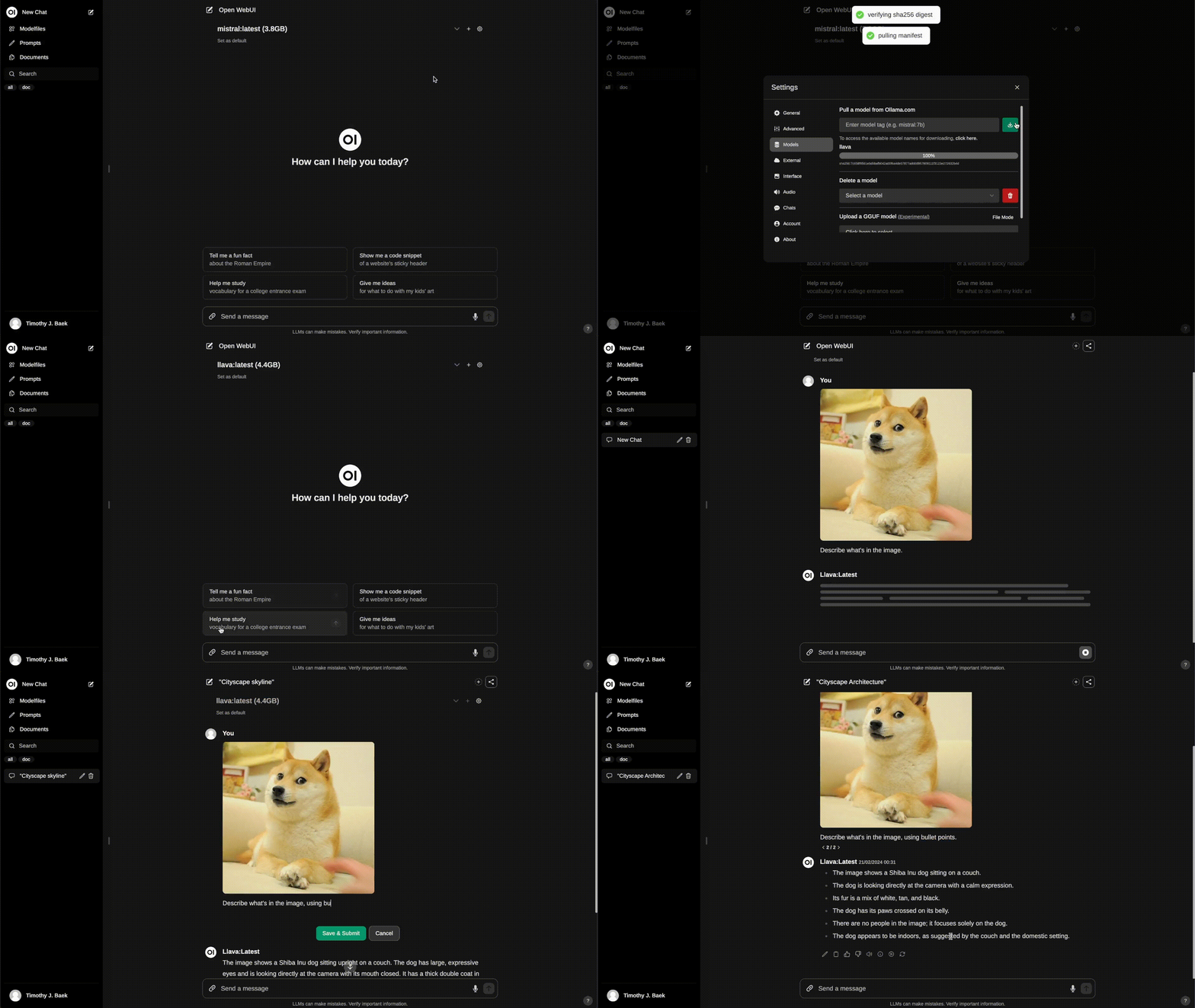
Open WebUI Features:
Intuitive Interface: Our chat interface draws inspiration from ChatGPT, ensuring a user-friendly experience.
Responsive Design: Enjoy a seamless experience across desktop and mobile devices.
Fast Response: Enjoy fast response performance.
Easy Setup: Get an effortless experience with seamless installation using Docker or Kubernetes (kubectl, kustomize, or helm).
Code Syntax Highlighting: Enhance code readability with our syntax highlighting feature.
Full Markdown and LaTeX Support: Elevate your LLM experience with comprehensive Markdown and LaTeX capabilities for rich interaction.
Local RAG Integration: Dive into the future of chat interaction with groundbreaking Retrieval-Augmented Generation (RAG) support. This feature seamlessly integrates document interaction into your chat experience. You can load documents directly into the chat or add files to a document library, easily accessing them using commands in prompts. In the alpha stage, as we actively improve and enhance this feature to ensure optimal performance and reliability, occasional issues may occur. #
Web Browsing Capability: Seamlessly integrate websites into your chat experience using a command followed by a URL. This feature allows you to incorporate web content directly into your conversations, enhancing the richness and depth of interaction. #
Prompt Preset Support: Instantly access preset prompts using commands in chat input. Effortlessly load predefined conversation starters and speed up your interactions. Easily import prompts through Open WebUI Community Integration. /
RLHF Annotation: Enhance your messages by rating them with thumbs up and thumbs down, facilitating the creation of datasets for Reinforcement Learning from Human Feedback (RLHF). Use your messages to train or fine-tune models while ensuring the confidentiality of locally saved data.
Conversation Tagging: Easily categorize and locate specific chats for quick reference and streamlined data collection.
Download/Delete Models: Easily download or delete models directly from the Web UI.
File Model Creation: Easily create Ollama models by uploading GGUF files directly from the Web UI. Simplified process with the option to upload from your machine or download GGUF files from Hugging Face.
Multi-Mode Support: Seamlessly switch between different chat modes for diverse interactions.
Multi-Modal Support: Seamlessly interact with models that support multi-modal interactions, including images (e.g., LLava).
Model File Generator: Easily create Ollama model files through the Web UI. Create and add characters/agents, customize chat elements, and easily import model files through Open WebUI Community Integration.
Multi-Model Conversations: Effortlessly engage with various models simultaneously, leveraging their unique strengths for optimal responses. Enhance your experience by parallel utilization of a diverse set of models.
Collaborative Chat: Harness the collective intelligence of multiple models by seamlessly orchestrating group conversations. Use the @ command to specify models, enabling dynamic and diverse conversations in the chat interface. Immerse yourself in the collective intelligence woven into the chat environment. @
OpenAI API Integration: Effortlessly integrate OpenAI-compatible APIs for versatile conversations with Ollama models. Customize the API base URL to link to LMStudio, Mistral, OpenRouter, and more.
Regeneration History Access: Easily revisit and explore your entire regeneration history.
Chat History: Easily access and manage your conversation records.
Import/Export Chat History: Seamlessly move your chat data in and out of the platform.
Voice Input Support: Interact with your model through voice; enjoy the convenience of talking directly to the model. Additionally, explore the option to automatically send voice input after 3 seconds of silence for a streamlined experience.
Fine-Tuning Control with Advanced Parameters: Gain deeper control by adjusting parameters such as temperature and defining system prompts to tailor conversations to your specific preferences and needs.
External Ollama Server Connection: Seamlessly link to external Ollama servers hosted at different addresses by configuring environment variables.
Role-Based Access Control (RBAC): Ensure secure access with restricted permissions; only authorized individuals can access your Ollama, and exclusive model creation/pull privileges are reserved for administrators.
Backend Reverse Proxy Support: Enhance security through direct communication between the Open WebUI backend and Ollama. This critical feature eliminates the need to expose Ollama over LAN. Requests from the Web UI to the "/ollama/api" route are seamlessly redirected from the backend to Ollama, enhancing the security of the overall system.
Continuous Updates: We are committed to improving Open WebUI through regular updates and new features.














