
 Script Planner Assistant▸
 AI Apps
 AI News

Article.Audio: Convert Articles to Audio
Article.Audio: Convert Articles to AudioIntroduction
Article.Audio is a tool that allows you to convert articles into high-quality voice. With over 140 available languages and natural, fluid human voices, you can easily convert any written content into audio format.
Users can paste website links, text documents, PDF documents, or photos of articles, and then choose from different languages and voices to listen to. Article.Audio is designed to make reading more accessible and convenient for those who are too busy, have visual impairments, or simply prefer listening over reading.
Article.Audio allows you to listen to articles instead of reading them, which can save time and improve comprehension.
Article.Audio supports multiple languages and voices to meet different preferences and needs.
Article.Audio offers both free and professional plans that can adapt to different budgets and usage levels.
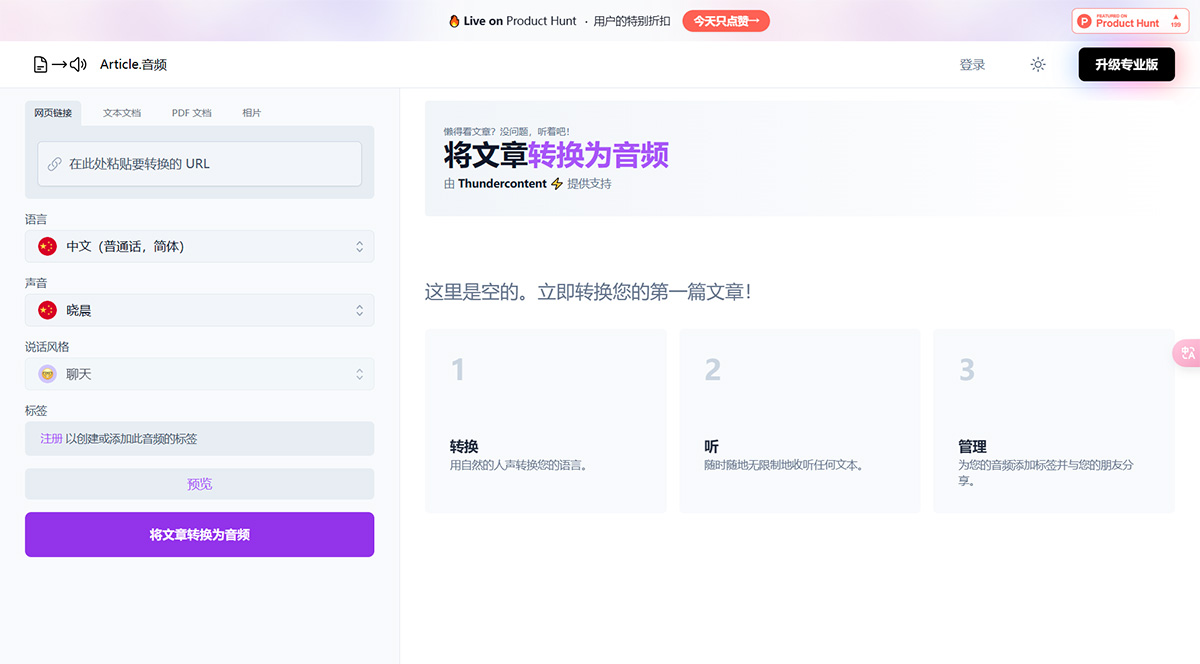
Features of Article.Audio:
Quick Conversion: Quickly convert articles into audio format.
Multiple Languages: Choose from over 140 languages for audio conversion.
Human-like Voices: Enjoy natural, fluid human voices for a better listening experience.
Multiple Voice Styles: Choose your ideal voice style, such as chat, narration, news broadcast, and more.
Audio Management: Add tags to organize your audio for easy retrieval later. 6. Sharing Options: Share your converted audio with others.
Applications of Article.Audio:
1. Accessibility: Convert articles into audio to enable visually impaired individuals to read articles.
2. Multitasking: Listen to articles while doing other tasks, such as exercising, commuting, or cooking.
3. Language Learning: Improve language skills by listening to articles in different languages.
4. Content Consumption: Easily consume articles without reading them.
5. Podcast Creation: Convert written content into audio to create podcasts.
How to Use Article.Audio?
1. Register or log in using your Google account or email.
2. Choose the language of the article you want to convert.
3. Input the article by providing a webpage link, uploading text or PDF documents, or even a photo of the article.
4. Choose your preferred voice and voice style.
5. Click the "Convert" button to convert the article into audio.
6. Once the conversion is complete, you can listen to the audio or manage it by adding tags.
7. You can also share the audio with others.
Article Audio was launched on Product Hunt on April 13, 2023, and received positive feedback from users who praised its simplicity, speed, and quality. Article Audio offers a free plan that allows users to convert up to 10 articles per month, as well as a professional plan at $9.99 per month that unlocks unlimited conversions, custom voices, and offline listening.













