
 Script Planner Assistant▸
 AI Apps
 AI News

Casper AI_云技派,专注ai人工智能!
Casper AI_云技派,专注ai人工智能!Introduction
Casper ai, a Chrome browser extension tool designed to streamline professionals' workflows by summarizing articles, creating content, and sharing insights with stakeholders. Casper leverages OpenAI's GPT to analyze articles and extract key information, providing concise and accurate summaries.
Whether you're preparing for an exam, conducting due diligence on an investment, handling a major transaction, or trying to get up to speed on new regulations, this tool will make your work easier.
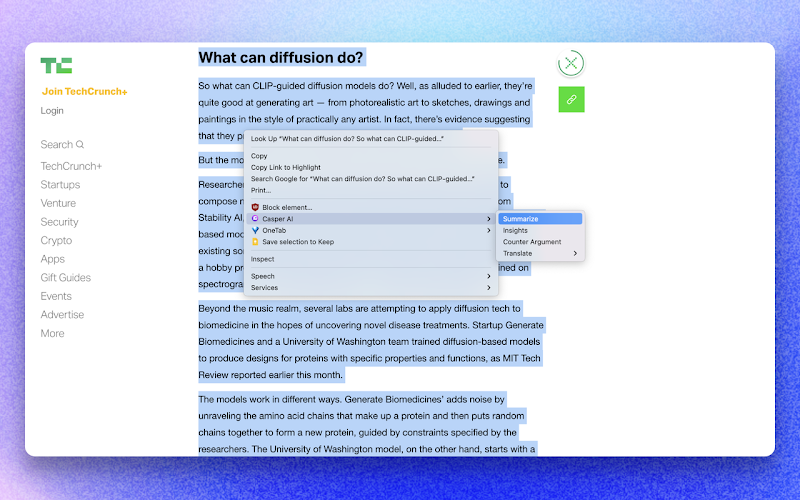
Core Features of Casper AI:
Article Summarization
Content Creation
Insight Sharing
Applications of Casper AI:
Exam Preparation
Conducting Due Diligence on Investments
Handling Major Transactions
Staying Up-to-Date with New Legislation
How to Use Casper AI?
To use Casper, simply install the Chrome extension and activate it while browsing articles. Casper will automatically generate summaries and provide insights based on what you read.
Casper AI FAQ
1. How does Casper generate summaries?
Casper leverages OpenAI's GPT to analyze articles and extract key information, providing concise and accurate summaries.
2. Is Casper compatible with other web browsers?
Currently, Casper is only available as a Chrome extension.
3. Can Casper be used offline?
No, Casper requires an internet connection to leverage its AI capabilities and provide insights in real time.
4. Is there a limit to the number of articles Casper can summarize?
Casper has no preset limit on the number of articles that can be summarized. However, system performance may vary depending on article length and complexity.
Casper AI Plugin Installation Instructions:
1. Open the Chrome browser's extension manager, and in the pop-up menu select [More Tools] — [Extensions]
Alternatively, you can directly type chrome://extensions/ into the address bar.
2. Once on the Extensions page, check the Developer mode option
3. Finally, drag and drop the extracted crx file into the browser to complete the installation















