
 Script Planner Assistant▸
 AI Apps
 AI News

Voqusa: Free AI Video-to-Text Transcription Tool
Voqusa: Free AI Video-to-Text Transcription ToolIntroduction
Voqusa Introduction
Voqusa is an online video and audio-to-text tool mainly aimed at content creators, marketers, and researchers. Its core feature is turning videos you see on social platforms or YouTube into text transcripts by simply pasting the link—no software download required, completed right in the browser.
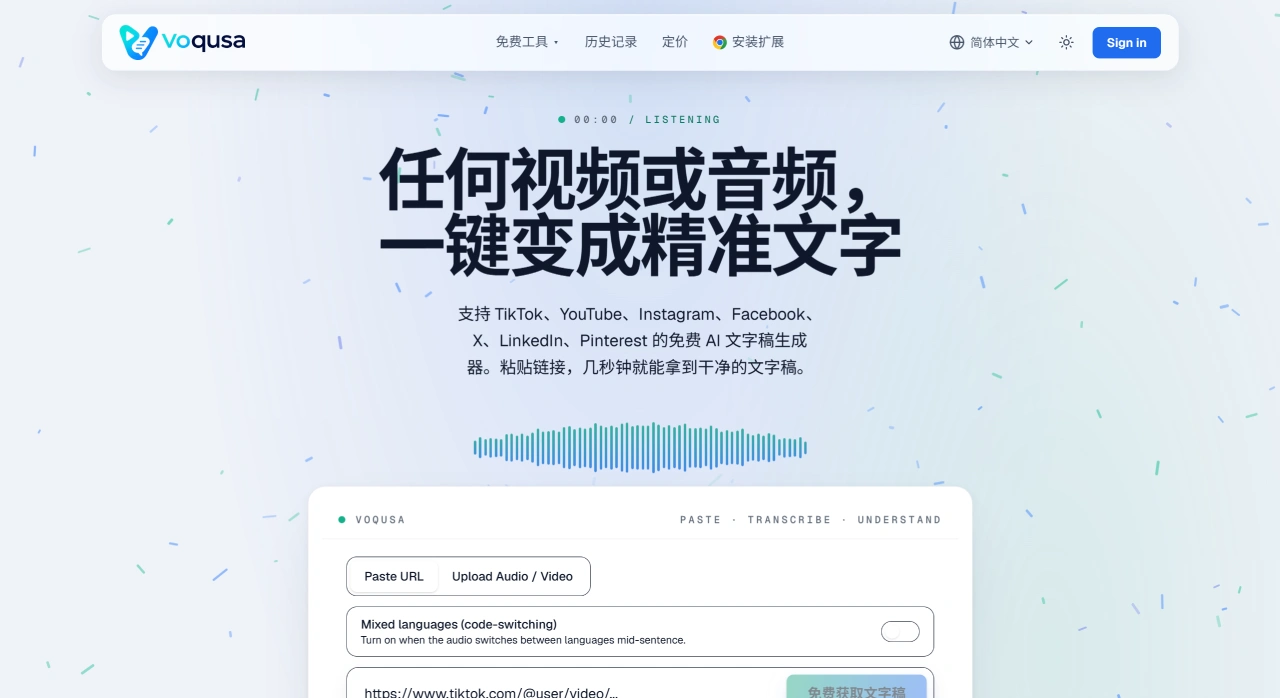
Voqusa Core Features
Multi-platform link transcription: Supports TikTok, YouTube (long videos and Shorts), Instagram (Reels and IGTV), Facebook, X, LinkedIn, and Pinterest—seven platforms in total. Just paste a public link to process.
AI speech-to-text: Automatically extracts speech, segments sentences and adds punctuation, with drafts ready in seconds. For clear audio, accuracy generally exceeds 95%.
Auto-detection of 80+ languages: No need to manually select the language; supports English, Spanish, Japanese, Arabic, Chinese, and more.
Free subtitle extraction: If the platform already has subtitles, extraction is completely free—no registration required.
Free translation: Transcripts can be directly translated into 14+ languages at no extra cost.
Content re-purposing: Provides summaries, mind maps, dialogues, rewrites, and more—quickly turning video content into blogs, social media copy, or scripts.
Mixed-language handling: Supports cases where multiple languages switch within a single sentence.
Voqusa Use Cases
Content creators: Transcribe both your own videos and competitors' videos into text to analyze the openings, structure, and tactics of viral hits and speed up content production.
Marketers and agencies: Batch-analyze brand or competitor videos and write creative briefs based on real data.
Researchers and journalists: Convert interviews, speeches, and conversations into searchable text, eliminating manual transcription.
Accessibility teams: Automatically generate subtitles and translations for videos to improve content accessibility.
Cross-platform content reuse: Repurpose videos from TikTok or YouTube into image-and-text content suitable for other platforms.
Voqusa Advantages
Zero barrier to entry: The free subtitle feature requires no registration—just open the page, paste the link, and use it.
One tool covers multiple platforms: No need to buy a different tool for each platform.
Broad language support: Auto-detection of 80+ source languages, 14+ translation languages, ideal for multilingual content.
Pay-as-you-go with no monthly subscription pressure: Speech-to-text consumes credits per minute; credits are valid for 12 months—no fixed monthly fees.
Data security: Transcripts from anonymous users are not retained on the server after the session ends, and user data is not used to train third-party models.
Voqusa How-to Guide
Paste the link: Copy a public video URL from TikTok, YouTube, Instagram, Facebook, X, LinkedIn, or Pinterest.
Generate the transcript: The AI automatically extracts speech, segments sentences and adds punctuation, with drafts ready in seconds.
Post-processing: You can copy, download, translate, or rewrite the output to further turn it into blogs, social media copy, and more.
Voqusa vs. Competitors
| Dimension | Voqusa | Otter.ai | Descript | HappyScribe |
|---|---|---|---|---|
| Core positioning | Video/audio to text, cross-platform content reuse | Real-time meeting transcription and collaboration | Transcript-based video/podcast editing | Subtitle generation and transcription |
| Supported platforms | 7 major social platforms + YouTube long videos | Zoom, Teams, Google Meet, and other meeting platforms | Local upload + recording | YouTube, Vimeo, Drive, etc. |
| Free tier | Free subtitle extraction (no registration); 5 credits gifted for AI transcription | 300 minutes/month, 30 minutes/meeting, 3 lifetime file imports | 1 hour/month, with watermark | Limited trial |
| Starting paid price | From $9.90 (credit packs, valid for 12 months) | Pro $16.99/month ($8.33/month billed annually) | Hobbyist $24/month ($12/month billed annually) | Usage-based or subscription, from about $17/month |
| Language support | 80+ source languages with auto-detection; 14+ translation languages | Multi-language support | Multi-language support | 120+ languages |
| Standout features | Direct link conversion, free translation, content rewriting, mind maps | Real-time meeting bot, collaboration, search | Transcript-driven video editing, AI voice cloning, filler-word removal | Human proofreading service, API |
| Target users | Content creators, marketers, researchers | Teams, meeting-intensive businesses | Podcasters, YouTubers, video creators | Professional subtitle production, enterprises |
| Data security | Anonymous transcripts not retained, no third-party model training | SOC 2, enterprise-grade security | SOC 2 Type 2 | GDPR, SOC 2 Type 2 |
Why Choose Voqusa
Voqusa is ideal for content creators and marketers who need to quickly extract transcripts from social platforms and YouTube videos. You can extract subtitles for free without registering, AI transcription is pay-as-you-go with no monthly subscription burden, and with 80+ languages auto-detected plus free translation, cross-platform content reuse becomes easy.
Voqusa FAQ
Q: Is Voqusa really free?
A: Yes. If the platform already has subtitles, extraction is completely free and requires no registration. AI speech-to-text consumes 1 credit per minute; new accounts get 5 free credits, paid plans start at $9.90, and credits are valid for 12 months.
Q: Which platforms are supported?
A: TikTok, YouTube (Shorts and long videos), Instagram (Reels and IGTV), Facebook, Twitter/X, LinkedIn, and Pinterest. Just paste a public video link.
Q: Do I need to install software?
A: No. It runs entirely in the browser—no extension or app installation needed. The free subtitle feature doesn't even require registration.
Q: How accurate is the transcription?
A: For videos with clear audio and supported languages, accuracy generally exceeds 95%. Heavy background noise, strong accents, or multiple people speaking at once can affect accuracy. After the draft is generated, you can freely edit it before copying or downloading.
It looks like the HTML snippet you intended to paste didn't come through — only the `>` character appeared. Could you resend the actual HTML fragment you'd like translated into English (en-us)?
A: Yes. Every transcript can be translated directly into more than 14 languages, completely free, without consuming extra credits.
Q: Is my data secure?
A: Transcripts are tied only to your account and can only be viewed by you. They will not be shared, resold, or used to train third-party models. Transcripts from anonymous users are not retained on the server after the session ends.














