
 Script Planner Assistant▸
 AI Apps
 AI News

Taierjian AI: A Physical Product Design Platform by Taiya Design Studio
Taierjian AI: A Physical Product Design Platform by Taiya Design StudioIntroduction
TaiErJianAI is a physical product design platform built by Taiya Product Design Studio, with virtually no learning curve. You don't need to write prompts or tweak parameters—users simply upload a benchmark product image and reference images, and the AI automatically fuses them to generate original new product concept images. The platform also has built-in designer and supplier resources, so the complete process from idea to physical sample production can be handled within it. It's well suited for small and medium-sized enterprises, processing factories, e-commerce businesses, and individuals without dedicated designers.
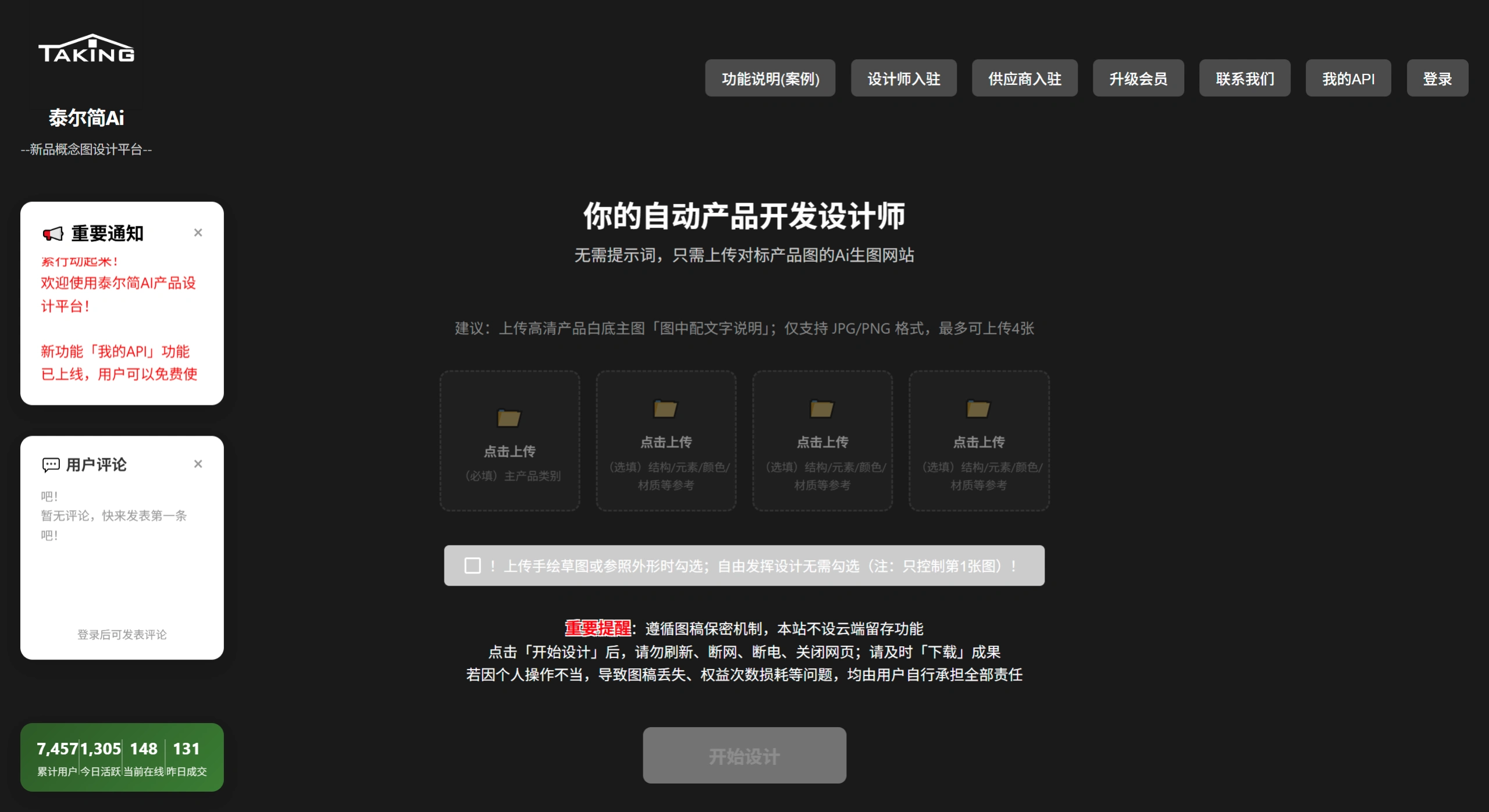
TaiErJian AI official website screenshot
Features
Prompt-Free Intelligent Creation: Unlike general-purpose AI drawing tools such as Midjourney that require complex prompts, TaiErJian AI is driven by uploaded images. Users can directly annotate their design ideas on the image or upload multiple reference images, letting the AI think and merge them to output original new product concepts.
Physical Product Innovation Focus: Rather than simply changing materials, colors, or backgrounds, it performs structure-level innovation diffusion for physical products (such as daily goods, small home appliances, and handicrafts). It helps business owners or product managers turn vague inspiration into visualized product prototypes.
One-Stop Landing Service: The platform integrates designers and suppliers. If AI-generated concept images need further refinement, users can connect directly with designers on the platform for modifications; if physical samples are needed, internal suppliers can be contacted, making the entire journey from digital creativity to physical samples seamless.
Multi-Image Fusion Capability: Supports uploading a benchmark product image along with multiple style or functional reference images simultaneously. The AI analyzes the features of each image on its own and then performs creative recombination, rather than simply imitating a single image.
Use Cases
New Product Development for Processing Factories: Traditional processing factories have production capability but lack design capability. They can use TaiErJian AI to quickly generate new product concepts, then hand them over to partner designers before tooling.
Rapid Product Testing for E-commerce Companies: Cross-border or domestic e-commerce sellers that need to continuously launch new products can use this tool to low-cost generate multiple differentiated product concepts, perform market testing first, and then decide on mass production.
Individual Entrepreneurs / Product Managers: Individuals who have product ideas but lack skills in professional software such as Photoshop, Rhino, or SolidWorks can leverage AI to visualize their ideas for pitch presentations or crowdfunding showcases.
Brand Upgrade for Small Businesses: Husband-and-wife stores, and small workshops without dedicated design teams can use this tool on their own to explore product iteration directions, reducing reliance on external design firms.
Pros and Cons Analysis
| Dimension | Advantages | Disadvantages |
|---|---|---|
| Usage Barrier | Extremely low; no design background or prompt engineering needed—basic mouse operation is enough to get started | For professional designers, controllability is weaker; precise parameter adjustment is not possible |
| Innovation Depth | Capable of cross-product feature fusion, producing structure-level new product concepts rather than surface-level beautification | Currently generates concept renderings only; cannot be used directly as engineering production drawings |
| Industry Chain Integration | Built-in designer and supplier resources form a closed loop of "creativity → refinement → sampling" | The service quality of designers and suppliers depends on the platform's review and matching mechanisms |
| Cost Efficiency | Compared with hiring external industrial designers, significantly reduces upfront concept exploration costs | High-precision refined design or complex structural verification still requires additional fees |
| Target Precision | Focused on the physical product domain, with deeper understanding of manufacturing user scenarios | Not suitable for UI/graphic design, pure visual art, or other non-physical product creation |
Frequently Asked Questions
Q1: Can the generated product images be sent directly to the factory for production?
Currently, TaiErJian AI generates concept effect images for ideation and visual confirmation; they cannot be used directly as production drawings. However, the platform provides designer and supplier matching services to refine concept images into producible engineering files.
Q2: I have zero design experience and have never used any prompts. Can I still use it?
Yes. This is the core feature of TaiErJian AI—no prompts are required at any stage; just upload images. You can even write text ideas directly on the image before uploading, and the AI will read and understand them.
Q3: How is it different from e-commerce product image tools (such as Meitu Design Studio)?
E-commerce product image tools are mainly for changing backgrounds and creating marketing posters for existing products; TaiErJian AI helps you "create a new product," solving the 0-to-1 design problem rather than the 1-to-100 marketing beautification problem.
Q4: Is there a fee for designers and suppliers to join the TaiErJian AI platform?
Designers and suppliers can currently join for free, but specific transaction service fees are subject to the platform's actual policies.
How to Use TaiErJian AI
Prepare Materials: Take a photo or download an existing product image you want to benchmark; if you have other style or functional reference images, prepare them as well.
Annotate Your Ideas: If you have specific improvement ideas (such as "add a hook" or "change to a round shape"), you can directly write them on the image using a drawing tool.
Upload and Generate: Enter the TaiErJian AI platform, upload the benchmark image and reference images. No parameters or prompts need to be filled in—just click Generate.
Screen Concepts: The AI will output fused new product concept images. Select the ones that best match your business direction.
Refine and Land: If the concept image is roughly satisfactory but needs professional adjustment, you can contact designers on the platform; if physical samples are needed, connect with platform suppliers to enter the sampling process.
Competitor Comparison
| Comparison Dimension | TaiErJian AI | Midjourney | RapidDirect AI Creator | Meitu Design Studio AI Product Image |
|---|---|---|---|---|
| Core Positioning | Physical product concept innovation | General-purpose AI art / concept image generation | Manufacturing product rendering + PRD documents | E-commerce product marketing image generation |
| Input Method | Image upload (no prompts required) | Primarily text prompts | Primarily text descriptions | Upload product image + select template |
| User Barrier | Extremely low (non-designer friendly) | Medium to high (requires prompt skills) | Low (but targeting manufacturing transformation) | Extremely low (e-commerce operation friendly) |
| Output Value | Original new product concept images | High-quality art / concept images | Product renderings + structured requirement documents | Product display background images / posters |
| Industry Chain Closed Loop | Built-in designers + suppliers | None | Can be handed over to hardware engineers for evaluation | None |
| Applicable Stage | Early product development (0→1) | Creative exploration / visual reference | Concept verification → engineering transition | Before product listing (1→100) |
| Pricing Strategy | Unclear (new platform) | Subscription ($10/month and up) | Currently free trial | Free + premium features |















