
 Script Planner Assistant▸
 AI Apps
 AI News

Ribbi AI: A Self-Evolving Creative AI Agent That Runs in Your Browser
Ribbi AI: A Self-Evolving Creative AI Agent That Runs in Your BrowserIntroduction
What is Ribbi ai
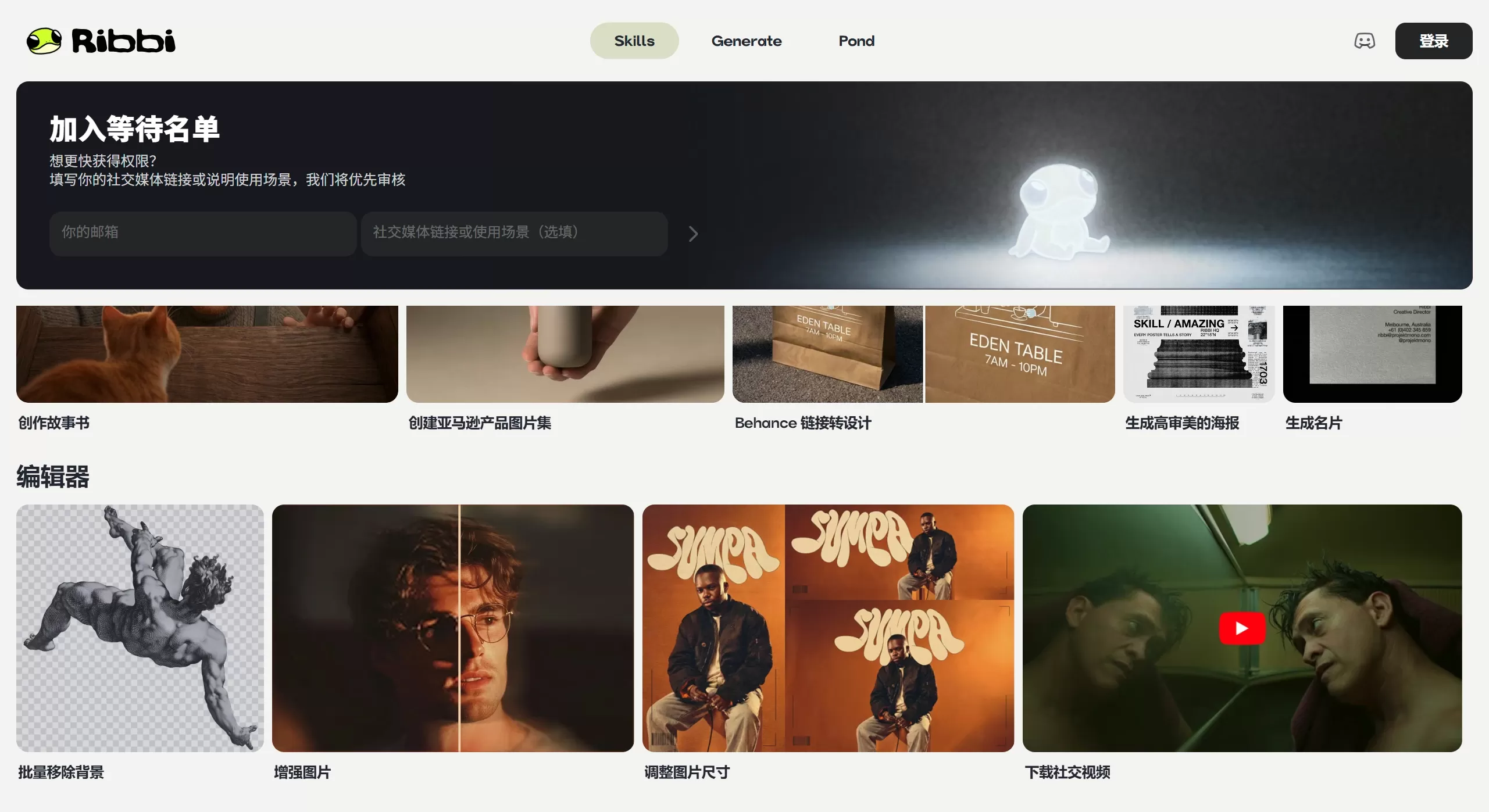
Ribbi AI is a creative AI Agent that runs directly in your browser, positioned as a "creative partner that evolves with you." Developed by former members of the Jimeng team, it works right out of the gate — no deployment required and very low barrier to entry.
Its goal is to connect the entire creative workflow: from inspiration gathering, to content generation, to multi-platform publishing, data monitoring, and iterative optimization — ultimately becoming a content system that improves itself continuously.
Core Features
Multimodal AI Creation Engine
Image generation: Integrates models such as Flux, Midjourney, and Seedream, capable of producing posters, product images, business cards, IP character designs, and more.
Video creation: Leverages models like Sora, Kling, Wan, and Seedance, supporting narrative videos, slideshow videos, and multilingual voiceover.
Audio & music: Built on technologies such as MiniMax TTS, it can turn articles into podcasts or songs, and also supports cover versions and original music generation.
Text copywriting: Can replicate viral content styles, generate platform-specific copy, and produce Listings for cross-border e-commerce.
Smart Social Media Operations
Viral content replication: One-click breakdown of carousel posts and short-video structures on overseas platforms, ready to reuse directly.
AI trend reports: Automatically pushes multi-platform hot-topic summaries every morning, with viral analysis and breakdowns of breakout accounts.
Account growth: Tracks account data in real time and provides Auto-Grow automated growth recommendations.
Scheduled publishing: Supports one-click scheduled publishing to YouTube, TikTok, Instagram, and Twitter/X.
Pond (Inspiration Pool) — A Self-Evolving Asset Hub
Right-click to save reference images while browsing the web; AI will automatically reverse-engineer prompts and parse style tags.
As you save more images, the style-understanding model keeps improving, getting better at recognizing your preferred design language the more you use it.
Solves the long-standing problem of "inconsistent styles" in traditional AI creation.
Minimalist Interaction
Use @ to invoke external models (e.g., @FLUX, @Midjourney)
Use / to trigger built-in skills (e.g., /Behance-link-to-design, /generate-poster)
Over 23 built-in skills covering account analysis, video production, image design, audio generation, and more.
Use Cases
Self-media operations: Replicate viral content, adapt content for multiple platforms, auto-clip long articles or long videos, and distribute across languages.
Cross-border e-commerce: Generate Amazon product image sets (white-background shots, lifestyle shots), automate Listings, and monitor competitors.
Brand visual design: Three-view IP character designs, multi-scene illustrations, deconstruction and reuse of Behance/Dribbble work styles.
Knowledge content production: Turn articles into narrative slideshows, cut podcasts into short videos, and produce multilingual voiceover videos.
Ribbi AI Pros and Cons
Pros
Zero deployment, high security: Runs in the browser, requires no system permissions, does not access local files, and keeps data privacy risks low.
Cost advantage: Saves roughly 73% in Token consumption compared with similar solutions (e.g., OpenClaw), making it far more cost-effective over the long term.
Personalized aesthetics: The Pond feature lets the product truly "self-evolve," avoiding generic templates and producing output that reflects your personal style.
End-to-end closed loop: More than just a generation tool — it also handles trend insights, data optimization, and account growth, letting one person do the work of a whole team.
Cons
Currently in closed beta; requires applying for a WaitList spot.
Chinese-language support is limited; the product is more focused on the overseas social media ecosystem.
As a browser-based tool, its heavy, complex editing capabilities don't match those of dedicated local professional software.
How to Use Ribbi AI
Visit the official site at https://ribbi.ai/
Install the Ribbi browser extension and enable the Pond inspiration collection feature.
Basic interactions:
Type @ + model name to invoke an AI tool (e.g., @NanoBanana Pro)
Type / + skill name to trigger a workflow (e.g., /Behance-link-to-design)
Style training: While browsing the web, right-click and choose "Save image to Ribbi" to continuously build up your aesthetic samples.
Publishing and monitoring: Connect your social media accounts, set up scheduled publishing, and track data.
FAQ
Q: Does it support batch processing?
A: Yes. You can perform batch image cutout, batch image processing, and similar operations.
Q: Can Behance links be converted directly?
A: Yes. Use the Behance URL To Design feature — just paste the link to extract design elements and generate a solution.
Q: How do I know how my published content is performing?
A: It has a built-in account performance tracking feature that lets you view engagement rate and follower growth data in real time, and pushes a trend summary every day.
Q: What's the difference between Ribbi AI and general-purpose AI Agents like OpenClaw?
A: Ribbi is more focused on the vertical scenario of content creation. It doesn't require configuring APIs or setting up a local environment, and is deeply optimized around the real pain points of creators.














