Script Planner Assistant▸
 AI Apps
 AI News

Reditor: Xiaohongshu AI Editor & Banned-Word Checker
Reditor: Xiaohongshu AI Editor & Banned-Word CheckerIntroduction
Reditor, a note creation tool built specifically for Xiaohongshu creators, originally named "Hongshu Editor", is now called Reditor. It brings together AI writing, formatting, and prohibited word detection in one place, so you can handle the entire note creation workflow on your computer or phone.
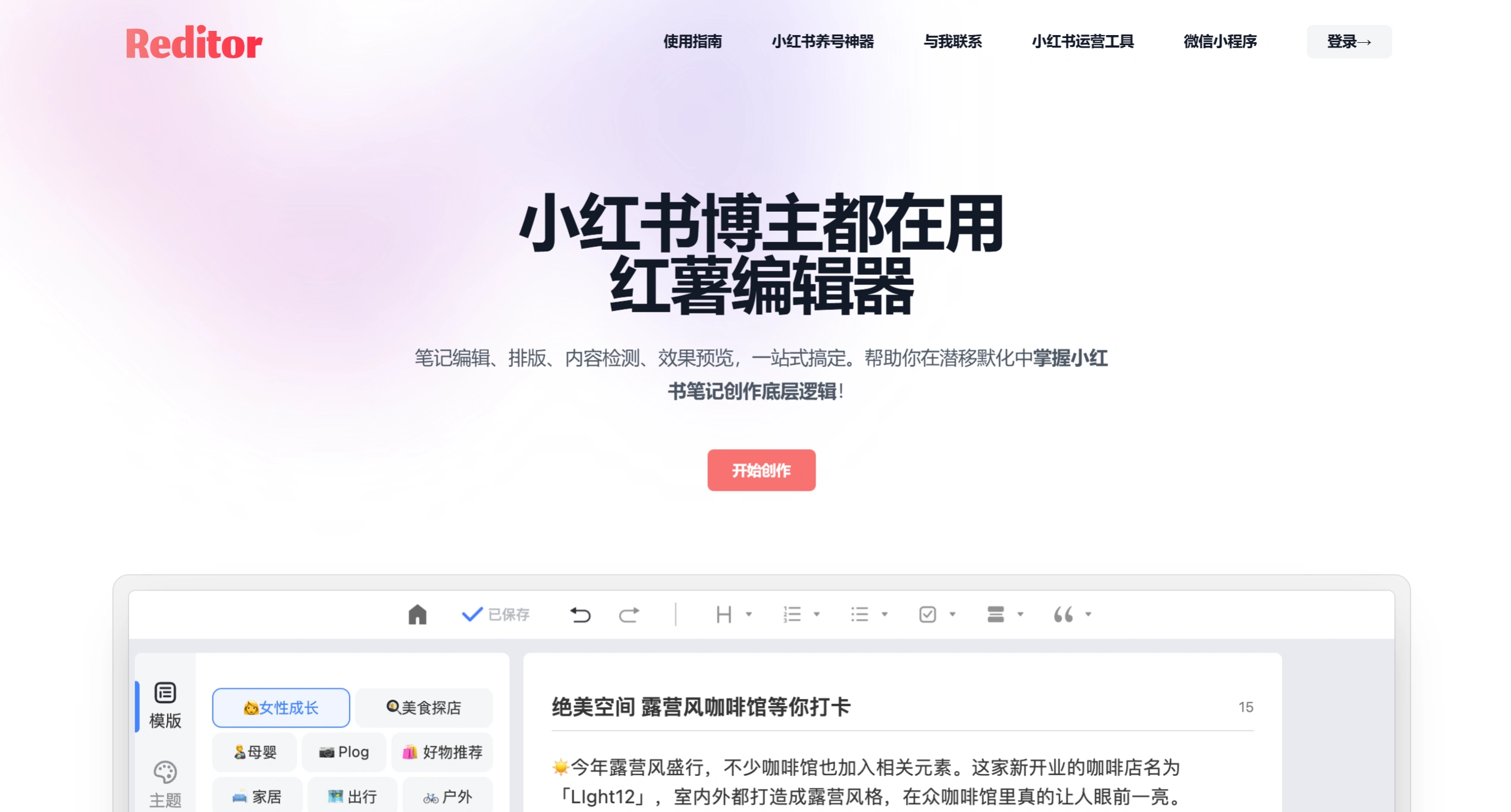
Feature Highlights
Sensitive Word Detection: A built-in library of prohibited words from advertising law and Xiaohongshu-specific industries lets you scan with one click and highlight risky terms, making revisions easier and effectively reducing the risk of your notes being throttled.
Accurate Word Count: Automatically adapts to the word count calculation differences between iOS and Android platforms, showing the count in real time so you can reserve space for hashtags and mentions.
AI Writing Assistant: Comes with 40+ AI blogger personas across vertical niches, from beauty and fashion to food and personal growth. Enter keywords to generate copy and titles that match the Xiaohongshu style.
AI Smart Formatting: After entering text, you can split paragraphs, auto-match emojis, and adjust line spacing with one click to create a more visually appealing layout. Some INS-style symbol themes are also available for direct use.
Publish Preview: While editing on a computer, you can see in real time how your note will ultimately appear on the phone, so you can spot and fix issues like broken formatting or missing blank lines before publishing.
One-Click Copy and Large Editing Area: Supports one-click copying of titles and body text while preserving blank lines. The editing area is also more spacious than Xiaohongshu's native editor, and you can upload up to 18 images for preview.
Note Management and Cloud Sync: Notes can be organized into groups, and the tool supports searching and viewing historical versions. Logging in with the same WeChat account keeps your data on the web and mini-program in real-time sync.
Viral Note Template Library: Curated viral note structures across various niches — beginners can apply them directly, while seasoned creators can use them to optimize their own content.
Use Cases
Daily Note Creation: Writing long image-and-text notes on a larger computer screen is more efficient. Once done, copy the content with one click and paste it into the Xiaohongshu app to publish.
Batch Matrix Operations: If you run multiple accounts at once, you can use the note grouping and cloud sync features to centrally manage content materials for different accounts and quickly pull them up.
Starting a New Account and Idea Block: New bloggers or those who need to post daily can leverage AI writing and viral templates to quickly produce content, shortening the time from topic selection to finished draft.
Compliance Safety Review: Run a prohibited word scan on your copy before publishing — especially for sensitive areas like medical aesthetics and finance — to reduce the risk of violations.
Formatting and Visual Upgrade: Take plain text and use the AI formatting assistant to automatically add emojis and split paragraphs, significantly improving the reading experience of your notes.
Reditor Pros and Cons
Pros
Complete Functional Loop: From writing, formatting, and checking to management, everything is handled in one place — no need to jump between multiple tools.
Deep Platform Rule Adaptation: Word counting and prohibited word libraries are tailored specifically for Xiaohongshu, making them more accurate than generic editors.
Seamless Cross-Device Switching: Built on the WeChat ecosystem, data sync between the web version and mini-program is smooth, so creation isn't tied to a specific device.
Low Learning Curve: The interface is designed around Xiaohongshu notes, so you can basically start using it right away without any learning.
Cons
Dependence on the WeChat Ecosystem: Login and sync are both tied to WeChat, which isn't friendly for non-WeChat users.
Limited Free Version: Core features like AI generation and advanced formatting themes require a paid membership — the free version only offers basic editing and detection.
No Direct Publishing API: After editing, you still need to manually copy and paste into the Xiaohongshu app to publish — there's no one-click direct posting.
Weak Image Editing: You can only upload and preview images; there are no features for cropping, filters, or collages.
Frequently Asked Questions
Q: What's the relationship between Hongshu Editor and Reditor?
A: Reditor is the rebranded name of Hongshu Editor — they're the same product.
Q: What features are available in the free version?
A: The free version includes basic editing, prohibited word detection, and emoji formatting. Newly registered users get a 3-day paid membership trial.
Q: Are the detected prohibited words always accurate?
A: The tool covers most common prohibited words, but Xiaohongshu's review rules are updated dynamically. Treat the detection results as a reference, and double-check high-risk content yourself.
Q: Does it support direct publishing to Xiaohongshu?
A: Currently there is no API for direct publishing. You need to copy the content and manually paste it into the Xiaohongshu app.
Q: Will my historical notes be lost?
A: All content is saved to the cloud in real time. As long as your WeChat account is linked, your data won't be lost when you switch devices and log in.
How to Use Reditor
Visit the official website https://www.reditorapp.com/ or search for "Hongshu Editor" in the WeChat mini-program, and log in by scanning the QR code with WeChat.
Click "Start Creating", enter the title and body in the editing page, and the preview window on the right will sync the phone view in real time.
If you need AI assistance, select an AI blogger persona from a vertical niche, enter keywords to generate copy, and then import it into the editor.
Click "AI Formatting" or manually insert emojis to optimize the visual hierarchy of your paragraphs.
After finishing, click the "Content Filter" button at the bottom to run prohibited word detection, and revise risky terms based on the highlighted prompts.
Once the word count and preview look good, use the "One-Click Copy" feature to copy your content and paste it into the Xiaohongshu app to publish.
On the "My Creations" page, you can group, search, or re-edit notes, making long-term material management easier.
Reditor vs. Competitors
| Comparison Dimension | Hongshu Editor Reditor | Leopard CLAW | AutoXHS |
|---|---|---|---|
| Product Positioning | All-in-one Xiaohongshu content creation platform, focused on the full "write — format — check — manage" workflow | AI Agent automation operations framework, focused on a fully automated "topic — generate — publish — analyze" loop | Xiaohongshu AI content workstation, focused on boosting single-post efficiency in "generation — detection — visuals" |
| Core Features | AI copy, prohibited word detection, emoji formatting, viral templates, word count, publish preview, note management, cloud sync | Trend tracking, AI topic selection, auto copy, cover generation, auto publishing, trend reports, MCP integration, comment interaction | AI copy generation, viral titles, prohibited word detection, AI-flavor detection, cover creation, AI images, image-text card splitting, topic inspiration |
| AI Copy Generation | 40+ vertical-niche AI blogger personas, generates based on viral templates, supports rewriting and polishing | AI auto topic selection and full copy generation, supports fully automated or semi-automated (manual topic confirmation) | Multi-title generation, image-text dual mode, supports expansion and rewriting, emphasizing a "de-AI" natural feel |
| Prohibited Word / Risk Detection | Built-in advertising law prohibited words and sensitive word detection, one-click scan with highlight, real-time revisions synced | Built-in content compliance and prohibited word lists, automatically reviewed as a step in the automation flow | Prohibited word detection + AI-flavor detection combined, provides content health score and smart polishing suggestions |
| Visual Production | Supports upload and preview only (up to 18 images), no image editing capability | AI auto cover image generation, supports long-image export and annotation | Cover creation tool (16 templates), headline poster generator, AI image generation, image-text card splitting |
| Level of Automation | Requires manual copy-paste to publish on Xiaohongshu | High automation: Supports fully automated operations (AI topic selection → generation → publish), or semi-automated (manual topic confirmation) | Semi-automated: Assists single-post creation, requires manual copy-paste after generation |
| Publishing Capability | Does not support direct API publishing; requires one-click copy and manual pasting into Xiaohongshu App | Supports automated browser-based publishing (based on Playwright), with scheduled publishing | Does not support direct API publishing; requires manual copy of content to Xiaohongshu |
| Data / Analytics Capability | Note grouping management and historical version search, no data analysis feature | Trend tracking, interaction data analysis, auto-generated topic reports, supports exporting AI memory library | No data analysis feature; provides topic inspiration recommendations and AI command library |
| Usage Form | Web client + lightweight multi-service, WeChat ecosystem login, multi-device sync | Requires deployment to a server (e.g., Lighthouse), operated via command line / chat interface, high technical barrier | Pure web client (autoxhs.cn), ready to use out of the box, no installation required |
| Target Users | Individual bloggers, matrix operators, brand content teams, emphasizing high-frequency daily updates and compliance safety | Technical operators, developers, enterprise accounts / studios needing 7×24 automated operations | Beginner bloggers, individual creators, lightweight users needing quick drafts |
| Pricing Strategy | Free basic version + paid membership (Monthly ¥15 / Quarterly ¥36 / Annual ¥128) | Open source and free; requires self-funded server deployment costs | Free version (3 generations per month) + Pro ¥29/month + Pro Max ¥69/month |
Related Information:
10 Essential Tools for Xiaohongshu Operations with Zero Foundation