
 Script Planner Assistant▸
 AI Apps
 AI News

PicSeal: Generate Leica-Watermarked Photos in Xiaomi's Signature Style
PicSeal: Generate Leica-Watermarked Photos in Xiaomi's Signature StyleIntroduction
PicSeal is an open-source project that can mimic the Xiaomi photo style to generate photos with Leica watermarks. It also supports watermarks for brands such as Canon, Nikon, Apple, Huawei, Xiaomi, and DJI. Users can choose automatic watermark recognition or customize the style. PicSeal is developed with Vite and React, with performance enhanced through WebAssembly.
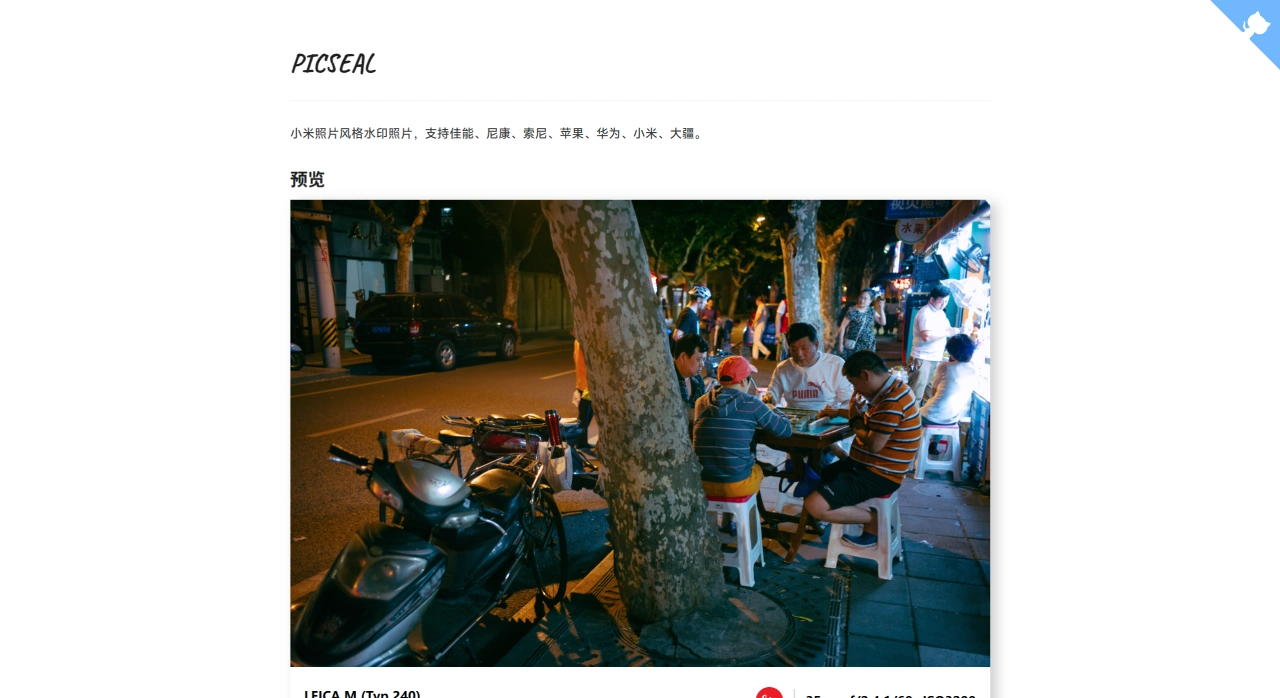
PicSeal Features
Extract EXIF information from photos to generate watermarks
Support watermark templates for various device brands
Export photos with watermarks, retaining the original image EXIF information
Custom watermarks: adjust font size, weight, color, etc.
EXIF data export: export shooting parameters, time, location, and other data
Banner size adjustment: adjust the banner watermark size to fit different photos
Font selection: provides multiple fonts such as MiSans
PicSeal Technical Implementation
EXIF parsing: use the Rust library kamadak-exif to extract image EXIF information, embedded in the frontend via WASM
Watermark generation: generate dynamic watermarks through HTML and CSS, supporting real-time preview
Image export: use the dom-to-image library to convert DOM elements with watermark text into image format
EXIF copying: support copying the original image EXIF information to the exported image
How to Use PicSeal
Visit https://picseal.vercel.app/
Upload the photo you want to watermark
Select a watermark brand or customize the style
Adjust parameters such as font size, weight, and color
Optionally add information such as shooting parameters, time, and location
Click the save or share button to complete watermarking
PicSeal Application Examples
Brand watermark: select the Xiaomi brand watermark and add shooting parameters and time
Custom watermark: select custom watermark, set font size to normal, weight to bold, and font to MiSans
You can use this tool to add watermarks to your photos, protect your work, and showcase your shooting equipment and parameters
PicSeal Deployment Methods
Supports multiple deployment methods:
Vercel one-click deployment
Local deployment (requires Rust and wasm-pack installed)
GitHub Pages deployment
Docker deployment
Project Structure
Frontend: React + TypeScript + Ant Design, built with Vite
Backend: WASM module written in Rust, handling EXIF parsing
Build scripts: support automated build and deployment processes
PicSeal open-source project address:https://github.com/zhiweio/picseal
Related information:















