
 Script Planner Assistant▸
 AI Apps
 AI News

PagePop: An AI Creation and Design Platform Where One Sentence Yields a Finished Product
PagePop: An AI Creation and Design Platform Where One Sentence Yields a Finished ProductIntroduction
What is PagePop?
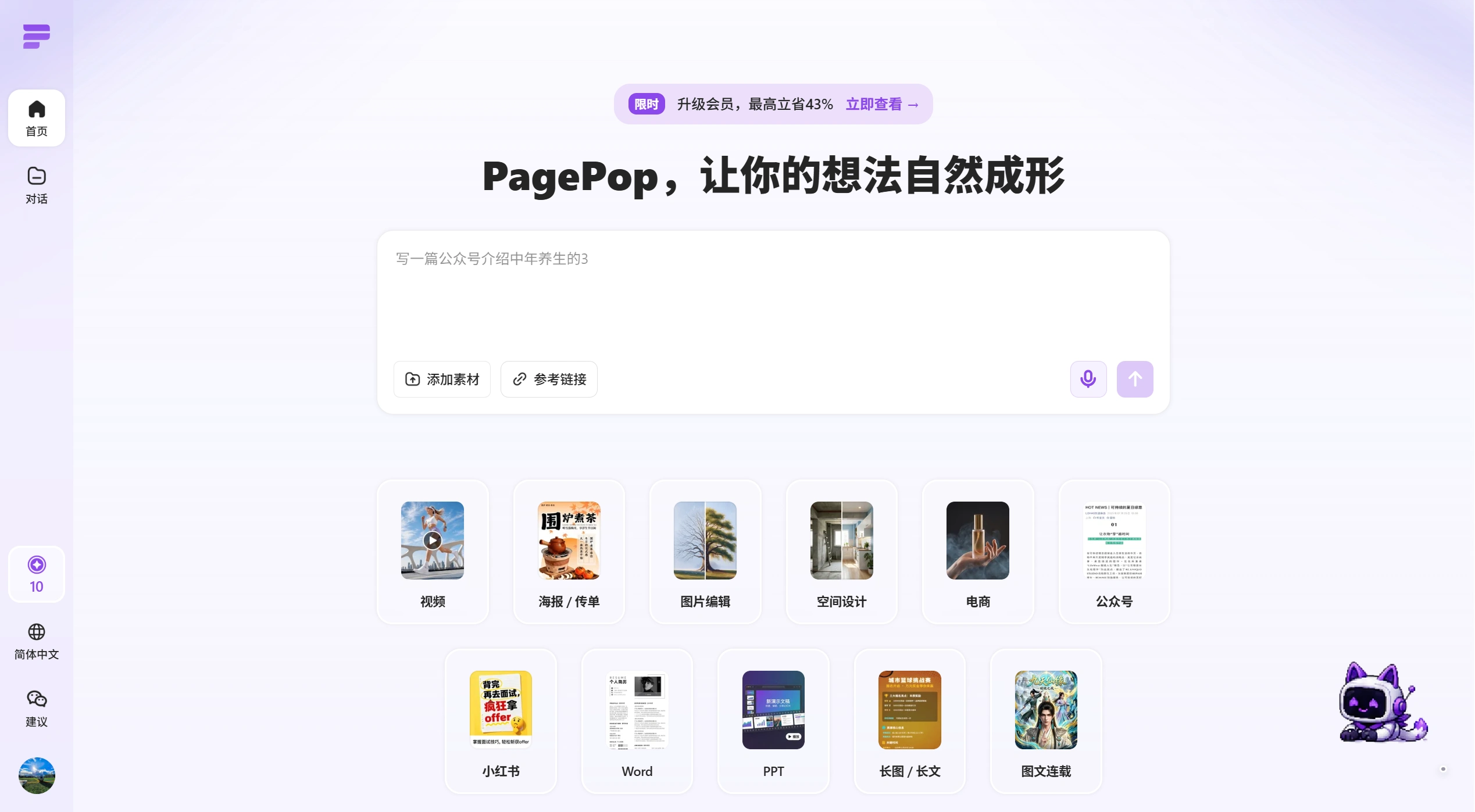
PagePop is an ai creation and design platform that focuses on "get a finished product with one sentence." You don't need to know design or layout — just describe your needs in natural language, and AI will help you generate posters, e-commerce images, Xiaohongshu graphics, WeChat official account articles, ppt, Word documents, long-form graphics, and videos, so you can get ready-to-use results directly.
PagePop official website: www.pagepop.cn
What problem does PagePop solve?
In the past, making a poster or a promotional article required writing copy, finding images, choosing templates, adjusting layouts, and resizing, which involved a lot of back-and-forth. PagePop packages all these steps into one platform: you describe your needs, and AI automatically handles content generation, visual design, and layout delivery.
For example, you can simply say:
"Help me make a coffee shop opening promotion poster, highlighting the second cup half price, with a young and clean style"
"Generate a Xiaohongshu note about avoiding rental pitfalls, with cover and matching images"
"Organize this event plan into a PPT suitable for reporting"
"Modify the promotional copy on the product image, keeping the original font and style"
PagePop Core Capabilities
One-sentence generation: Input your needs, and AI automatically understands the topic, audience, and scenario, generating copy, images, and layout
Direct delivery of finished products: It's not just about generating an image — it completes content organization and layout design around real work scenarios
Wide scenario coverage: Marketing promotion (posters, flyers, banners), self-media (Xiaohongshu, WeChat official accounts, long-form graphics), e-commerce (product images, promotional images, detail page materials), image processing (text modification, redrawing, background removal, background replacement), office work (PPT, Word, reports), spatial design (interior renderings), video creation
Zero learning curve: No need to learn design software, no need to adjust fonts, colors, or layouts — operations staff, small business owners, teachers, salespeople, and entrepreneurs can all use it directly
Reduce tool switching: Writing, drawing, image editing, layout, and documents are all completed on one platform, no need to switch back and forth
Who is PagePop for?
Self-media bloggers and content operations: Quickly produce Xiaohongshu notes, WeChat official account articles, covers, and long-form graphics, reducing the cost of topic selection, writing, and layout
E-commerce merchants and private domain operations: Batch produce product images, event posters, community materials, and holiday marketing images, improving the efficiency of new product launches and campaigns
Marketing and brand teams: Create promotional images, store posters, banners, flyers, quickly bringing ideas to life and running multiple version tests
Office workers: Quickly organize text content into clearly structured and visually appealing Word or PPT documents
Teachers and training institutions: Create course posters, enrollment brochures, event notices, and courseware
Individual users with no design experience: Create resumes, social media graphics, holiday greeting images, photo enhancements, without mastering professional software
How to use PagePop?
Use it online via web browser. Open the official website on a computer or mobile browser, register and log in to start. You can claim free credits by logging in daily, and all basic features are available to try out.
Open the official website: Directly enter the address in your browser at https://www.pagepop.cn/, works on both computer and mobile.
Register and log in: New users need to register an account first. Once logged in, you'll see a bunch of feature entries on the homepage.
Choose a scenario, input your needs: The homepage has categories like posters, Xiaohongshu, WeChat official accounts, PPT, and e-commerce images. Click the one you want. Then just describe your requirements clearly in plain language in the input box.
For example:
For a poster, write: "Help me create a summer promotion poster for a milk tea shop, with a refreshing style, emphasizing buy one get one free"
For Xiaohongshu, write: "Write a guide on avoiding rental pitfalls, with a cover and matching images, in a tone like a real person sharing"
For PPT, write: "Organize this event plan into a 10-page reporting PPT, with a business style"
AI generates images, you pick: AI will produce multiple versions at once, and you can choose the one you like best. If something doesn't feel right, you can modify the description and try again, or enter the editor to manually change text, swap images, or adjust colors.
Download: Download finished products directly as high-definition images, or copy the link to share with others. Files such as PPT and Word can also be exported for use.














