
 Script Planner Assistant▸
 AI Apps
 AI News
OmniFlowLab: Free Unlimited 480p Video Generation
OmniFlowLab: Free Unlimited 480p Video GenerationIntroduction
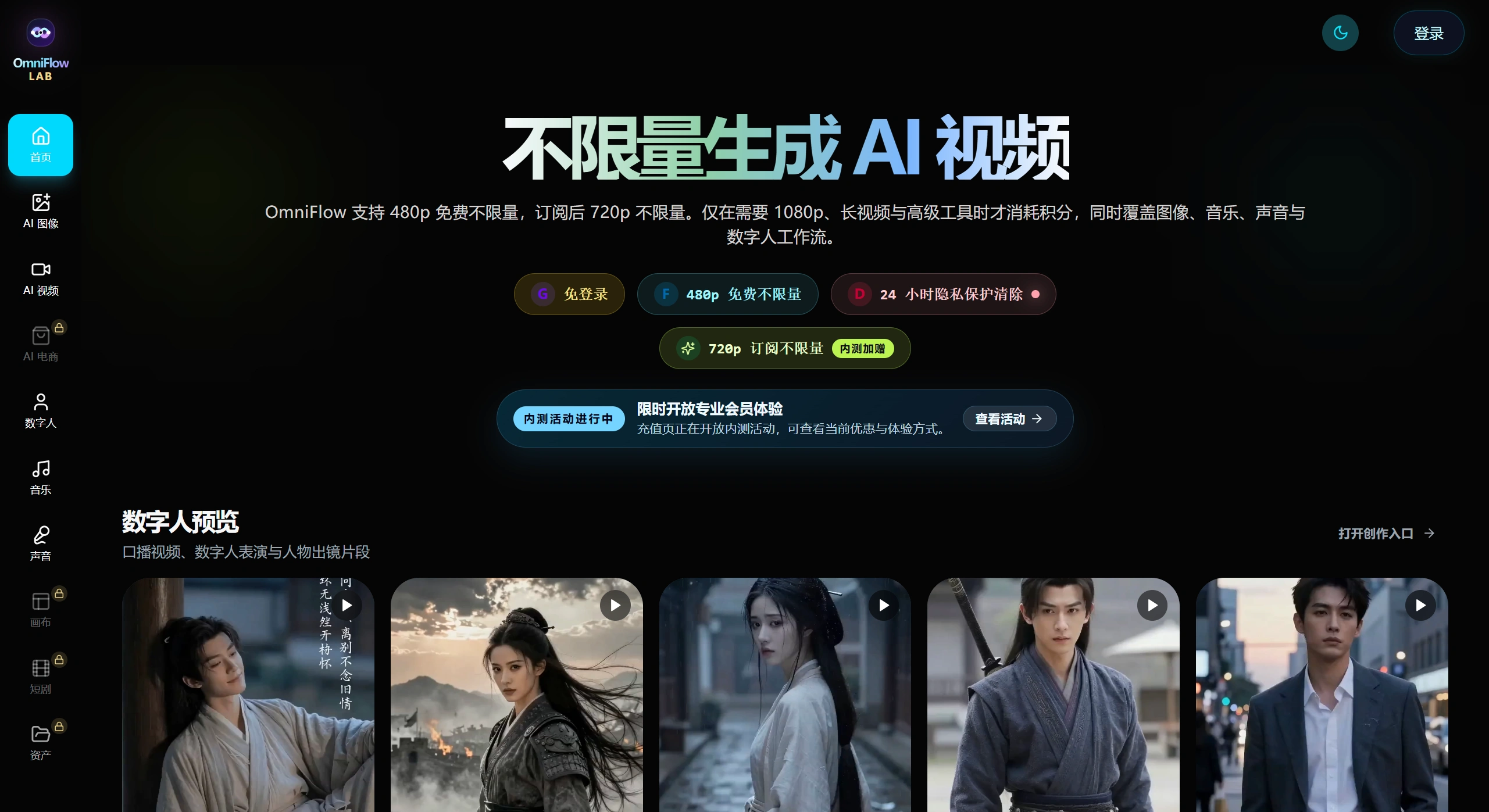
OmniFlowLab is a creative platform that brings AI video, music, voice cloning, and digital humans together. Its biggest draw is that 480p video and audio can be generated unlimited times for free, making it especially friendly for beginners who want to experiment at low cost. There's also no worry about data leaks, since generated content is automatically deleted after 24 hours. Pricing is flexible too—you can buy credits on demand or go with a monthly plan, so whether you're an individual creator or a professional team doing pre-production, there's a usage that fits.
OmniFlowLab Core Features
All-in-one workflow: No need to jump between multiple tools—video, background music, voice cloning, and digital human voiceovers can all be done in one place.
A boon for free users: The free tier lets you generate 480p video and audio without limits, so getting started costs basically nothing.
Fast output: The underlying tech is optimized, so you won't be left waiting too long for HD content.
Privacy guaranteed: Content is automatically cleared after 24 hours, and even subscribers don't need to worry about their data being misused.
Spend your way: If you don't want a monthly plan, just buy credits—pay for what you use, no forced bundles.
OmniFlowLab Use Cases
Voiceover and explainer videos: Don't want to appear on camera yourself? Use a virtual digital human to read your script, saving on filming and location costs.
MVs and short dramas: Independent musicians and self-media creators can quickly produce low-cost MVs or narrative shorts.
E-commerce and ad creatives: Pair short videos with custom background music and sound effects, or directly generate digital human ads.
Teaching materials: Teachers can use it to recreate historical scenes or generate science experiment animations, making classes more vivid.
Pre-production for film and games: Directors or planners can quickly produce storyboard drafts and temp voiceovers to push pre-production forward.
OmniFlowLab Pricing
Free tier: Generate 480p video and audio at will—great for beginners experimenting or producing basic content.
Subscription tier: To unlock unlimited 720p, create long videos, or do batch exports, you'll need to upgrade.
Credit system: To get 1080p HD quality or premium sound effects, you'll need to exchange credits, which can be purchased or come bundled with subscriptions.
Market Reception
OmniFlowLab has indeed won a lot of fans thanks to its "unlimited free 480p generation," and the barrier to entry is genuinely low. However, some users have complained about tasks being blocked or failing to generate, and 480p resolution does look a bit fuzzy on today's short-video platforms. Overall, it's a great fit as a low-cost tool for experimenting and sparking ideas, but if you need stability and high resolution, you may want to wait and see.
OmniFlowLab FAQ
What's the difference between the free and paid tiers?
The free tier only outputs 480p; the subscription tier unlocks unlimited 720p, long videos, and batch exports; 1080p requires credits.
Can the generated videos be used commercially? Who owns the copyright?
You own the copyright; the platform doesn't claim it. As long as you follow the platform rules, commercial use is fine.
Can it be installed and run on a local computer?
Not currently—it's only available as a web-based cloud service.
Are there any restrictions on voice cloning?
You can't clone the voice of public figures or anyone without authorization; you must use the source voice sample of the actual person.
OmniFlowLab Tutorial
Open the site: Go to the OmniFlowLab official website. You can try it out without logging in first, or sign up for an account so you can save your work.
Pick a feature: In the console, click on what you want to create, such as "AI Video," "Digital Human," or "Music."
Enter your content: Fill in the visual description or the script you want read aloud, and pick a voice you like.
Adjust parameters: Choose the resolution (480p by default on the free tier), and tweak the script length as needed.
Generate and download: Click "Generate Now," wait a bit, then head to "My Works" to listen and watch. If you're happy with the result, download it.
OmniFlowLab Alternatives Comparison
| Comparison Dimension | OmniFlowLab | Traditional AI Video Tools (e.g., Runway/Pika) | Local Open-Source Models (e.g., MiniCPM-o) |
|---|---|---|---|
| Core Advantage | Free unlimited 480p, full-featured | Top-tier visual quality, great ecosystem | Runs offline, data stays absolutely secure |
| Pricing Model | Basic free, HD on demand | Subscription or expensive compute credits | Open-source and free (but needs a good GPU) |
| Hardware Requirements | Pure cloud, works on any machine | Pure cloud, works on any machine | Requires a consumer GPU (e.g., RTX 5070 12G+) |
| Privacy & Security | Auto-delete after 24 hours | Depends on platform policy | Data stays local, never leaves your device |
| Best For | Beginners and self-media creators wanting zero-cost experimentation | Pro creators chasing top-tier visual quality | Geeks and users who prioritize privacy above all |











