Script Planner Assistant▸
 AI Apps
 AI News
Next3D: 3D Model Generation Platform for Image-to-3D and Text-to-3D
Next3D: 3D Model Generation Platform for Image-to-3D and Text-to-3DIntroduction
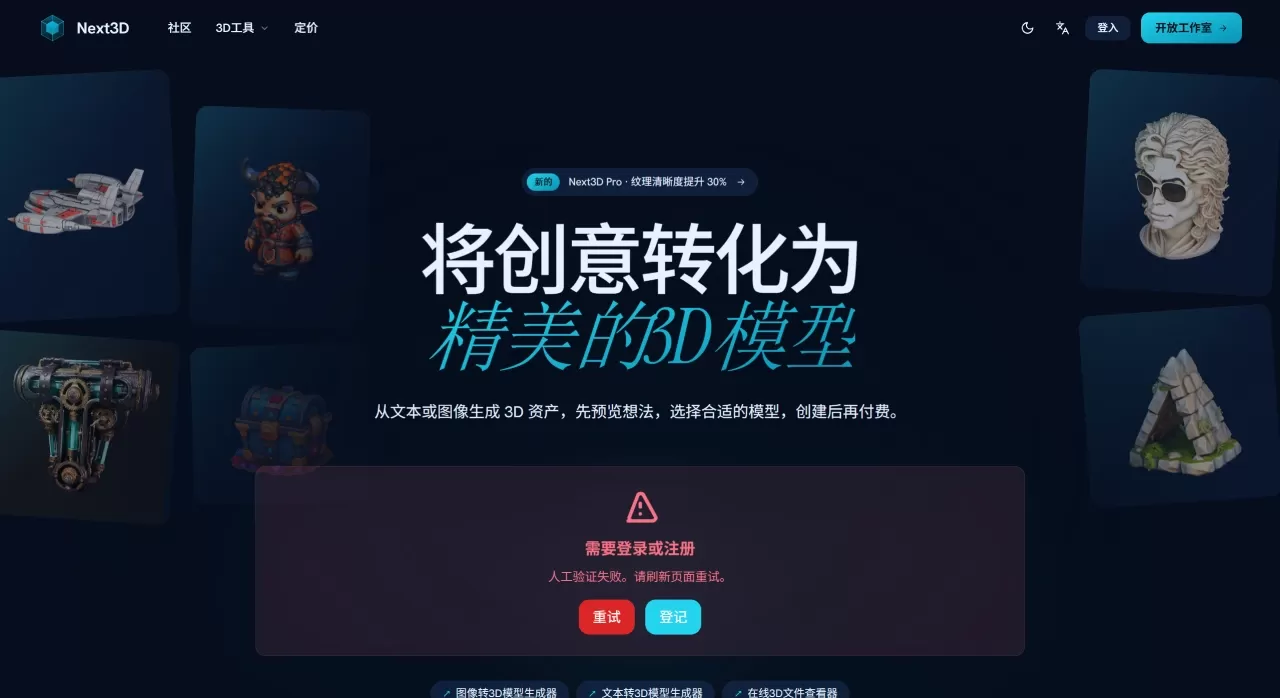
Next3D ai is an AI-driven 3D model generation platform. You only need to enter a text description or upload an image, and it can generate a textured 3D file in anywhere from a dozen seconds to half a minute.
Next3D AI integrates several different AI models (such as Hunyuan 3D, Tripo, Meshy, etc.), and you can choose which one to use when generating. Before generating, it will first show you a 2D concept image to confirm the direction is correct before consuming credits to generate the final model, avoiding waste. All generated models are allowed for commercial use and can be used in games, apps, websites, product displays, and more.
Next3D AI Features
Supports text-to-3D. After entering a description, an image preview is generated first, and you can proceed once you're satisfied.
Supports image-to-3D. Just upload a reference image in JPG, PNG, or WEBP format.
You can also upload multiple photos from different angles (front, side, back) for a more stable reconstruction result.
You can switch between different AI models before generation, choosing based on the effect or speed you want.
After generation, you can preview the materials, lighting, and shape directly in the browser.
The default export is textured GLB format, and it can also be converted to common formats such as FBX, OBJ, PLY, and STL.
It also comes with some online tools, such as a model viewer, format converter, compression tool, and more.
Next3D AI Application Scenarios
Game development: Quickly produce models, saving the time spent on manual modeling.
E-commerce product display: Convert product photos into 3D and place them on the page so customers can rotate and view them.
AR/VR projects: Quickly create prototype assets without modeling from scratch.
Architecture or interior design: Quickly generate architectural volumes or furniture layouts for visualization purposes.
Design prototyping: Turn ideas into 3D concept models quickly for easy adjustment.
Digital twins or simulation scenes: Quickly generate objects within an environment.
Next3D AI Frequently Asked Questions
How is the accuracy of the generated models?
The official claim is up to 99% accuracy. In actual experience, the proportions and textures are quite on point, making them suitable for use in formal projects.
Can the models be used commercially?
Yes, all generated models come with a full commercial license, so you don't need to worry about copyright issues.
I don't know how to model. Can I still use it?
You don't need any 3D software skills at all—as long as you can type or have an image, you're good to go.
What formats are supported?
Input supports JPG, PNG, and WEBP; the default output is GLB, and other formats can be converted.
What is the principle behind turning images into 3D?
The AI analyzes the depth, lighting, and structural information in the image, then reconstructs a complete 3D model.
Next3D AI Usage Steps
Open Next3D AI and choose a generation method: text, image, or multi-view.
Enter a description or upload an image. For text, several candidate images will be generated first, and you pick a direction.
Choose a model you find suitable from the model list, then select the generation quality.
Click generate, wait a few dozen seconds, and the progress bar will show the progress.
View the results directly in the browser and check whether the shape and materials are satisfactory.
Download the GLB file and use it directly in your project, or convert it to another format.
The entire process is online, with no software installation required.
Next3D AI Competitor Comparison
| Item | Next3D.ai | Meshy | Tripo AI | Blender |
|---|---|---|---|---|
| Type | AI online generation | AI generation tool | AI generation tool | Open-source modeling software |
| Generation speed | 10~30 seconds | Relatively fast | Slightly slow | Manual, hours to days |
| Input method | Text, single image, multi-view | Text, concept art | Text, image, sketch | Manual modeling |
| Learning curve | Zero门槛 | Low | Low | High, requires learning |
| Output format | GLB, FBX, OBJ, PLY, STL | Multiple | Multiple | Almost all |
| Price | Free + from $19/month | 20 credits per generation | 30 credits per generation | Free |
| Commercial license | Included | Depends on plan | Depends on plan | Must comply with GPL |
| Target users | Creators of all levels, enterprises | Creators, studios | Professional creators | Professional 3D artists |
User Reviews
On third-party platforms, Next3D.ai currently has over 50,000 active users, with a rating of 4.9/5 (out of 5). It also attracted some attention after being launched on Product Hunt. Users generally feel that it can compress what used to be weeks of manual modeling time into just a few minutes, which is a huge help for independent developers and small studios. There are also hands-on review articles listing it as one of the mainstream AI 3D tools in 2026.
Why Choose Next3D AI
Next3D.ai requires no modeling background. After entering text or an image, a model can be produced within dozens of seconds, and it comes with a commercial license. The platform has multiple built-in AI models to choose from, with pay-per-use credits and no mandatory subscription. It's suitable for games, e-commerce, AR/VR, and can save a great deal of time.